
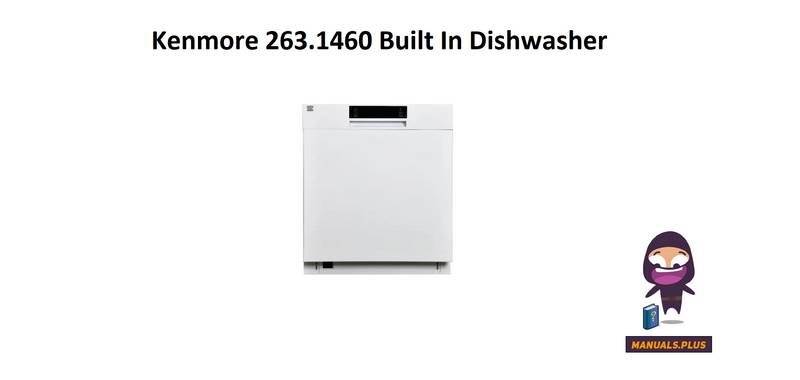
Kenmore 263.1460 Dishwasher














is turned off after activating the delay start
feature, the delay will be canceled.
7 THE CONTROL PANEL
NOTE: If the dishwasher door is opened during
the delay period and closed within four seconds,
the dishwasher will resume counting down the
delay period. If the door is opened for more
than four seconds, the delay timer is paused. To
resume the delay timer, press the Start/Pause
button and close the door.
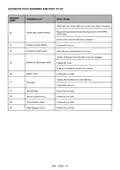
1. Power Button
2. Cycles Button
2.1 Cycle Indicators
4. Remaining Time Indicator
Cycle duration can be monitored via Cycle Time
Indicator.
3. Delay Hours Button
3.1 Delay Indicator
4. Remaining Time Indicator
5. Start/Pause Button
6. Options Select Button
5. Start/Pause Button
After choosing the cycle and options, press the
Start/Pause button to begin the cycle. The time
remaining will be shown in the Time Remaining
Indicator. The total time may change due to the
ambient temperature, water temperature, and
soil on the dishes. While the cycle is running,
pressing the Start/Pause button will pause the
cycle. It is best to avoid opening the door while
the dishwasher is running, but if it is necessary
to open the door, the cycle will pause when the
door is opened. If the door is closed within four
seconds after opening, the cycle will continue
automatically. If the door is opened for longer
than four seconds, the door must be closed
and the Start/Pause button must be pressed to
resume the cycle.
7. Options Confirm Button
8. High Temp Option Indicator
9. Sani Rinse Option Indicator
10. Half Load Option Indicators
11. Extra Dry Option Indicator
12. Accela Wash Option Indicator
13. Quiet Wash Option Indicator
14. Rinse Aid Indicator
15. Washing Cycle Progress Indicators
a- Washing Cycle Symbol
b- Drying Cycle Symbol
c- End Cycle Symbol
16. Sanitized Indicator
6. Option Select Button
Options can be selected by pressing the Option
Select button repeatedly. The chosen option will
be indicated by a blinking LED.
1. Power Button
Turn the machine on by pressing the Power
button.
7. Option Confirm Button
Add the option to the cycle by pressing the
Option Confirm button. The LED for the chosen
option will then remain lit.
2. Cycles Button
Select a suitable cycle by pressing the Cycles
button. The selected cycle indicator (2.1) will be
on. For the details of the cycles refer to section
Cycle Table.
8. High Temp Option Indicator
When this option is selected, both the water
temperature and the washing time are increased.
3. Delay Hours Button
The start time of the cycle can be delayed for
1-24 hours by pressing Delay Hours. When the
Delay Hours button is pressed, the display will
show “1h.” The display will alternate between
the delay time and the cycle duration every two
seconds. The delay time will increase in one hour
increments with every push of thd Delay Hours
button. When the desired delay hours has been
set, press the Start/Pause button. The Delay
Indicator (3.1) will turn on. If the dishwasher
9. Sani Rinse Option Indicator
Sani Rinse option raises the water temperature in
the final rinse.
USA - CAN - 24

| General | Details |
|---|---|
| Name | Kenmore 263.1460 Dishwasher |
| Make | Kenmore |
| Language | English |
| Filetype | PDF (Download) |
| File size | 4.66 MB |
 (1 votes, average: 5.00 out of 5)
 Loading...

Kenmore 14041 Automatic Dishwasher

Kenmore 665.15822000 Undercounter Dishwasher

Kenmore 665.1605 Ultra Wash Dishwasher

Kenmore 665.15632 Ultra Wash Dishwasher

Kenmore 665.15624000 Undercounter Dishwasher

Kenmore 665.15824000 Undercounter Dishwasher

Kenmore 587.141500 Dishwasher

Kenmore W10898468B Ultra WashTMHE Dishwasher

ASKO DBI343ID.W.AU Dishwasher

Montpellier MAB1353DC Retro Dishwasher

BOSCH SMS4EMW01E Dishwasher

BOSCH SHP78CM2N 800 Series Dishwasher

FISHER AND PAYKEL DD24STX6I1 Drawer Dishwasher

BOSCH SMS4EMI06G Dishwasher

FISHER AND PAYKEL DW60FC4X1 Dishwasher

FISHER AND PAYKEL DD24SV2T9 Dish Drawer Dishwasher

AEG FFE83800PM Built-Under Dishwasher

GAGGENAU DF480801 Dishwasher