
Home > KitchenAid > KitchenAid KDSDM82143 Dishwasher
KitchenAid KDSDM82143 Dishwasher


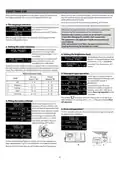


OPTIONS AND SETTINGS
With each cycle additional options can be used. A full list of available options working with specific cycles can be found in the Cycle Table on
the previous page. All active options are shown on the display.
To set an option press„SET”button. SET OPTIONS message is shown for a few seconds. Then use „<”or„>”button to navigate through the
option list. Press„SET”to select the option, in the setting menu the LED above„SET”button is lit.
If the option is not available, it will be still visible in its position but with „
”
TABLET (All-in-one)
DYNAMIC CLEAN
Thanks to additional water jets this option provides a more intensive
and powerful wash in the specific area of lower rack.
This setting allows you to optimise the performance of the cycle
according to the type of detergent used. Enable it if you use combined
detergents in tablet form (rinse aid, salt and detergent in 1 dose).
DYNAMIC CLEAN
DYNAMIC CLEAN
DYNAMIC CLEAN
OFF
ON
Default value is OFF.
To set the Tablet, enter in the setting
TABLET
TABLET
TABLET
OFF
ON
To set the Dynamic Clean, enter in
the setting menu by pressing„SET
button and navigate with„< , >”
until„DYNAMIC CLEAN”is shown,
then press„SET”button.
menu by pressing„SET”button and
navigate with„< , >”until„TABLET”
is shown, then press„SET”button.
ON
ON
BOOST
START DELAY
The boost option delivers a cut 25%-67% of the duration for main
cycles, while ensuring an optimal level of washing and drying. In order
to do that it will require water and energy consumption compared to
the regular full-lenght cycle. The option can be selected on programs:
Eco 50°, Dynamic Sensor 50-60°, Glass 45°.
The start of the cycle may be delayed for a selected period of time.
To set a delay, enter in the setting menu by pressing„SET”button and
navigate with„< , >”until„START DELAY”is shown, then press„SET”button.
With each press of the button “>”or “<“, the delay start increases by:
• every 0:30 if selection below 4 hours,
To set the Boost, enter in the setting
• every 1:00 if selection is below 12 hours,
• every 2 hours if selection is above 12 hours.
BOOST
BOOST
BOOST
OFF
menu by pressing„SET”button and
navigate with„< , >”until„BOOST”
is shown, then press„SET”button.
ON
START DELAY
OFF
Default value is OFF.
If delay is selected, the is lit
.
With each press of the button„>”or
„<“ option will be ON or OFF.
ON
<STARTS IN h>
<STARTS IN h>
<STARTS IN h>
OFF
Once„SET”button is pressed the
delay is confirmed and the machine
comes back to the cycle selection
screen with delay value visible.
Confirm by pressing„SET”button.
4:00
4:00
FLOOR LIGHT
A LED light projected on the floor indicates that the dishwasher is
working. The light stays on during the cycle and switches off at the
end of the cycle.
To remove the delay, press„<” or„>”
button until„OFF”is displayed.
Press„START”and close the door within 4 sec. to start the delay
This feature is active by default, but it is possible to deactivate it in the
“SETTINGS MENU”.
MULTIZONE
If there are not many dishes to be washed it can be loaded in one rack
only. Using this option you can select which rack you want to wash.
To set the Multizone, enter in the setting menu by pressing„SET”but-
ton and navigate with„< , >”until„MULTIZONE”is shown, then press
„SET”button.
TUB LIGHT
When the feature is active the LEDs in the tub are automatically swit-
ched on/off as soon as the user open/close the door respectively.
If the door remains opened for more than 10 min, the LEDs in the
tub switch off (to turn them on again, the door has to be closed and
opened again).This feature is active by default, but it is possible to
deactivate it in the “SETTINGS MENU”.
MULTIZONE
OK
By default the MULTIZONE is not
active and all racks icons are lit.
<ALL RACKS>
<LOW ONLY>
< >
< >
< >
< >
The multizone icon becomes lit.
The multizone icon becomes lit.
The multizone icon becomes lit.
<HIGH ONLY>
<CUTLERY ONLY>
<CUTLERY ONLY>
12

| General | Details |
|---|---|
| Name | KitchenAid KDSDM82143 Dishwasher |
| Make | KitchenAid |
| Language | English |
| Filetype | PDF (Download) |
| File size | 1.99 MB |
 (1 votes, average: 5.00 out of 5)
 Loading...

KitchenAid KDTE304RBS Third Level Jet Rack Dishwasher

KitchenAid KDTF324PPA Dishwasher

Kitchenaid MVWC565FW1 Dishwasher

KitchenAid w11323304 Dishwasher

KitchenAid KDFE104KWH Two Rack Dishwasher

KitchenAid KDTE104KPS Dishwasher

KitchenAid KDFE104KBL Front Dishwasher

KitchenAid KDTF924PPS Flush Cabinet Dishwasher

KitchenAid KDTE304RBS Level Jet Rack Dishwasher

KitchenAid KDF Series Dishwasher


Amica EGSP 14797-1 E Dishwasher

Monsher MD 6001 Dishwasher

FISHER PAYKEL DD60DCHX9 Dishwasher

BOSCH GSI6644E Dishwasher

Miele G 7191 SCVi AD 125 Dishwasher

BOSCH SHPM65W55N Dishwasher

BOSCH SMS4HCW19E Dishwasher

FISHER PAYKEL DD24SI9 N Integrated Single Dishwasher

BOSCH SMS6EMI65Q Dishwasher

HEINNER HWDM-V9614D Front Load Dishwasher