
Home > KitchenAid > KitchenAid KDSDM82143 Dishwasher
KitchenAid KDSDM82143 Dishwasher


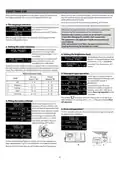


SETTINGS MENU
To change machne settings you need to enter into the Settins Menu.
Press„SET” button and navigate with„< , >” until SETTINGS is shown, then press „SET” button.
To exit the setting menu, press any cycle button or press„< , >” button untill EXITis shown, then press„SET” button.
Language
Tub Light
To change tub light, enter in the
setting menu by pressing„SET”
button and navigate with„< , >”
until„TUB LIGHT”is shown, then
press„SET”button.
To change language, enter in the
setting menu by pressing„SET”
button and navigate with„< , >”
until„LANGUAGE”is shown, then
press„SET”button.
1.LANGUAGE
OK
7.TUB LIGHT
ON
1.ITALIAN
1.ENGLISH
< >
7.TUB LIGHT
OFF
Rinse Aid level
To change rinse aid level, enter in
the setting menu by pressing„SET”
button and navigate with„< , >”
until„RINSE AID LEV.”is shown, then
press„SET”button.
First cycle
8.RINSE AID LEV.
5
4
You can choose which cycle is
selected by default when switching
on the appliance: ECO or the LAST
USED one.
2.FIRST CYCLE
OK
8.RINSE AID LEV.
2.<ECO>
< >
Choose between five levels: 1, 2, 3, 4 and 5.
To change first cycle, enter in the
setting menu by pressing„SET”but-
ton and navigate with„< , >”until
„FIRST CYCLE”is shown, then press
„SET”button.
If the rinse aid level is set to 1, no rinse aid will be supplied. The LOW
RINSE AID indicator light will not be lit if you run out of rinse aid.
2.<LAST USED>
The factory setting is for (5)level .
• If you see bluish streaks on the dishes, set a low number (2-3).
• If there are drops of water or limescale marks on the dishes, set
a high number (4-5).
Sounds
To change sounds, enter in the
setting menu by pressing„SET”
button and navigate with„< , >”
until„SOUNDS”is shown, then press
„SET”button.
Demo mode
3.SOUNDS
3.<HIGHT>
3.<OFF>
OK
To see to demo mode, enter in the
9.DEMO MODE
ON
< >
setting menu by pressing„SET”
button and navigate with„< , >”
until„DEMO MODE”is shown, then
9.DEMO MODE
OFF
Choose between 2 levels: High;
Low. Can be also OFF.
press„SET”button.
Reset to factory default
Water Hardness
To reset to factory default, enter in
the setting menu by pressing„SET”
button and navigate with„< , >”
until„RESET TO DEF.”is shown, then
press„SET”button.
To change water hardness level,
enter in the setting menu by
10.RESETTODEF.
ON
4.WATER HARDNESS
3
pressing„SET”button and navigate
with„< , >”until„WATER HARDNESS”
is shown, then press„SET”button.
10.RESETTODEF.
OFF
4.WATER HARDNESS
4
To setup correct level according to water hardness, see table on page 6.
Exit
To exit the setting menu, press any
cycle button or press„< , >”button
untill EXITis shown, then press
„SET”button.
Screen Brightness
11.EXIT
< >
To change screen brightness
5.SCREEN BRIGHT.
5
3
level, enter in the setting menu by
pressing„SET”button and navigate
with„< , >”until„SCREEN BRIGHT.”is
shown, then press„SET”button.
5.SCREEN BRIGHT.
Choose between five levels: 1, 2, 3, 4 and 5.
Floor Light
To change floor light, enter in the
setting menu by pressing„SET”
button and navigate with„< , >”
until„FLOOR LIGHT”is shown, then
press„SET”button.
6.FLOOR LIGHT
ON
6.FLOOR LIGHT
OFF
13

| General | Details |
|---|---|
| Name | KitchenAid KDSDM82143 Dishwasher |
| Make | KitchenAid |
| Language | English |
| Filetype | PDF (Download) |
| File size | 1.99 MB |
 (1 votes, average: 5.00 out of 5)
 Loading...

KitchenAid KDTE304RBS Third Level Jet Rack Dishwasher

KitchenAid KDTF324PPA Dishwasher

Kitchenaid MVWC565FW1 Dishwasher

KitchenAid w11323304 Dishwasher

KitchenAid KDFE104KWH Two Rack Dishwasher

KitchenAid KDTE104KPS Dishwasher

KitchenAid KDFE104KBL Front Dishwasher

KitchenAid KDTF924PPS Flush Cabinet Dishwasher

KitchenAid KDTE304RBS Level Jet Rack Dishwasher

KitchenAid KDF Series Dishwasher


Miele PFD 102 i Dishwasher

FISHER PAYKEL DW60UNT4B2 Tall Built-under Dishwasher

BOSCH SPS4HMW49E Dishwasher

GRUNDIG GSV 42840 Dishwasher

FORTE F18DWS250SS 18 Inch Dishwasher

BOSCH SMS2HTW02E Free Standing Dishwasher

BOSCH SHP65CM6N Dishwasher

Indesit D2F HD624 A Separate Dishwasher

ATAG DW7214MC Dishwasher

FISHER and PAYKEL DD60SAX9 Contemporary Dishwasher