
×
- 1. User Manual (Dishwasher)
- 2. Wichtige Sicherheitshinweise (Vor Dem Aufstellen → Bei Kindern Im Haushalt → Reinigung Und Wartung → Technische Informationen)
- 3. Wichtige Sicherheitshinweise (Vor Dem Aufstellen → Vor Der Ersten Inbetriebnahme)
- 4. Bei Kindern Im Haushalt (Beim Täglichen Einsatz)
- 5. Bei Störfällen (Empfehlungen → Was Nicht In Den Geschirrspüler Darf)
- 6. Bestecke (Recycling)
- 7. Altgeräte (Um Gefahren Zu Vermeiden)
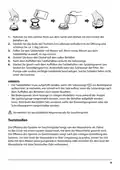
- 8. Lernen Sie Ihr Gerät Kennen (Gerätebeschreibung → Komponenten Ihres Geräts → Hinweis:)
- 9. Vorbereitung Des Gerätes Zum Gebrauch (Vor Dem Ersten Gebrauch → Bedeutung Der Entkalkung Von Wasser → Salz Einfüllen)
- 10. Salzbehälter Auffüllen (Spülprogramm Starten → Verwendung Von Regeneriersalz → Teststreifen)
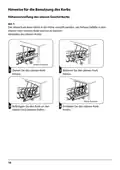
- 11. Hinweise Für Die Benutzung Des Korbs (Höhenverstellung Des Oberen Geschirrkorbs → Verstellen Des Oberen Korbs)
- 12. Um Den Korb In Die Obere Position Zu Bringen (Herunterklappen Der Ablagen Für Becher/tassen → Einklappen Der Korbständer)
- 13. Reinigung Und Wartung (Reinigung Der Außenflächen → Bedienfeld → Reinigen Der Innenflächen → Filtersystem)
- 14. Grobfilter (Hauptfilter → Feinfilter → Öffnen → Warnung)
- 15. Sprüharme (Reinigung Der Sprüharme)
- 16. Reinigung Des Geschirrspülers (Frostschutz → Den Netzstecker Ziehen → Keine Löse- Oder Scheuermittel Verwenden → Transport Des Geräts)
- 17. Montageanleitung (Risiko Eines Elektrischen Schlages → Elektrischer Anschluss → Elektrische Anforderungen → Elektrische Verbindung)
- 18. Wasseranschluss (Zulaufschlauch → Versorgungsschlauch → Sicherheitsversorgungsschlauch → Hinweis)
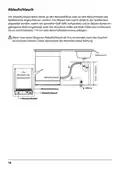
- 19. Ablaufschlauch (Arbeitstisch → Wasseranschluss)
- 20. Aufstellen Des Geschirrspϋlers (Wählen Sie Einen Geeigneten Standort Für Ihren Geschirrspüler → Temperaturen Unter 0 Celsius → Vor Der Installation → Bodenunebenheiten Ausgleichen)
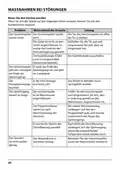
- 21. Massnahmen Bei Störungen (Bevor Sie Den Service Anrufen → Problem → Der Geschirrspüler → Das Geschirr)
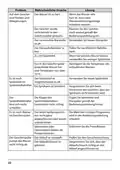
- 22. Problem (Wahrscheinliche Ursache → Lösung → Das Geschirr Ist Nicht Trocken Genug. → Der Geschirrspüler Startet Nicht.)
- 23. Problem (Wahrscheinliche Ursache → Lösung → Das Geschirr Wurde Nicht Korrekt In Den Geschirrspüler Geräumt. → Der Geschirrspüler Pumpt Das Wasser Nicht Richtig Ab.)
- 24. Problem (Wahrscheinliche Ursache → Lösung → Der Geschirrspüler → Geräuschbildung)
- 25. Einräumen Von Geschirr (Nach En60436 → Oberkorb → Unterer Korb)
- 26. Besteckhalter (Besteckkorb → Informationen Zu Den Prüfungen Nach Der Norm En 60436 → Volumen: 14 Standard-geschirrsets → Programm: Eco)
- 27. Gebrauch Des Geschirrspülers (Display / Bedienpanel → Leistung → Programm → Startverzögerung → Kindersicherung)
- 28. Display (Klarspüler → Regeneriersalz → Wasserzulaufventil → Eco)
- 29. Extra Spülen (Extra Trocknen → Schnellprogramm → Oberer Korb → Unterer Korb)
- 30. Wasserenthärter (Einstellen Des Klarspülerbehälters → Wasserhärte)
- 31. Verbrauch Von Spülmitteln (Mehrzweckspülmittel (z. B.: 2 In 1', 3 In 1' Usw.) → Darauf Müssen Sie Achten, Wenn Sie Produkte Dieser Art Verwenden:)
- 32. Anwendungsempfehlung (Einstellen Der Verwendung Von Mehrzweckspülmitteln → Bewahren Sie Die Spülmittel An Einem Trockenen Und Kühlen Ort Auf Und Halten Sie Kinder Von Den Spülmitteln Fern.)
- 33. Füllen Des Klarspülbehälters Und Auswahl Der Einstellungen (Einstellen Des Klarspülerbehälters)
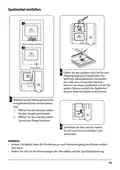
- 34. Spülmittel Einfüllen (Öffnungsmethode → Hinweis)
- 35. Geschirrspülmaschine Programmierung (Programmtabelle → Zyklusbeschreibung)
- 36. Einschalten Des Geräts (Programmwechsel)
- 37. Einräumen Von Geschirr Während Des Spülvorgangs (Nach Dem Ende Des Spülprogramms → Abschalten Des Geschirrspülers)
- 38. Ausräumen Des Geschirrs (Fehlercodes → Beschreibung Des Fehlercode → Massnahme Fehlers → Warnhinweis)
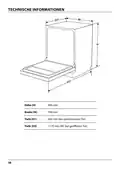
- 39. Technische Informationen (Höhe (h) → Breite (w) → Tiefe (d1) → Tiefe (d2))
- 40. Produktdatenblatt (Delegierte Verordnung (eu) 2019/2017 Der Kommission Zur Energieverbrauchskennzeichnung → Allgemeine Produktparameter → Modellkennung → Weitere Angaben)
- 41. Safety Information (Product Overview → Using Your Dishwasher → Installation Instruction → Troubleshooting Tips)
- 42. Note: Reviewing The Section On Troubleshooting Tips Will Help You Solve Some Common Problems By Yourself. If You Cannot Solve The Problems B…
- 43. Safety Information (Warning → Installation And Repair → Intended Use → Supervision And Instruction → Indoor Household Use Only)
- 44. Earthing Instructions (Improper Connection Of The Equipment-earthing Conductor → Check With A Qualified Electrician → Do Not Modify The Plug Provided → Warning: Knives And Other Utensils With Sharp Points)
- 45. Check That The Detergent Powder Is Empty After Completion Of The Wash Cycle.
- 46. Disposal
- 47. Product Overview (Important → Top Spray Arm → Lower Spray Arm → Dispenser)
- 48. Using Your Dishwasher (Before Using Your Dishwasher: → Set The Water Softener → Loading The Salt Into The Softener → Fill The Dispenser)
- 49. Adding Dishwasher Salt
- 50. Basket Used Tips (Adjusting The Upper Basket → Type 1)
- 51. To Raise The Upper Basket, Just Lift The Upper Basket At The Center Of Each Side Until The Basket Locks Into Place In The Upper Position. It…
- 52. Maintenance And Cleaning (External Care → The Control Panel → Internal Care → Filtering System)
- 53. Coarse Filter (Main Filter → Fine Filter → Reassembly Of Filters → Cleaning Filters)
- 54. Spray Arms
- 55. Caring For The Dishwasher (Frost Precaution → After Every Wash → Remove The Plug → Moving The Appliance)
- 56. Installation Instruction (About Power Connection → Electrical Requirements → Electrical Connection)
- 57. Water Supply And Drain (Cold Water Connection → About The Safety Supply Hose → How To Connect The Safety Supply Hose → How To Disconnect The Safety Supply Hose)
- 58. Connection Of Drain Hoses (How To Drain Excess Water From Hoses → Water Outlet → Extension Hose → Syphon Connection)
- 59. Position The Appliance (Levelling The Appliance → Free Standing Installation → Fitting Between Existing Cabinets)
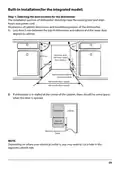
- 60. Built-in Installation(for The Integrated Model) (Step 1. Selecting The Best Location For The Dishwasher → Illustrations Of Cabinet Dimensions And Installation Position Of The Dishwasher.)
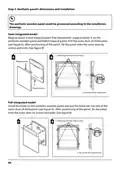
- 61. Step 2. Aesthetic Panels Dimensions And Installation (Semi-integrated Model → Full-integrated Model)
- 62. Step 3. Tension Adjustment Of The Door Spring (Door Spring Tension Is Correct When The Door Remains Horizontal In The Fully Opened Position, Yet Rises To A Close With The Slight Lift Of A Finger.)
- 63. Step 4. Dishwasher Installation Steps (Connect The Inlet Hose To The Cold Water Supply. → Connect The Drain Hose. → Connect The Power Cord. → Level The Dishwasher.)
- 64. Step 5. Levelling The Dishwasher (Dishwasher Must Be Level For Proper Dish Rack Operation And Wash Performance.)
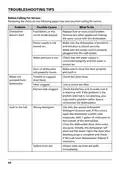
- 65. Troubleshooting Tips (Before Calling For Service → Problem → Possible Causes → What To Do)
- 66. Problem (Possible Causes → What To Do → The Dishes Are Not Clean. → Stained Tub Interior.)
- 67. Problem (Possible Causes → What To Do)
- 68. Loading The Baskets (Upper Basket → Lower Basket)
- 69. Cutlery Rack (Cutlery Basket → Information For Comparability Tests In Accordance With En60436 → Capacity: 14 Place Settings → Program: Eco)
- 70. Note:
- 71. Quick User Guide (Install The Dishwasher → Loading The Baskets → Removing The Larger Residue On The Cutlery → Filling The Dispenser → Selecting A Program And Running The Dishwasher)
- 72. Using Your Dishwasher (Control Panel → Operation (button) → Delay → Child Lock)
- 73. Display (Rinse Aid → Salt → Water Faucet → Program)
- 74. Extra Cleaning (Extra Drying → Function → Upper Basket → Lower Basket)
- 75. Water Softener (Adjusting Salt Consumption → Water Hardness)
- 76. Loading The Salt Into The Softener (Water Softener → Preparing And Loading Dishes → Are Not Suitable → Are Of Limited Suitability)
- 77. Recommendations For Loading The Dishwasher (Removing The Dishes)
- 78. Loading The Upper Basket (Loading The Lower Basket → Loading The Cutlery Basket)
- 79. Function Of The Rinse Aid And Detergent (When To Refill The Rinse Aid → Function Of Detergent → Proper Use Of Detergent)
- 80. Filling The Rinse Aid Reservoir (Adjusting The Rinse Aid Reservoir)
- 81. Filling The Detergent Dispenser (Sliding It To The Right → Add Detergent Into The Larger Cavity (a) → Please Choose An Open Way → Close The Flap By Sliding It To The Front And Then Pressing It Down)
- 82. Programming The Dishwasher (Wash Cycle Table → Description Of Cycle)
- 83. Starting A Cycle Wash (Changing The Program Mid-cycle)
- 84. Forget To Add A Dish? (Auto Open Door)
- 85. Error Codes (Codes → Meanings → Possible Causes)
- 86. Technical Information (Height (h) → Width (w) → Depth (d1) → Depth (d2))
- 87. Product Information Sheet (General Product Parameters → Additional Information)
- 88. Information For Users On The Disposal Of Electrical And Electronic Equipment (households) (For Business Users In European Union Countries → Information On Disposal In Other Countries Outside The European Union)
- 89. Bezpečnostní Informace (Pokyny K Uzemnění → Popis Výrobku → Používání Myčky Nádobí → Údržba A Čištění)
- 90. Tipy Pro Řešení Problémů (Autorizovaný Servis → Změny Výrobce → Ztráta Návodu K Obsluze)
- 91. Bezpečnostní Informace (Výstraha)
- 92. Pokyny K Uzemnění (Využijte Služeb Kvalifikovaného Elektrikáře → Nepoužívejte Myčku, Pokud Na Ní Nejsou Správně Umístěny Všechny Krycí Panely → Při Vkládání Předmětů K Umytí)
- 93. Některé Detergenty Pro Myčky Nádobí Jsou Silně Alkalické. Při Požití Mohou Být Extrémně Nebezpečné. Vyvarujte Se Kontaktu S Kůží A Očima A P…
- 94. Likvidace (Zajištění Správné Likvidace → Podrobnější Informace O Recyklaci)
- 95. Popis Výrobku (Důležité: → Vrchní Rameno → Zásobník Soli → Sestava Filtru → Horní Koš)
- 96. Používání Myčky Nádobí (Před Použitím Myčky Nádobí → Nastavte Změkčovač Vody → Plnění Soli Do Změkčovače → Naplňte Košík)
- 97. Doplňování Soli Do Myčky (Pokyny Pro Naplnění Zásobníku Na Sůl → Kontrolka Nedostatku Soli → Doporučení Po Naplnění Soli)
- 98. Tipy Pro Použití Koše (Úprava Horního Koše → Typ 1:)
- 99. Pokud Chcete Zvednout Horní Koš (Sklopení Držáků Na Šálky → Sklopení Regálových Poliček)
- 100. Údržba A Čištění (Péče O Vnější Část → Ovládací Panel → Péče O Vnitřní Část → Filtrační Systém)
- 101. Hrubý Filtr (Jemný Filtr → Výstraha)
- 102. Ostřikovací Ramena (Čistění Ostřikovacího Ramene → Pokyny Pro Vyjmutí Horního Ostřikovacího Ramene → Pokyny Pro Vyjmutí Spodního Ostřikovacího Ramene → Údržba A Čištění Ramena)
- 103. Péče O Myčku Nádobí (Ochrana Před Mrazem → Po Každém Mytí → Pokud Se Spotřebič Po Delší Dobu Nepoužívá → Přemísťování Spotřebiče)
- 104. Pokyny Pro Instalaci (Nebezpečí Úrazu Elektrickým Proudem → Připojení K Elektrické Síti → Elektrické Požadavky → Elektrické Připojení)
- 105. Připojení Vody A Odpadu (Připojení Studené Vody → Bezpečnostní Přívodní Hadice → Jak Připojit Bezpečnostní Přívodní Hadici → Jak Odpojit Bezpečnostní Přívodní Hadici)
- 106. Připojení Vypouštěcích Hadic (Jak Vypustit Přebytečnou Vodu Z Hadic → Odtok Vody → Prodlužovací Hadice → Sifonové Připojení)
- 107. Umístění Spotřebiče (Vyrovnání Spotřebiče → Volně Stojící Instalace → Montáž Mezi Stávající Skříňky)
- 108. Vestavěná Instalace (pro Vestavěný Model) (Krok 1. Volba Nejlepšího Místa Pro Myčku Nádobí → Minimální Prostor)
- 109. Krok 2. Rozměry A Instalace Dekorativního Panelu (Polo-vestavěný Model → Plně Vestavěný Model)
- 110. Krok 3. Nastavení Napnutí Pružiny Dvířek
- 111. Kroky Instalace Myčky Nádobí (Připevněte Kondenzační Pás → Připojte Přívodní Hadici → Nainstalujte Nábytková Dvířka → Myčka Nádobí Musí Být Zajištěna Na Místě)
- 112. Krok 5. Vyrovnání Myčky Nádobí (Zkontrolujte Úroveň)
- 113. Tipy Pro Řešení Problémů (Než Zavoláte Servis → Problém → Možná Příčina → Řešení)
- 114. Problém (Možná Příčina → Řešení → Nádobí Není Čisté → Zvuk Klepání V Myčce)
- 115. Problém (Možná Příčina → Řešení → Filtry Nejsou Čisté → Nádobí Není Vysušeno)
- 116. Plnění Košíků (Podle En60436: → Horní Koš: → Spodní Koš:)
- 117. Držák Na Příbor (Koš Na Příbory → Informace Pro Srovnávací Test Podle En60436 → Kapacita: 14 Souprav → Program: Eco)
- 118. Poznámka
- 119. Rychlý Návod K Obsluze (Instalace Myčky. → Plnění Košů. → Výběr Programu A Spuštění Myčky. → Plnění Zásobníku.)
- 120. Používání Myčky Nádobí (Ovládací Panel → Napájení → Program → Dětská Pojistka)
- 121. Displej (Leštící Prostředek → Sůl → Vodovodní Kohoutek → Eco)
- 122. Extra Mytí (Extra Sušení → Rychlé → Horní Koš → Spodní Koš)
- 123. Změkčovač Vody (Úprava Spotřeby Soli → Tvrdost Vody)
- 124. Plnění Soli Do Změkčovače (Změkčovač Vody → Příprava A Plnění Nádobí → Mytí Následujících Příborů/nádobí)
- 125. Doporučení Pro Plnění Myčky (Předměty Do Myčky Umístěte Následujícím Způsobem: → Vyjmutí Nádobí)
- 126. Plnění Horního Koše (Plnění Dolního Koše → Plnění Košíku Na Příbory)
- 127. Funkce Oplachového A Mycího Prostředku (Kdy Doplnit Dávkovač Oplachovacího Prostředku → Funkce Mycího Prostředku → Správné Použití Mycího Prostředku)
- 128. Plnění Nádrže Na Oplachovací Prostředek (Nastavení Dávkování Oplachovacího Prostředku)
- 129. Plnění Dávkovače Mycího Prostředku (Způsob Otevření Zvolte Podle Použitého Typu)
- 130. Tabulka Mycích Cyklů (Mycí Prostředek → Popis Cyklu → Automatika → Hygiena)
- 131. Spuštění Mycího Cyklu (Změna Programu Uprostřed Cyklu)
- 132. Zapomněli Jste Vložit Nějaké Nádobí? (Automatické Otevření → Poznámka)
- 133. Kódy Poruch (Význam → Možná Příčina → Výstraha)
- 134. Technické Informace (Výška (h) → Šířka (w) → Hloubka (d1) → Hloubka (d2))
- 135. Informační List Výrobku (Nařízení Komise V Přenesené Pravomoci (eu) 2019/2017 → Obecné Parametry Produktu → Další Informace)
- 136. Informace Pro Uživatele K Likvidaci Elektrických A Elektronických Zařízení (domácnosti) (Pro Podnikové Uživatele V Zemích Evropské Unie → Informace K Likvidaci V Ostatních Zemích Mimo Evropskou Unii)
- 137. Bezpečnostné Informácie (Pokyny Na Uzemnenie → Pokyny Pri Inštalácii → Tipy Pri Riešení Problémov → Technické Informácie)
- 138. Tipy Pri Riešení Problémov
- 139. Bezpečnostné Informácie (Výstraha → Použitie Spotrebiča → Bezpečnostné Opatrenia)
- 140. Pokyny Na Uzemnenie (Nesprávne Pripojenie Uzemňovacieho Vodiča Zariadenia Môže Znamenať Riziko Úrazu Elektrickým Prúdom. → Využite Služby Kvalifikovaného Elektrikára A Nechajte Nainštalovať Správny Typ Zásuvky. → Pri Vkladaní Predmetov Na Umývanie: → Ak Umývačka Pracuje, Dvierka Otvárajte Veľmi Opatrne, Hrozí Nebezpečenstvo Vystreknutia Vody, Ktorá Môže Byť Horúca.)
- 141. Bezpečnostné Upozornenia (Používanie Umývačky Riadu → Inštalácia A Pripojenie → Úspora Energie → Technické Špecifikácie)
- 142. Likvidácia (Recyklácia Obalov → Správna Likvidácia Výrobku → Informácie O Recyklácii → Nevyhadzujte Do Netriedeného Odpadu)
- 143. Popis Výrobku (Dôležité → Vrchné Rameno Ostrekovača → Zásobník Soli → Zásobník Na Umývacie Prípravky)
- 144. Použitie Umývačky Riadu (Pred Použitím Umývačky Riadu → Nastavte Zmäkčovač Vody → Plnenie Soli Do Zmäkčovača → Dajte Dávkovač Prostriedkov)
- 145. Pri Doplňovaní Soli Do Umývačky Postupujte Podľa Nasledujúcich Pokynov:
- 146. Tipy Pre Použitie Koša (Úprava Horného Koša → Typ 1:)
- 147. Ak Chcete Zdvihnúť Horný Kôš (Ak Chcete Spustiť Horný Kôš → Sklopenie Držiakov Na Šálky → Sklopenie Regálových Poličiek)
- 148. Údržba A Čistenie (Starostlivosť O Vonkajšiu Časť → Ovládací Panel → Starostlivosť O Vnútornú Časť → Filtračný Systém)
- 149. Hrubý Filter (Hlavný Filter → Jemný Filter → Otvoriť → Výstraha)
- 150. Ostrekovacie Ramená (Pri Čistení Ostrekovacieho Ramena Postupujte Podľa Nasledujúcich Pokynov: → Umyte Ramená V Mydlovej A Teplej Vode A Použite Mäkkú Kefku Na Čistenie Trysiek.)
- 151. Starostlivosť O Umývačku Riadu (Ochrana Pred Mrazom → Po Každom Umytí → Vytiahnite Zástrčku Z Elektrickej Zásuvky → Ak Sa Spotrebič Dlhší Čas Nepoužíva)
- 152. Pokyny Pri Inštalácii (Nebezpečenstvo Úrazu Elektrickým Prúdom → Pripojenie K Elektrickej Sieti → Elektrické Požiadavky → Elektrické Pripojenie)
- 153. Pripojenie Vody A Odpadu (Bezp Ečnostná Prívodná Hadica → Ako Pripojiť Bezpečnostnú Prívodnú Hadicu → Ako Odpojiť Bezpečnostnú Prívodnú Hadicu)
- 154. Pripojenie Vypúšťacích Hadíc (Ako Vypustiť Prebytočnú Vodu Z Hadíc → Odtok Vody → Predlžovacia Hadica → Sifónové Pripojenie)
- 155. Umiestnenie Spotrebiča (Vyrovnanie Spotrebiča → Voľne Stojaca Inštalácia → Montáž Medzi Existujúce Skrinky)
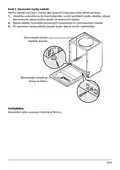
- 156. Vstavaná Inštalácia (pre Vstavaný Model) (Krok 1. Voľba Najlepšieho Miesta Pre Umývačku Riadu → Ilustrácie Rozmerov Skrinky A Montážnej Polohy Umývačky Riadu → Minimálny Priestor)
- 157. Krok 2. Rozmery A Inštalácia Dekoratívneho Panelu (Polo-vstavaný Model → Plne Vstavaný Model)
- 158. Krok 3. Nastavenie Napnutia Pružiny Dvierok (Pružiny Dvierok Sú Z Výroby Nastavené Na Správne Napnutie Vonkajších Dvierok. → Napnutie Pružiny Dvierok Je Správne, Keď Dvierka Zostávajú Vodorovne V Úplne Otvorenej Polohe, No Miernym Zdvihnutím Prsta Sa Zdvihnú A Zatvoria.)
- 159. Kroky Inštalácie Umývačky Riadu (Pripojenie Hadíc → Umiestnenie Umývačky Riadu → Nastavenie Nožičiek Umývačky → Inštalácia Nábytkových Dvierok)
- 160. Krok 5. Vyrovnanie Umývačky Riadu (Skontrolujte Úroveň)
- 161. Tipy Pri Riešení Problémov (Než Zavoláte Servis → Problém → Riešenie → Pena Vo Vani)
- 162. Problém (Možná Príčina → Riešenie → Biely Povlak Na Vnútornom Povrchu → Riad Nie Je Čistý)
- 163. Problém (Možná Príčina → Náprava → Filtre Nie Sú Čisté Alebo Nie Sú Správne Namontované → Riad Nie Je Suchý)
- 164. Plnenie Košíkov (Pod Ľa En60436 → Horný Kôš → Spodný Kôš)
- 165. Držiak Na Príbor (Kôš Na Príbory → Informácie Pre Porovnávací Test Podľa En60436 → Kapacita: 14 Súprav → Program: Eco)
- 166. Poznámka
- 167. Rýchly Návod Na Obsluhu (Inštalácia Umývačky → Plnenie Košov → Plnenie Zásobníka → Výber Programu A Spustenie Umývačky)
- 168. Používanie Umývačky Riadu (Ovládací Panel → Napájanie → Program → Detská Poistka)
- 169. Displej (Leštiaci Prostriedok → Soľ → Vodovodný Kohútik → Eco)
- 170. Extra Umývanie (Ikony Funkcií → Extra Sušenie → Rýchle → Horný Kôš)
- 171. Zmäkčovač Vody (Úprava Spotreby Soli → Tvrdosť Vody)
- 172. Zmäkčovač Vody (Príprava A Plnenie Riadom → Umývanie Nasledujúcich Príborov/riadu → Nevhodné Sú → Vhodné Iba Obmedzene Sú)
- 173. Rady Pri Plnení Umývačky (Predmety Do Umývačky Umiestnite Nasledujúcim Spôsobom → Vybratie Riadu → Výstraha)
- 174. Plnenie Horného Koša (Plnenie Dolného Koša → Plnenie Košíka Na Príbor)
- 175. Funkcia Oplachovovacieho A Čistiaceho Prípravku (Kedy Doplniť Dávkovač Oplachovacieho Prípravku → Funkcia Čistiaceho Prípravku → Správne Použitie Čistiaceho Prípravku)
- 176. Plnenie Nádrže Na Oplachovací Prípravok (Nastavenie Dávkovania Oplachovacieho Prípravku)
- 177. Plnenie Dávkovacieho Čistiaceho Prípravku (Spôsob Otvorenia Zvoľte Podľa Použitého Typu → Poznámka)
- 178. Programovanie Umývačky (Tabuľka Umývacích Cyklov → Popis Cyklu → Čistiaci Prípravok → Doba Trvania (min))
- 179. Spustenie Umývacieho Cyklu (Zmena Programu Uprostred Cyklu)
- 180. Zabudnutý Riad (Výstraha → Automatické Otvorenie → Poznámka)
- 181. Kódy Porúch (Výstraha)
- 182. Technické Informácie (Výška (h) → Šírka (w) → Hĺbka (d1) → Hĺbka (d2))
- 183. Informačný List Výrobku (Delegované Nariadenie Komisie (eú) 2019/2017 → Všeobecné Parametre Výrobku → Doplňujúce Informácie)
- 184. Informácie O Likvidácii Opotrebovaného Elektrického Zariadenia (súkromné Domácnosti) (Pre Právnické Osoby V Európskej Únii → Informácie O Likvidácii V Krajinách Mimo Európskej Únie)
- 185. Changes And Printing Errors Excepted.
×
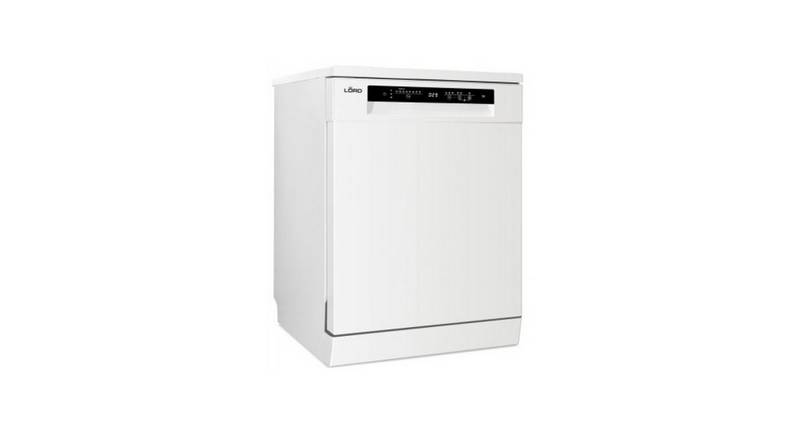
lord D3 Dishwasher



































USING YOUR DISHWASHER
Control Panel
9
10
8
11
12
1
2
3
4
6
5
7
Operation (Button)
Press this button to turn on the dishwasher, the screen lights
up.
Power
Program
Function
Alt
1
2
3
4
Select the appropriate washing program and corresponding
indicator will be lit.
Press the button to select a function, corresponding indicator
will be lit.
Press the button to select either upper basket or lower basket
loaded, and the response indicator will be lit.
Press the button to increase the delay start time. Delay a cycle
for up to 24 hours in one-hour increments. After setting the
delay time, press the Start/Pause button to start.
Delay
5
This option allows you to lock the buttons on the control
panel, so children cannot accidently start the dishwasher by
pressing the buttons on the panel. Only the Power button
remains active. To lock or unlock the buttons on the control
panel, press and hold the Alt button+ Delay button for 3
seconds simultaneously.
Child lock
6
7
To start the selected washing program or pause it when the
dishwasher is working.
Start/Pause
71

| General | Details |
|---|---|
| Name | lord D3 Dishwasher |
| Make | LORD |
| Language | English |
| Filetype | PDF (Download) |
| File size | 24.22 MB |
 (1 votes, average: 5.00 out of 5)
 Loading...

lord D5 Dishwasher

lord D8 Dishwasher

lord D1000 Dishwasher

FISHER and PAYKEL DW24UNT4X2 Dishwasher

FISHER PAYKEL DD24DDFTB9-N Dishwasher

Haier HDW13V1B1 Dishwasher

ASKO DFI5558MKXXL Dishwasher

Mueller DW-2400 Dishwasher

SIEMENS SN27ZI04CZ Dishwasher

BOSCH SMI6ZCS13E Dishwasher

Whirlpool WFE 2B19 X UK Dishwasher

Bosch 1071797 SMS Dishwasher

BOSCH SMT6EB801E Fully Integrated Dishwasher
Table of Contents
- 1. User Manual - Dishwasher →
- 2. Wichtige Sicherheitshinweise - Vor Dem Aufstellen →
- 3. Wichtige Sicherheitshinweise - Vor Dem Aufstellen →
- 4. Bei Kindern Im Haushalt - Beim Täglichen Einsatz →
- 5. Bei Störfällen - Empfehlungen →
- 6. Bestecke - Recycling →
- 7. Altgeräte - Um Gefahren Zu Vermeiden →
- 8. Lernen Sie Ihr Gerät Kennen - Gerätebeschreibung →
- 9. Vorbereitung Des Gerätes Zum Gebrauch - Vor Dem Ersten Gebra... →
- 10. Salzbehälter Auffüllen - Spülprogramm Starten →
- 11. Hinweise Für Die Benutzung Des Korbs - Höhenverstellung Des ... →
- 12. Um Den Korb In Die Obere Position Zu Bringen - Herunterklapp... →
- 13. Reinigung Und Wartung - Reinigung Der Außenflächen →
- 14. Grobfilter - Hauptfilter →
- 15. Sprüharme - Reinigung Der Sprüharme →
- 16. Reinigung Des Geschirrspülers - Frostschutz →
- 17. Montageanleitung - Risiko Eines Elektrischen Schlages →
- 18. Wasseranschluss - Zulaufschlauch →
- 19. Ablaufschlauch - Arbeitstisch →
- 20. Aufstellen Des Geschirrspϋlers - Wählen Sie Einen Geeigneten... →
- 21. Massnahmen Bei Störungen - Bevor Sie Den Service Anrufen →
- 22. Problem - Wahrscheinliche Ursache →
- 23. Problem - Wahrscheinliche Ursache →
- 24. Problem - Wahrscheinliche Ursache →
- 25. Einräumen Von Geschirr - Nach En60436 →
- 26. Besteckhalter - Besteckkorb →
- 27. Gebrauch Des Geschirrspülers - Display / Bedienpanel →
- 28. Display - Klarspüler →
- 29. Extra Spülen - Extra Trocknen →
- 30. Wasserenthärter - Einstellen Des Klarspülerbehälters →
- 31. Verbrauch Von Spülmitteln - Mehrzweckspülmittel (z. B.: 2 In... →
- 32. Anwendungsempfehlung - Einstellen Der Verwendung Von Mehrzwe... →
- 33. Füllen Des Klarspülbehälters Und Auswahl Der Einstellungen -... →
- 34. Spülmittel Einfüllen - Öffnungsmethode →
- 35. Geschirrspülmaschine Programmierung - Programmtabelle →
- 36. Einschalten Des Geräts - Programmwechsel →
- 37. Einräumen Von Geschirr Während Des Spülvorgangs - Nach Dem E... →
- 38. Ausräumen Des Geschirrs - Fehlercodes →
- 39. Technische Informationen - Höhe (h) →
- 40. Produktdatenblatt - Delegierte Verordnung (eu) 2019/2017 Der... →
- 41. Safety Information - Product Overview →
- 42. Note: Reviewing The Section On Troubleshooting Tips Will Hel... →
- 43. Safety Information - Warning →
- 44. Earthing Instructions - Improper Connection Of The Equipment... →
- 45. Check That The Detergent Powder Is Empty After Completion Of... →
- 46. Disposal →
- 47. Product Overview - Important →
- 48. Using Your Dishwasher - Before Using Your Dishwasher: →
- 49. Adding Dishwasher Salt →
- 50. Basket Used Tips - Adjusting The Upper Basket →
- 51. To Raise The Upper Basket, Just Lift The Upper Basket At The... →
- 52. Maintenance And Cleaning - External Care →
- 53. Coarse Filter - Main Filter →
- 54. Spray Arms →
- 55. Caring For The Dishwasher - Frost Precaution →
- 56. Installation Instruction - About Power Connection →
- 57. Water Supply And Drain - Cold Water Connection →
- 58. Connection Of Drain Hoses - How To Drain Excess Water From H... →
- 59. Position The Appliance - Levelling The Appliance →
- 60. Built-in Installation(for The Integrated Model) - Step 1. Se... →
- 61. Step 2. Aesthetic Panels Dimensions And Installation - Semi-... →
- 62. Step 3. Tension Adjustment Of The Door Spring - Door Spring ... →
- 63. Step 4. Dishwasher Installation Steps - Connect The Inlet Ho... →
- 64. Step 5. Levelling The Dishwasher - Dishwasher Must Be Level ... →
- 65. Troubleshooting Tips - Before Calling For Service →
- 66. Problem - Possible Causes →
- 67. Problem - Possible Causes →
- 68. Loading The Baskets - Upper Basket →
- 69. Cutlery Rack - Cutlery Basket →
- 70. Note: →
- 71. Quick User Guide - Install The Dishwasher →
- 72. Using Your Dishwasher - Control Panel →
- 73. Display - Rinse Aid →
- 74. Extra Cleaning - Extra Drying →
- 75. Water Softener - Adjusting Salt Consumption →
- 76. Loading The Salt Into The Softener - Water Softener →
- 77. Recommendations For Loading The Dishwasher - Removing The Di... →
- 78. Loading The Upper Basket - Loading The Lower Basket →
- 79. Function Of The Rinse Aid And Detergent - When To Refill The ... →
- 80. Filling The Rinse Aid Reservoir - Adjusting The Rinse Aid Re... →
- 81. Filling The Detergent Dispenser - Sliding It To The Right →
- 82. Programming The Dishwasher - Wash Cycle Table →
- 83. Starting A Cycle Wash - Changing The Program Mid-cycle →
- 84. Forget To Add A Dish? - Auto Open Door →
- 85. Error Codes - Codes →
- 86. Technical Information - Height (h) →
- 87. Product Information Sheet - General Product Parameters →
- 88. Information For Users On The Disposal Of Electrical And Elec... →
- 89. Bezpečnostní Informace - Pokyny K Uzemnění →
- 90. Tipy Pro Řešení Problémů - Autorizovaný Servis →
- 91. Bezpečnostní Informace - Výstraha →
- 92. Pokyny K Uzemnění - Využijte Služeb Kvalifikovaného Elektriká... →
- 93. Některé Detergenty Pro Myčky Nádobí Jsou Silně Alkalické. Př... →
- 94. Likvidace - Zajištění Správné Likvidace →
- 95. Popis Výrobku - Důležité: →
- 96. Používání Myčky Nádobí - Před Použitím Myčky Nádobí →
- 97. Doplňování Soli Do Myčky - Pokyny Pro Naplnění Zásobníku Na ... →
- 98. Tipy Pro Použití Koše - Úprava Horního Koše →
- 99. Pokud Chcete Zvednout Horní Koš - Sklopení Držáků Na Šálky →
- 100. Údržba A Čištění - Péče O Vnější Část →
- 101. Hrubý Filtr - Jemný Filtr →
- 102. Ostřikovací Ramena - Čistění Ostřikovacího Ramene →
- 103. Péče O Myčku Nádobí - Ochrana Před Mrazem →
- 104. Pokyny Pro Instalaci - Nebezpečí Úrazu Elektrickým Proudem →
- 105. Připojení Vody A Odpadu - Připojení Studené Vody →
- 106. Připojení Vypouštěcích Hadic - Jak Vypustit Přebytečnou Vodu... →
- 107. Umístění Spotřebiče - Vyrovnání Spotřebiče →
- 108. Vestavěná Instalace (pro Vestavěný Model) - Krok 1. Volba Ne... →
- 109. Krok 2. Rozměry A Instalace Dekorativního Panelu - Polo-vest... →
- 110. Krok 3. Nastavení Napnutí Pružiny Dvířek →
- 111. Kroky Instalace Myčky Nádobí - Připevněte Kondenzační Pás →
- 112. Krok 5. Vyrovnání Myčky Nádobí - Zkontrolujte Úroveň →
- 113. Tipy Pro Řešení Problémů - Než Zavoláte Servis →
- 114. Problém - Možná Příčina →
- 115. Problém - Možná Příčina →
- 116. Plnění Košíků - Podle En60436: →
- 117. Držák Na Příbor - Koš Na Příbory →
- 118. Poznámka →
- 119. Rychlý Návod K Obsluze - Instalace Myčky. →
- 120. Používání Myčky Nádobí - Ovládací Panel →
- 121. Displej - Leštící Prostředek →
- 122. Extra Mytí - Extra Sušení →
- 123. Změkčovač Vody - Úprava Spotřeby Soli →
- 124. Plnění Soli Do Změkčovače - Změkčovač Vody →
- 125. Doporučení Pro Plnění Myčky - Předměty Do Myčky Umístěte Nás... →
- 126. Plnění Horního Koše - Plnění Dolního Koše →
- 127. Funkce Oplachového A Mycího Prostředku - Kdy Doplnit Dávkova... →
- 128. Plnění Nádrže Na Oplachovací Prostředek - Nastavení Dávkován... →
- 129. Plnění Dávkovače Mycího Prostředku - Způsob Otevření Zvolte ... →
- 130. Tabulka Mycích Cyklů - Mycí Prostředek →
- 131. Spuštění Mycího Cyklu - Změna Programu Uprostřed Cyklu →
- 132. Zapomněli Jste Vložit Nějaké Nádobí? - Automatické Otevření →
- 133. Kódy Poruch - Význam →
- 134. Technické Informace - Výška (h) →
- 135. Informační List Výrobku - Nařízení Komise V Přenesené Pravom... →
- 136. Informace Pro Uživatele K Likvidaci Elektrických A Elektroni... →
- 137. Bezpečnostné Informácie - Pokyny Na Uzemnenie →
- 138. Tipy Pri Riešení Problémov →
- 139. Bezpečnostné Informácie - Výstraha →
- 140. Pokyny Na Uzemnenie - Nesprávne Pripojenie Uzemňovacieho Vod... →
- 141. Bezpečnostné Upozornenia - Používanie Umývačky Riadu →
- 142. Likvidácia - Recyklácia Obalov →
- 143. Popis Výrobku - Dôležité →
- 144. Použitie Umývačky Riadu - Pred Použitím Umývačky Riadu →
- 145. Pri Doplňovaní Soli Do Umývačky Postupujte Podľa Nasledujúci... →
- 146. Tipy Pre Použitie Koša - Úprava Horného Koša →
- 147. Ak Chcete Zdvihnúť Horný Kôš - Ak Chcete Spustiť Horný Kôš →
- 148. Údržba A Čistenie - Starostlivosť O Vonkajšiu Časť →
- 149. Hrubý Filter - Hlavný Filter →
- 150. Ostrekovacie Ramená - Pri Čistení Ostrekovacieho Ramena Post... →
- 151. Starostlivosť O Umývačku Riadu - Ochrana Pred Mrazom →
- 152. Pokyny Pri Inštalácii - Nebezpečenstvo Úrazu Elektrickým Prú... →
- 153. Pripojenie Vody A Odpadu - Bezp Ečnostná Prívodná Hadica →
- 154. Pripojenie Vypúšťacích Hadíc - Ako Vypustiť Prebytočnú Vodu ... →
- 155. Umiestnenie Spotrebiča - Vyrovnanie Spotrebiča →
- 156. Vstavaná Inštalácia (pre Vstavaný Model) - Krok 1. Voľba Naj... →
- 157. Krok 2. Rozmery A Inštalácia Dekoratívneho Panelu - Polo-vst... →
- 158. Krok 3. Nastavenie Napnutia Pružiny Dvierok - Pružiny Dviero... →
- 159. Kroky Inštalácie Umývačky Riadu - Pripojenie Hadíc →
- 160. Krok 5. Vyrovnanie Umývačky Riadu - Skontrolujte Úroveň →
- 161. Tipy Pri Riešení Problémov - Než Zavoláte Servis →
- 162. Problém - Možná Príčina →
- 163. Problém - Možná Príčina →
- 164. Plnenie Košíkov - Pod Ľa En60436 →
- 165. Držiak Na Príbor - Kôš Na Príbory →
- 166. Poznámka →
- 167. Rýchly Návod Na Obsluhu - Inštalácia Umývačky →
- 168. Používanie Umývačky Riadu - Ovládací Panel →
- 169. Displej - Leštiaci Prostriedok →
- 170. Extra Umývanie - Ikony Funkcií →
- 171. Zmäkčovač Vody - Úprava Spotreby Soli →
- 172. Zmäkčovač Vody - Príprava A Plnenie Riadom →
- 173. Rady Pri Plnení Umývačky - Predmety Do Umývačky Umiestnite N... →
- 174. Plnenie Horného Koša - Plnenie Dolného Koša →
- 175. Funkcia Oplachovovacieho A Čistiaceho Prípravku - Kedy Dopln... →
- 176. Plnenie Nádrže Na Oplachovací Prípravok - Nastavenie Dávkova... →
- 177. Plnenie Dávkovacieho Čistiaceho Prípravku - Spôsob Otvorenia... →
- 178. Programovanie Umývačky - Tabuľka Umývacích Cyklov →
- 179. Spustenie Umývacieho Cyklu - Zmena Programu Uprostred Cyklu →
- 180. Zabudnutý Riad - Výstraha →
- 181. Kódy Porúch - Výstraha →
- 182. Technické Informácie - Výška (h) →
- 183. Informačný List Výrobku - Delegované Nariadenie Komisie (eú)... →
- 184. Informácie O Likvidácii Opotrebovaného Elektrického Zariaden... →
- 185. Changes And Printing Errors Excepted. →