
SAMSUNG DW80N3030UW Front Control Dishwasher












setting up your dishwasher
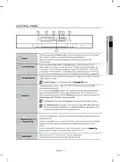
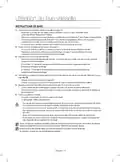
To start a cycle, press the Start button before closing the door.
7
Start
To cancel the cycle, press and hold the Start button for 3 seconds or press
the Power button to power off the dishwasher.
You can select options (Hi-Temp Wash, Sanitize, Heated Dry) before starting a
cycle. If you change the cycle after selecting an option, the original cycle is reset.
To prevent the touchpad from losing response sensitivity, follow these instructions:
-
-
-
Touch the center of each keypad using one finger. Do not push.
Clean the touch control’s surface regularly with a soft, damp cloth.
Be careful not to touch more than one touch key pad at a time, except as directed.
When you pause a cycle by opening the door, press the Start button before closing
the door to continue the cycle.
Push the door firmly closed within 3 seconds of pressing the Start button.
If the door is not closed within 3 seconds, the cycle will not start.
O O X
English - 8

| General | Details |
|---|---|
| Name | SAMSUNG DW80N3030UW Front Control Dishwasher |
| Make | Samsung |
| Language | English |
| Filetype | PDF (Download) |
| File size | 13.46 MB |
 (1 votes, average: 5.00 out of 5)
 Loading...

SAMSUNG DW80N3030UW Front Dishwasher

SAMSUNG DW90F89 Dishwasher

SAMSUNG DW80BB70 Dishwasher

SAMSUNG DW50T6060U Dishwasher

SAMSUNG DW80BB70 Series Dishwasher

SAMSUNG DW80CB5450 Dishwasher

Samsung DW60M5062 Dishwasher

Samsung DW60 7 Series Dishwasher

SAMSUNG DW9000F Dishwasher

SAMSUNG DW60R2014 Wide 12 Place Dishwasher


BLAKESLEE UC-1000-1 Undercounter Dishwasher

BOSCH SMS2HVW67G Standing Dishwasher

FISHER AND PAYKEL DD24DTI9 N Dishwasher

Haier HDW15F3B1 Steam Dishwasher

BOSCH SMD6YCX02E Available Customer Service Dishwasher

BOSCH SHX78B75UC 24 Bar Handle Dishwasher

BOSCH SPV6YMX11E Dishwasher

FISHER AND PAYKEL DD60D2NX9 Dishwasher

TOSHIBA DWS-22AMY(K) Dishwasher

BOSCH SMS6ZCI16E Dishwasher