
Whirlpool WDT975SAHZSS Fingerprint Resistant Smart Dishwasher
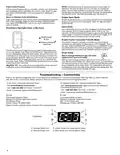
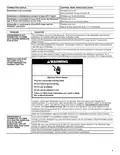

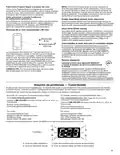




CONNECTION STATUS
CONTROL PANEL INDICATOR LIGHTS
Dishwasher is not connected
Wireless icon is off.
Blue and Amber House icons are off.
Dishwasher is attempting to connect to home Wi-Fi router
Wireless icon is blinking slowly.
Dishwasher is connected to home Wi-Fi router, but Whirlpool® Wireless icon is on.
app or Smart Grid functions do not work
Blue Internet icon is blinking slowly.
Wireless icon is on.
Blue or Amber House icon is on – it is not blinking
Dishwasher is connected to home Wi-Fi router and the
Whirlpool® app works
PROBLEM
SOLUTION
DISHWASHER IS NOT
CONNECTED TO HOME
WI-FI ROUTER (WIRELESS
ICON IS OFF)
The dishwasher may be in Standby mode. Touch the Power button on the dishwasher and observe
indicators. All indicator lights are off when in Standby mode.
Check that the dishwasher has been connected to the home Wi-Fi router. See the “Connectivity
Setup” section.
Press and hold CONNECT for 5 seconds. The Wireless Status icon should blink while connecting (this
may take up to 2 minutes).
Check whether the router connection is on and working with other computers or devices in the home
(able to access the Internet).
There may be weak signal strength or signal interference between the dishwasher and router. Try to
place the wireless router closer to the dishwasher. It may be necessary to install a Wi-Fi range extender.
WIRELESS ICON DOES
NOT LIGHT AT ALL
AFTER PRESSING THE
CONNECT BUTTON
Unplug or disconnect dishwasher power for 30 seconds, then reconnect power. Repeat Wi-Fi
connect process. If no connection after several attempts unplug or disconnect power for 30 seconds
In Canada, visit www.whirlpool.ca/en_CA and click on the Whirlpool® Connected Appliances link.
Appliance may be assigned to a Wi-Fi network that is not active. Verify that the network it is assigned
to is operating properly.
Verify that the dishwasher operates correctly, except for not being able to connect. Call for service.
DISHWASHER IS
If not, touch CONNECT to reestablish wireless connection.
CONNECTED TO HOME
WI-FI ROUTER (WIRELESS
ICON IS ON), BUT
Connection to the Whirlpool® app and Smart Grid service may be unavailable. Check if the Blue House
icon is off or blinking.
Check that your user account is set up. See the “Connectivity Setup” section or the Whirlpool® app
directly for account setup and dishwasher registration instructions.
WHIRLPOOL® APP OR
SMART GRID FUNCTIONS
DO NOT WORK
Verify that the dishwasher is paired with your account in the app.
Verify correct email address, mobile number, and notification preferences.
5

| General | Details |
|---|---|
| Name | Whirlpool WDT975SAHZSS Fingerprint Resistant Smart Dishwasher |
| Make | Whirlpool |
| Language | English |
| Filetype | PDF (Download) |
| File size | 0.51 MB |
 (1 votes, average: 5.00 out of 5)
 Loading...

Whirlpool 2B19 Dishwasher

Whirlpool WFO3O33PLAUS Standard Dishwasher

Whirlpool W11323304G Dishwasher

Whirlpool WH7IPC15BM60 Dishwasher

Whirlpool FINPUTSAD Dishwasher

Whirlpool W7U HS31 X Dishwasher

Whirlpool Thron Dishwasher

Whirlpool WDF332PAMS 24 Front Tall Tub Dishwasher

Whirlpool WRF540CWHZ Dishwasher

Whirlpool WDF130PAHB Dishwasher


Whirlpool 400011634913 Dishwasher

FISHER and PAYKEL DD60SCX9 Dishwasher

FISHER PAYKEL DD24SV2T9 Dishwasher

Whirlpool W11643461 B Dishwasher

Westinghouse WSF6606KXB Dishwasher
Whirlpool Thron Dishwasher

saco Dishwasher Whirlpool G2P DWI

BOSCH SPV2IKX2BR Dishwasher

FISHER PAYKEL DD60SCHTX9 Dishwasher

BOSCH SPS2HKW58E Dishwasher