
Home > GE Appliances > GE APPLIANCES GSD2100VBB Dishwasher
GE APPLIANCES GSD2100VBB Dishwasher


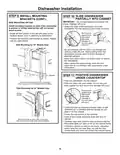


Dishwasher Installation
CONNECT WATER
POSITION DISHWASHER
UNDER COUNTERTOP
(CONT.)
STEP 12
STEP 11
SUPPLY
Connect water supply line to 90° elbow.
If using a flexible braided hose connection:
• Attach nut to 90° elbow using an adjustable wrench.
If using a copper
tubing connection:
• Slide compression nut,
90° Elbow
Hot Water
Door
Fits and
Swings
Back
Behind
Cabinet
Frame
then ferrule over end
of water line.
Supply Line
• Insert water line into
90° elbow.
Door Catches
on Cabinet Frame
Ferrule Compression
Nut
• Slide ferrule against
elbow and secure with compression nut.
Incorrect
Alignment
Correct
Alignment
CONNECT POWER SUPPLY
STEP 13
TOP VIEW
If a power cord with plug is already installed
proceed to Step 14.
The controls on these
models are designed
to be hidden by your
countertop. Align the
dishwasher as shown in
figure.
Hold
3
Sec To Cancel
WARNING
Clean
Sanitized
Start
If house wiring is not 2-wire with ground, a ground
must be provided by the installer. When house wiring
is aluminum, be sure to use UL-Listed anti-oxidant
compound and aluminum-to-copper connectors.
Controls Hidden by Countertop
Leave a 1/2” minimum gap
Countertop
between the underside of the
countertop and the top of the
dishwasher door as shown in
figure.
• Remove junction box cover.
• Secure house wiring to the back of the junction box
with a strain relief.
• Locate the 3 dishwasher wires, (white, black and
green) with the stripped ends coming out of the AC
jumper. Use UL listed wire nuts of appropriate size to
connect incoming ground to green, white to white and
black to black.
• Replace the junction box cover using the screw.
Check to be sure that wires are not pinched under
the cover.
1/2”
Min.
NOTE: If the drain hose
gets trapped behind the unit
it can prevent the controls
from being hidden by the
countertop.
Front
View
Dishwasher
Door
Tip: The leveling legs can
be used to increase or
decrease the amount of gap
between the controls and
the countertop affecting the
visibility of the controls.
• If using a Power Cord Kit, use GE Appliances part
number WX09X70910 or WX09X70911 and refer to
the included instructions.
Countertop
NOTE: Do not remove the Junction Box Bracket.
UL Listed Wire Nuts
Black
Ground/
Green
White
IMPORTANT– Leave a 1/2”
minimum gap between the
controls and the underside
of the countertop to prevent
condensation and damage
to the control panel from
screwheads.
Control
Panel
Junction Box
Cover
House
Wiring
with
Strain
Relief
Dishwasher
Ground Wire
and Screw
Dishwasher
Wires
NOTE: If this dishwasher is replacing an existing
dishwasher, the old countertop bracket screw holes
may not be in the correct position to accept a top-
control model. New holes may be required.
Dishwasher Ground
Wire and Screw
Junction Box Bracket
NOTE: All ground screws, brackets and wires must
remain intact.
10

| General | Details |
|---|---|
| Name | GE APPLIANCES GSD2100VBB Dishwasher |
| Make | GE Appliances |
| Language | English |
| Filetype | PDF (Download) |
| File size | 0.86 MB |
 (1 votes, average: 5.00 out of 5)
 Loading...

GE APPLIANCES GTW845 Dishwasher

GE APPLIANCES GDF550PGR Plastic Interior Dishwasher with Front Controls

GE APPLIANCES PDT755SYV/BTV UltraFresh System Dishwasher with Interior

GE APPLIANCES PDP715SYVFS GE Profile Series Interior Dishwasher

GE APPLIANCES PDT715SYV Interior Dishwasher with Hidden Controls

GE APPLIANCES GDT670SGV Interior Dishwasher with Hidden Controls

GE APPLIANCES GDT650SYV Interior Dishwasher with Hidden Controls

GE APPLIANCES PDT705SYWFS Dishwasher

GE APPLIANCES GDT565HSYSS Energy Star Hybrid Tub Dishwasher

GE APPLIANCES GD*650-670 Series Interior Dishwasher


BOSCH SMV6ECX10E Dishwasher

FISHER PAYKEL DD24SCTB9_N Tall Dishwasher

whirlpool DF9E 1B10 Dishwasher

FISHER AND PAYKEL DD60D2NX9 Dishwasher

FISHER AND PAYKEL DD60ST4NX9 Single DishDrawer Dishwasher

FISHER PAYKEL DW24U2I1 Drop Down Dishwasher

BOSCH SGS2HVW66G Free-Standing Dishwasher

Omega ODWF6014X Dishwasher

SIEMENS SX63HX60AE Fully Integrated Dishwasher

BOSCH SBD6YCX02E-46 Dishwasher