
Home > KitchenAid > KitchenAid KDFE204KPS Dishwasher
KitchenAid KDFE204KPS Dishwasher
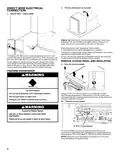
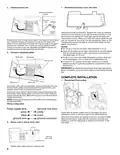
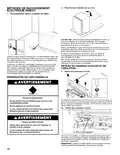
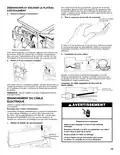


4. Connect ground wire
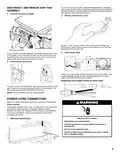
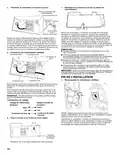
7. Reinstall terminal box cover and wires
Ground connector
screw
Ground
wire
Washer
Ground
screw
Place wires inside terminal box. Replace the cover by inserting
the hooks of the terminal cover into the slots in the floor of the
terminal box and sliding the cover tight against the back wall
where wires come in. Make sure wires are tucked inside the box
and not pinched by the cover. Put the terminal box back on the
crossbar and push to the right so terminal box snaps into the
plastic side member.
Route power cord through strain relief in the back of the terminal
box. Remove the ground connector screw on the raised floor
inside the box and place it through the ring terminal of the green
ground wire of power cord. If wire has no ring terminal, bend
a loop in the end of the wire. Reattach and tighten the ground
connector screw to the raised floor of the box.
NOTES:
■ Do not plug cord into an outlet until instructed to do so.
■ Once the terminal box has been remounted on the dishwasher,
tuck any excess length or slack over nearby components to
help keep them off the floor.
5. Connect remaining wires
White wire
White wire
■ Route cord out the rear of the dishwasher so that it does not
touch dishwasher motor or lower part of dishwasher tub.
Ground wire
■ A maximum of 2 power cord supply conductors (12 AWG
largest size) plus 1 grounding conductor are permitted in the
terminal box.
IMPORTANT: No additional connections other than dishwasher
power connection are to be made inside the dishwasher terminal
box.
COMPLETE INSTALLATION
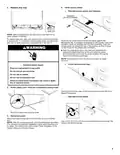
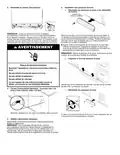
1. Reconnect float switch
Black wire
Black wire
To connect wires with ring terminals, remove the screws from the
terminal block, place the screw through the ring terminals, and
reattach screws back into the terminal block.
To connect wires without ring terminals, remove the screws from
the terminal block. Bend a loop in the end of the wires. Push the
screws through the loop. Return the screws to the terminal block.
Tighten the screws.
NOTE: Pre-tinned wires should not be used when connecting to
the terminal block.
Wiring configuration
Check that the power supply wire or cord does not touch
dishwasher motor or the lower part of the dishwasher tub.
Reconnect float switch by aligning connector removed in Step
Remove float switch wires with the connector housing and
pushing in until the locking tab is visible over the back of the
connector.
6. Secure cord or wire in strain relief
Terminal
box cover
Tighten strain relief screws to secure cord.
6

| General | Details |
|---|---|
| Name | KitchenAid KDFE204KPS Dishwasher |
| Make | KitchenAid |
| Language | English |
| Filetype | PDF (Download) |
| File size | 1.9 MB |
 (1 votes, average: 5.00 out of 5)
 Loading...

KitchenAid KDTE304RBS Third Level Jet Rack Dishwasher

KitchenAid KDTF324PPA Dishwasher

Kitchenaid MVWC565FW1 Dishwasher

KitchenAid w11323304 Dishwasher

KitchenAid KDFE104KWH Two Rack Dishwasher

KitchenAid KDTE104KPS Dishwasher

KitchenAid KDFE104KBL Front Dishwasher

KitchenAid KDTF924PPS Flush Cabinet Dishwasher

KitchenAid KDTE304RBS Level Jet Rack Dishwasher

KitchenAid KDF Series Dishwasher

ASKO DBI565IXXLS Logic Series 24 Dishwasher

Whirlpool OZT56J Dishwasher

BLAUPUNKT 5VF421AU Dishwasher

FISHER PAYKEL DD24SCTW9N Dishwasher

FISHER and PAYKEL DD24DCHTX9 N Contemporary Tall Dishwasher

AEG FSE64637P Dishwasher

BOSCH SBI4ECS21E Dishwasher

FISHER PAYKEL DD60DDFHX9 Drawer Dishwasher

FISHER and PAYKEL Built Under Dishwasher

CMA EST-FL1 EST Front Loader Water Dishwasher