
SHARP SDW6767HS Dishwasher


QUICK START GUIDE
QUICK START GUIDE
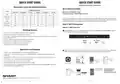
Option 2: Without a Barcode
Step 2: Enable Remote Command & Control
Touch Power to turn on the dishwasher, then touch and hold Rinse Only and Wash Zone together for
5 seconds until "UG" appears on the display.
With the Dishwasher connected to Wi-Fi and paired to the mobile app, authorize your appliance to accept
control commands from your mobile app or voice commands.
To start the network control, touch and hold Rinse Only and START/CANCEL together for 5 seconds until the
Wi-Fi indicator stops flashing and remains lit.
5
S
Open the Amazon Alexa app, select Devices and touch + to add a device. Select the type of device, then
select DON'T HAVE A BARCODE? and touch NEXT.
5
S
2
You have successfully connected the dishwasher and
enabled remote command and control. Access your
Dishwasher on the Devices tab in the Amazon Alexa app.
Dishwasher
Devices
Add Device
1
First Dishwasher
You can also change the name from "First Dishwasher" to
"Dishwasher" in the Devices tab by selecting the Settings
icon in the top right corner, and then selecting Edit Name.
Devices
Sharp
Proceed to Step 2:
Enable Remote Command & Control
Alexa Command List
Alexa, set wash zone to upper
Alexa, set wash zone to lower
Alexa, set wash zone to both
Alexa, turn on dishwasher
Turn ON/OFF
Washing Zone
Alexa, turn on child lock
Cycle
Mode
Program
Child Lock
Delay Time
A
B
Alexa, set delay to x hour(s)
Alexa, set delay start to x hour(s)
Operation Mode
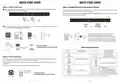
Option 3: Zero Touch Setup
Alexa, set dishwasher “A” to “B”
(E.g. Alexa, set dishwasher cycle to auto.)
Auto
Heavy Duty
Normal
Light
Express Wash
Rinse Only
Enable
Activate
Start
Zero Touch Setup is only available if your dishwasher was purchased through Amazon.com and Zero Touch
Setup was applied to your personal Amazon account during checkout.
A
B
Turn On
Alexa, “A” or “B” Pause on my dishwasher
(E.g. Alexa, turn on pause on my dishwasher.)
Touch Power to turn on the dishwasher. Open the Amazon Alexa app, and it will automatically pair to your
Dishwasher.
Disable
Deactivate
Stop
Engage
Enable
Turn On
An active Echo Dot (2nd Gen or later) can also perform Zero Touch Setup.
Turn Off
A
B
Dishwasher Status
Alexa, what is the dishwasher cycle?
Alexa, what is the dishwasher mode?
Check the current mode
Alexa, “A” “B”
(E.g. Alexa, turn on power wash.)
Power Wash
Heat Dry
High Temp Wash
Fan Dry
Sanitize
A pop up will appear
on mobile phone
once your device is
Alexa, what is the status on the dishwasher?
Alexa, what is the status in the dishwasher?
Check the current status
Remaining Wash Time
successfully paired
Proceed to Step 2:
Enable Remote Command & Control
Alexa, what is the dishwasher’s remaining time?
Note: Alexa command list is subject to change without notice. For the latest command list, please visit shop.sharpusa.com.
2
3

| General | Details |
|---|---|
| Name | SHARP SDW6767HS Dishwasher |
| Make | Sharp |
| Language | English |
| Filetype | PDF (Download) |
| File size | 0.36 MB |
 (1 votes, average: 5.00 out of 5)
 Loading...

SHARP SDW6506JS 24 Front Dishwasher

SHARP SDW6888JS Smart Dishwasher

SHARP QW-NA1BF47EI-EU Series Dishwasher

SHARP QW-NA24S42DI-EE Dishwasher

SHARP SDW6767HS Slide In Smart Dishwasher

SHARP SDW6767HS Smart Dishwasher

SHARP QW-NA26F39DI-EN Dishwasher

SHARP QW-NS1CF49EI-ES Dishwasher

SHARP SDW6757ES Dishwasher

SHARP QW-NA25GU44BS-DE Undercounter Dishwasher


BOSCH SHP65CM2WH Dishwasher

FISHER PAYKEL DD60SHTI9 Integrated Single Dishwasher

FISHER PAYKEL ADDD60D Dishwasher

TESLA WDI461M Dishwasher

BOSCH SMD8YCX03G Dishwasher

BOSCH SPV4EKX20E Dishwasher

Maidaid Halcyon AMH80 Amika Pass Through Gravity Drain Dishwasher

Whirlpool W2IHKD526A Fully Integrated Dishwasher

FISHER PAYKEL DD60SCHW9 Dishwasher

IKEA 004.754.23 PROFFSIG Dishwasher