
Whirlpool WDFS3L5PBSSG 15 Place Setting Free Standing Dishwasher


Daily Reference Guide
EN
THANK YOU FOR BUYING A WHIRLPOOL PRODUCT.
In order to receive a more complete assistance, please
register your appliance on: www.whirlpool.com.hk
Before using the appliance carefully read Safety and Installation
Instructions. More information about your product available on
After installation, please remember to remove all transport protec-
tion parts from the dishwasher.
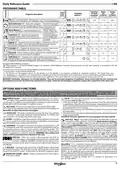
CONTROL PANEL
1
2
3
4
5
6
7
8
9
10 11
12
13 14 15
16
17
18
19
20
21
22
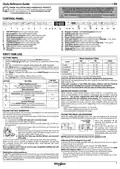
1. ON-OFF/Reset button with indicator light
2. Eco program button with indicator light
12. Program number and remaining time indicator
13. Closed water tap indicator light
14. DESCALE indicator light
15. Power Clean® option button with indicator light
16. Half Load option button with indicator light/ Settings - 3 sec. press
17. Extra Dry option button with indicator light
18. Silent option button with indicator light/ Key lock - 3 sec. press
19. Sani Rinse option button with indicator light
20. Self-Clean program button with indicator light
21. Delay option button with indicator light
3. Auto Intensive program button with indicator light
4. Auto Mixed program button with indicator light
5. Auto Fast program button with indicator light
6. Rapid program button with indicator light
7. Crystals program button with indicator light
8. Prewash program button with indicator light
9. Salt reservoir empty indicator light
10. Rinse Aid reservoir empty indicator light
11. Display
22. START/Pause button with indicator light
FIRST TIME USE
SETTING MENU
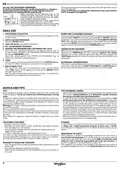
1. Switch on the appliance by pressing the ON-OFF button.
Water Hardness Table
°dH
German degrees
°fH
French degrees
°Clark
English degrees
2. Hold the Settings (Half Load
a beep.
3. After one second the first available setting (letter„h”) will be displayed.
4. Press button to scroll through the list of available settings (see ta-
ble below), then press START/Pause to view and change the value of
the currently selected setting.
5. Press to change the value, then press START/Pause to save the
new value.
6. To change another setting, repeat points 2 and 5.
7. Press ON-OFF or wait 30 seconds to exit the menu.
) button for 3 seconds until you hear
Level
1 (soft)
0 - 6
7 - 11
0 - 10
11 - 20
21 - 29
30 - 60
61 - 90
0 - 7
8 - 14
2 (medium)
3 (average)
4 (hard)
12 - 16
17 - 34
35 - 50
15 - 20
21 - 42
43 - 62
5 (very hard)
To change, follow instructions in section“SETTING MENU”.
Only use salt that has been specifically designed for dishwashers.
After the salt has been poured into the machine, the SALT REFILL indicator
light switches off.
VALUES
(Default - in bold)
LETTER
SETTING
If the salt container is not filled, the water softener and the heating
element may be damaged as a result of limescale accumulation.
Use of salt is recommended with any type of dishwasher detergent.
Water Hardness Level
(see “SETTING THE WATER HARDNESS”
and “WATER HARDNESS TABLE”)
Rinse Aid Level
1 | 2 | 3 | 4 | 5
0 | 1 | 2 | 3 | 4 | 5
1 | 0
WATER SOFTENING SYSTEM
(see “ADJUSTING THE DOSAGE OF RINSE AID”)
NaturalDry (see “OPTIONS AND FUNCTIONS”)
“1”= On, “0”= Off
Water softener automatically reduces water hardness, consequently pre-
venting scale buildup on the heater, contributing also to better cleaning
efficiency. This system regenerates itself with salt, therefore it is re-
quired to refill the salt container when empty. The frequency of regen-
eration depends on the water hardness level setting - regeneration takes
place once per 4-6 Eco cycles with the water hardness level set to 3. The
regeneration process occurs at the beginning of the cycle with additional
fresh water.
Sound
“1”= On, “0”= Off
Factory Settings
1 | 0
Press START/Pause to restore to the factory
default all the values of the settings included in
the settings menu.
-
•
•
•
Single regeneration consumes: ~3L of water;
Takes up to 5 additional minutes for the cycle;
Consumes below 0.005kWh of energy.
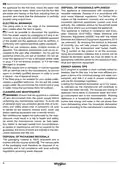
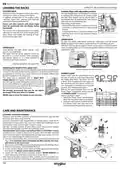
FILLING THE SALT RESERVOIR
The use of salt prevents the formation of LIMESCALE on the dishes and on
the machine’s functional components.
The salt reservoir is located in the lower part of the dishwasher (under the
lower rack on the left side).
FILLING THE RINSE AID DISPENSER
Rinse aid makes dish DRYING easier. The rinse aid dispenser A should be
filled when the RINSE AID REFILL indicator light in the control panel is lit.
•
•
•
It is mandatory that the salt reservoir never be empty.
It is important to set the water hardness.
Salt must be filled when the SALT REFILL indicator light
trol panel is lit.
1. Open the dispenser
pressing and pulling up the
tab on the lid.
2. Pour in the rinse aid (max.110
ml), making sure it does not
overflow from the dispenser.
If this happens, clean the spill
immediately with a dry cloth.
B
by
on the con-
1. Remove the lower rack and unscrew the reservoir cap
(anticlockwise).
2. Position the funnel (see figure) and fill the salt reservoir
right up to its edge (approximately 0,5 kg); it is not un-
usual for a little water to leak out.
A
B
3. Press the lid down until you hear a click to close it.
NEVER pour the rinse aid directly into the appliance tub.
3. Only the first time you do this: fill the salt reservoir
with water.
4. Remove the funnel and wipe any salt residue away from the opening.
Make sure the cap is screwed on tightly so that no detergent can get into
the container during the wash program (this could damage the water
softener beyond repair).
Run a program every time as soon as you completed refilling the salt
reservoir to avoid corrosion.
Adjusting the dosage of rinse aid
If you are not completely satisfied with the drying results, you can adjust
the quantity of rinse aid used.
To change, follow instructions in the section “SETTING MENU”.
If the rinse aid level is set to ZERO, no rinse aid will be supplied. The LOW
RINSE AID indicator light will not be lit if you run out of rinse aid.
A maximum of 6 levels can be set according to the dishwasher model.
• If you see bluish streaks on the dishes, set a low number (0-3).
• If there are drops of water or limescale marks on the dishes, set a mid-
range number (4-5).
Setting the water hardness
To allow the water softener to work in a perfect way, it is essential that the water
hardness setting is based on the actual water hardness in your house. This infor-
mation can be obtained from your local water supplier. The factory setting is“3”.
See„WATER HARDNESS TABLE”.
7

| General | Details |
|---|---|
| Name | Whirlpool WDFS3L5PBSSG 15 Place Setting Free Standing Dishwasher |
| Make | Whirlpool |
| Language | English |
| Filetype | PDF (Download) |
| File size | 7.21 MB |
 (1 votes, average: 5.00 out of 5)
 Loading...

Whirlpool 2B19 Dishwasher

Whirlpool WFO3O33PLAUS Standard Dishwasher

Whirlpool W11323304G Dishwasher

Whirlpool WH7IPC15BM60 Dishwasher

Whirlpool FINPUTSAD Dishwasher

Whirlpool W7U HS31 X Dishwasher

Whirlpool Thron Dishwasher

Whirlpool WDF332PAMS 24 Front Tall Tub Dishwasher

Whirlpool WRF540CWHZ Dishwasher

Whirlpool WDF130PAHB Dishwasher


FISHER AND PAYKEL DD60DHI9-CN Dishwasher

FRIGIDAIRE GDPH4525AF Dishwasher

BOSCH SPI4HKS49E Dishwasher

AEG FSE74617P Dishwasher

TESLA WD461MX Dishwasher

Thermador DWHD660EFP Sapphire Dishwasher

FISHER PAYKEL DW60FC4X2 Dishwasher

FISHER and PAYKEL DD60STI9 Tail Dishwasher

BOSCH SBV4ECX21E Dishwasher

Di LUSSO DW269SS Dishwasher