
LG DB425 Dishwasher


















OWNER'S MANUAL
DISHWASHER
Before beginning installation, read these instructions
carefully. This will simplify installation and ensure that the
product is installed correctly and safely. Leave these
instructions near the product after installation for future
reference.
ENGLISH
DB425*** / DB325***
MFL70282479
Rev.04_042122
Copyright © 2021-2022 LG Electronics Inc. All Rights Reserved.


| General | Details |
|---|---|
| Name | LG DB425 Dishwasher |
| Make | LG |
| Language | English |
| Filetype | PDF (Download) |
| File size | 2.93 MB |
 (1 votes, average: 5.00 out of 5)
 Loading...

LG LDTH7972SS Black Dishwasher

LG SDWB24S3 STUDIO Smart Dishwasher

LG LDTH7972D Smart Tub Dishwasher

LG LDPH7972D Smart Dishwasher

LG XD3A25UMB 15 Place QuadWash Dishwasher

LG LDT779 Dishwasher

LG LDT7808BD Dishwasher

LG LDFN4542S Dishwasher

LG DFB424 Dishwasher

LG LDTS5552D PrintProof Black Dishwasher

LG DB425 Dishwasher Overview
Summary of Contents
- Page 1: Owner's manual for the dishwasher. Read these instructions carefully before beginning installation. This will simplify installation and ensure correct and safe installation. Leave these instructions near the product after installation for future reference. Model numbers: DB425*** / DB325***. Copyright © 2021-2022 LG Electronics Inc. All rights reserved.
- Page 2: This manual may contain images or content that may be different from the model you purchased. This manual is subject to revision by the manufacturer. Safety instructions should be read before use. Warning statements are included in the manual. Caution statements are provided for safe operation. Information on caring for the environment is included. The installation section covers parts and specifications. Operation overview and instructions are detailed. Smart functions include the LG ThinQ application and smart diagnosis. Maintenance guidelines for cleaning and caring for the appliance are provided.
- Page 3: Before calling for service.
- Page 4: Safety instructions emphasize the importance of supervision for children around the appliance. Observe the specifications regarding the maximum number of place settings for the dishwasher. The water pressure must be between 0.05 MPa and 1.0 MPa. Never operate the appliance if it is damaged or malfunctioning. Contact an authorized service center if the power cord is damaged or the socket outlet is loose. Do not modify the power cord provided with the appliance. Transport the appliance securely with two or more people. Avoid installing the appliance in damp, dusty, or outdoor areas. Do not use multiple socket outlets, extension cables, or adapters with this appliance. Disconnect the power cord before installing or servicing the appliance.
- Page 5: Safety instructions When installing or moving the appliance, be careful not to pinch, crush, or damage the power cord. Use new hose or hose-set supplied with the appliance. Reusing old hoses can cause a water leak and subsequent property damage. Improper connection of the equipment-grounding conductor can result in risk of electric shock. This appliance must be grounded. In the event of malfunction or breakdown, grounding will reduce the risk of electric shock. This appliance is equipped with a power cord having an equipment-grounding conductor and a grounding power plug. After installing, check the hose connection for leaks before moving the appliance into the cabinet opening. Do not damage or place heavy items on the power cord of the appliance. This appliance is intended to be used in household and domestic applications only and must not be used for commercial purposes. For a permanently connected dishwasher: This appliance must be connected to a grounded metal, permanent wiring system. Immediately unplug the power plug and contact an LG Electronics customer information centre if you detect a strange sound, odour, or smoke.
- Page 6: Safety instructions Do not repair or replace any part of the appliance. All repairs and servicing must be performed by qualified service personnel unless specifically recommended in this Owner’s Manual. Do not leave the appliance door open. Children may hang on the door or crawl inside the appliance, causing damage or injury. Do not use flammable gas and combustible substances near the appliance. Do not attempt to separate any panels or disassemble the appliance. Do not bend the power cable excessively or place a heavy object on it. Do not put animals, such as pets into the appliance. Do not touch the power plug or the appliance controls with wet hands. If there is a gas leakage, do not touch the appliance or power plug and ventilate the area immediately. Hydrogen gas is explosive. If the hot-water system has not been used for two weeks or more, turn on all hot water taps and let the water flow for several minutes. Keep the area underneath and around your appliances free of combustible materials.
- Page 7: Safety instructions Do not operate the appliance unless all enclosure panels are properly in place. Use only detergents or wetting agents recommended for use in an appliance and keep them out of the reach of children. Do not wash and dry articles that have been soaked in explosive substances such as gasoline or solvents. When loading items to be washed, locate sharp items so that they are not likely to damage the door seal. Do not wash plastic items unless they are marked “dishwasher safe” or check the manufacturer’s recommendations. Do not touch any heating element during or immediately after use. Do not abuse, sit on, or stand on the door or dish rack of the dishwasher. Do not open the door while the appliance is in operation to avoid water splashing out. Be careful not to catch your hand when closing the door of the appliance. Small parts can be a choke hazard to small children if removed from the dishwasher.
- Page 8: Safety instructions highlight the importance of not leaving the door open to prevent tripping hazards. Maintenance guidelines emphasize the need to unplug the appliance by gripping the power plug firmly. It is essential to securely plug the power plug into the socket after removing moisture and dust. Cleaning should not involve spraying water inside or outside the appliance. Disconnecting the appliance from the power supply is necessary before cleaning, as setting controls to OFF does not suffice. Disposal instructions recommend unplugging old appliances and cutting off the cable to prevent misuse. Packaging materials should be disposed of away from children to avoid suffocation risks. Removing the door before discarding the appliance is crucial to prevent trapping hazards for children or small animals. Caution statements advise following basic safety precautions to reduce risks of fire, electric shock, or injury. Installation tips include placing the product on a firm and level floor and avoiding placing the drain hose under the dishwasher.
- Page 9: Safety instructions Turn off the water tap and unplug the appliance if it will be left for an extended period. Do not place objects on the top of the appliance. Do not wipe or coat the surface with liquid detergent or bleach. Do not touch water draining from the machine as it may be hot. Defrost the drain hose and water supply hose if they are frozen in winter. Do not put hands, feet, or metal objects below or behind the appliance. Do not wash dishes stained with chemical products used in beauty or massage shops. Wipe off cooking oil spills on the exterior immediately. Do not clean the exterior with cleaners containing alcohol, thinners, or abrasives.
- Page 10: Safety instructions Caring for the environment Disposal of your old appliance This crossed-out wheeled bin symbol indicates that waste electrical and electronic products should be disposed of separately from the municipal waste stream. Old electrical products can contain hazardous substances, so correct disposal of your old appliance will help prevent potential negative consequences for the environment and human health. Your old appliance may contain reusable parts that could be used to repair other products, and other valuable materials that can be recycled to conserve limited resources. You can take your appliance either to the shop where you purchased the product, or contact your local government waste office for details of your nearest authorised collection point. For the most up to date information for your country, please see the relevant recycling website.
- Page 11: Installation Parts and specifications Appearance and specifications may change without notice to improve the quality of the appliance. Front view Interior view Control panel Levelling feet Power cord Filtration system Detergent and rinse aid dispenser
- Page 12: Installation details include noise straps and moisture barrier tape. Accessories include noise strips and a funnel. Specifications for models DB425*** and DB325*** are provided. The power supply is rated at 220 - 240 V~, 50 Hz. Dimensions are 598 mm x 554 mm x 815 mm. The product weight is approximately 45 kg. It has a maximum capacity of 14 place settings. The permissible inlet water pressure ranges from 0.05 to 1.0 MPa. Power consumption is between 1600 and 1800 W.
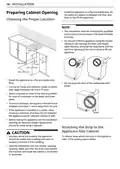
- Page 13: Install the appliance on a flat and stable area. This installation must be conducted by qualified service personnel to ensure it has been installed correctly. Do not pull or lift the appliance using the handle; doing so can damage the door and hinges. Select a location as close to the sink as possible for ease of connection to the water and drain pipes. To ensure drainage, the appliance should not be installed more than 1 metre away from the sink. If the appliance is installed in a corner, allow minimum clearance of at least 50 mm between the appliance and an adjacent cabinet or wall. Before sliding the appliance into the installation opening, all necessary height adjustments should be made using a spanner. To reduce noise, attach the strip to the appliance sides, if the opening space allows. Any bare wood surrounding the appliance should be sealed with a waterproof paint or sealant to prevent it from swelling. Make sure that the drain hose behind the machine and inside the cabinet is not kinked or stretched.
- Page 14: Installation instructions include removing double-sided tape from side strips and cleaning the underside of the counter top. Attach the side strip to the front of the side cabinet and ensure it adheres well. Remove the protective film from the tape and install it to the underside of the counter top. Repeat the steps for the opposite side strip. Moisture barrier tape is included in the manual assembly bag. Install the moisture barrier tape to protect the counter top from condensation when the appliance is opened. Moisture barrier tape is not required for granite or waterproof materials. Condensation may occur on the underside or front edge of the counter top in low room temperatures.
- Page 15: Installation Adjusting back levelling feet Levelling the appliance prevents unnecessary leakage and poor washing. Check whether the appliance is perfectly level after installation. Turn the centre screw clockwise to raise the rear of the tub and counterclockwise to lower it. If the appliance rocks when pushing the top plate diagonally, adjust the feet again. The appliance is not level if there is a rubbing sound or stickiness when the door is opened. When the appliance is not perfectly level, turn the adjustable feet until it no longer wobbles. To avoid damaging the screw, do not use an electric screwdriver. Place the appliance on a solid, level floor.
- Page 16: Installation Check the opening of the door and repeat if necessary until the door opens and closes properly. Ensure that the height leveling of the dishwasher is done by adjusting the feet before installing the side cabinet securing screws. If the end of the drain hose does not fit to the drain line, use a drain extension kit that is resistant to heat and detergent. Remove the 2 plastic caps from the mounting bracket access holes. Check the waste spigot when initially installing. An OE error can occur when the waste spigot below the sink is not drilled out properly. Make sure that plastic debris is not remaining inside of the spigot after it has been drilled out. Caution should be taken when passing hoses through cabinetry holes as they may have sharp edges and could damage the hoses. Reinstall the plastic caps. Make sure that the line is not kinked or sharply bent. External water leakage could result if the installation of the screws to the surrounding timber cabinet is not done correctly.
- Page 17: Installation Preparing water and electrical connections Make sure the drain hose is straight before feeding the end of it through the hole for the water supply. To prevent siphoning, one of the following methods must be used. Do not shorten or damage the water supply hose as it contains electrical wires and components. It is important that the water supply hose not be tampered with, cut, disassembled, pulled, or kinked. Standpipe diameter is at least 40 mm. It is essential that an airtight connection be made to avoid inducing odours. Only use the threaded nut of the water supply hose to tighten it to the tap. Do not twist or kink the water supply hose when connecting it to the tap. This appliance may be fed with either hot or cold water.
- Page 18: Installation Use sealant tape or sealing compound on the tap’s thread to avoid water leaks. Make sure that the line is not kinked or sharply bent. Turn on electrical power. Turn on house water supply. Before connecting the water supply hose to the tap, turn on the tap to flush out foreign substances in the water lines. The door should open and close smoothly and without harsh noises if the unit has been levelled correctly. Run the appliance on a rinse cycle to verify proper operation and check for leaks. Connect the appliance to an earthed socket in accordance with the current wiring regulations. For personal safety, remove house fuse or open circuit breaker or switch off power plug before installation. Repairs to the appliance must only be carried out by qualified service personnel.
- Page 19: Installation Error code Possible cause and solution Water supply line kinked under dishwasher. Feed the drainage and supply hoses through the hole under the sink. Gradually slide the dishwasher into the cabinet while pulling on the hoses. This helps avoid kinking the hoses or trapping them beneath the dishwasher. House water supply not turned on. Turn water on. Water pressure may be too high or too low.
- Page 20: Operation overview Make certain that no dishes or utensils are in the path of the spray arms. Do not place one dish on top of another. Press the power button to turn on the unit and check the indicators. Check that there is rinse aid and dishwasher salt present. Add the proper amount of detergent powder to the dispenser. Always clean the filter either after a wash or before a wash. Set and start the programme; it will start automatically in 4 seconds. Do not load any items in the upper rack when the lower rack is pulled out. Ensure the spray arms can unobstructedly rotate. Do not open the door during operation or right after it has completed the wash cycle.
- Page 21: Operation You can check water hardness by using the test strip included in the product. It is not recommended to rinse the dishes manually before operating the dishwasher because it increases water and energy consumption. Washing tableware in a household dishwasher usually consumes less energy and water in the use phase than hand dishwashing when the household dishwasher is used according to the manufacturer’s instructions. Loading the household dishwasher up to the capacity indicated by the manufacturer will contribute to energy and water savings. This model has a water softener to soften hard water. The appliance can be used without dishwasher salt if not required, however, the hardness level needs to be set to H0 so that the icon does not remain lit. In order to provide satisfactory rinsing results, the appliance requires soft water, i.e., containing little or no lime, otherwise water stains will be left behind on the dishes and inside the appliance. If the tap water exceeds a certain level of hardness, it must be softened, i.e., decalcified. This is achieved by adding dishwasher salt to the water softener inside the appliance. Check the water hardness in your area. The water utility company can help you with this.
- Page 22: Operation Water hardness table Water hardness levels range from soft to hard. The water softener has five adjustment levels. Adjust the setting according to the hardness level of the water supply. The salt refill icon indicates insufficient salt unless set to H0. Filling the salt dispenser is necessary before starting the washing program. Run the rinse cycle immediately after filling with dishwasher salt to prevent corrosion. The current setting value can be checked and adjusted using specific button combinations. The appliance is programmed at the factory for a water hardness level of H2.
- Page 23: Operation Remove the lower rack and the cap of the salt dispenser located on the left side of the filters. Before using the appliance for the first time, pour 1 kg of dishwasher salt and 1 litre of water if using the water softener system. The salt can be purchased from salt distributors. The rinse aid indicator appears in the display when more rinse aid is needed. The use of rinse aid is recommended to prevent water spots on dishes and to enhance drying results. Run the rinse cycle without dishes. Do not pour any detergent in the salt dispenser as it will cause a malfunction. Add a liquid rinse aid to the maximum fill level. Wipe off any spilled salt around the salt dispenser cap to prevent corrosion. Seal the cap properly to avoid leakage of saline solution into the tub.
- Page 24: Operation Close the lid to lock the dispenser. Rinse aid is dispensed automatically during the final rinse cycle. The rinse aid refill icon will illuminate when more rinse aid is needed. If you notice cloudy spots, streaks or water marks on the glassware after washing, increase the setting level. Wipe off any spilled rinse aid to prevent suds. Only use liquid rinse aid in the appliance. Setting the rinse aid control too low can cause spotting and streaking on dishes and poor drying results. The dispenser has five adjustment levels. The default programme is rinse aid level 2. Press Power and Dual Zone simultaneously to check the current setting. Press Delay Start to change the rinse aid dispenser setting. If the rinse aid lid is not closed properly, a large amount of rinse aid will release into the tub and cause washability problems.
- Page 25: Operation Control panel features Press the power button to turn power on and off. After the cycle is complete, the power automatically turns off for safety and economy. If there is a power surge, power outage, or disruption, power is automatically turned off for safety. When power is connected again, it will turn on automatically and resume the cycle. The digital display shows the estimated cycle time. During operation, the display shows the remaining estimated operating time. The estimated time does not include delay times for heating water. The rinse aid icon flashes when the rinse aid level is low. This icon flashes after every 30 cycles to indicate machine clean. The salt refill icon flashes when the salt level is low.
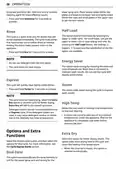
- Page 26: Operation To activate or deactivate the button sounds, press and hold Dual Zone and Energy Saver simultaneously for 3 seconds. The error alert sound cannot be turned off. Cancel The drain pump activates and the cycle cancels. Once the appliance finishes draining, the power turns off. Press and hold START button for 3 seconds to activate the cancel function. To operate the appliance, either press START button and close the door or close the door and press START button. If START button is not pressed to start the cycle within 4 minutes, the power will automatically turn off. Wash Cycles Auto: This cycle senses the soil amount and water clarity and optimizes the wash to achieve the best cleaning. Turbo: This cycle will clean moderately soiled dishes using slightly more energy and water. Intensive: This cycle is for heavily soiled dishes and dishes with hardened on soil. Download Cycle: Use a dedicated cycle downloadable via Wi-Fi or NFC. Delicate: Use this cycle to clean delicate items such as fine china and stemware. Machine Clean: This cycle is for cleaning the inside of the appliance. Use the cycle without dishes in the appliance.
- Page 27: Operation Add citric acid or another cleaning agent for more effective results. Place heavily soiled dishes in the lower rack and lightly soiled dishes in the upper rack for the best results. Press and hold Intensive for 3 seconds to activate. Half Load washes intensively by selecting the upper or lower racks. This cycle is a quick rinse only for dishes that will not be washed immediately. Rinsing the dishes helps prevent odors in the appliance. Do not use detergent with the Energy Saver option. This option saves energy by reducing the wash and rinse temperatures. Express cycle will quickly clean lightly soiled dishes. Select the desired cycle button and then select the options for that cycle.
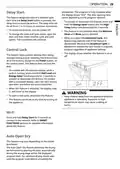
- Page 28: Operation of the dishwasher is complete when the display shows End. The Delay Start feature allows you to delay the start of a selected cycle from 1 to 12 hours in one-hour increments. To activate or deactivate Delay Start, press and hold the Energy Saver and High Temp buttons simultaneously for 3 seconds. To cancel the Delay Start feature, turn the power off. Control Lock prevents settings from being changed during a cycle by locking all buttons except for the Power button. To activate or deactivate Control Lock, press and hold Half Load and Energy Saver simultaneously for 3 seconds. When Control Lock is activated, the display code CL will show on the display. Keep children away from the appliance while it is operating to prevent exposure to high-temperature steam. Press and hold Delay Start for 3 seconds to connect to the Wi-Fi network. The Auto Open Dry feature enhances drying performance by automatically opening the door during the drying stage.
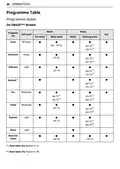
- Page 29: Operation Programme table Programme guide On DB425 models Wash Main wash Rinse Heating rinse Soil level Dry
- Page 30: Operation Running time may vary according to the water temperature, ambient temperature, water pressure and voltage. Information that the values given for programmes other than the eco programme are indicative only. When the Auto Open Dry feature is activated, the heating rinse temperature may vary.
- Page 31: Operation on DB325 models includes various wash programs such as main wash, pre-wash, and rinse. Different soil levels are available, including heavy, moderate, and light. Heating rinse options are provided for optimal cleaning. The document outlines specific temperature settings for each program, ranging from 42°C to 75°C. Running time may vary according to water temperature, ambient temperature, water pressure, and voltage. Values given for programs other than the eco program are indicative only. Additional programs include turbo and express options. Machine clean program is also available. Rinse programs are specified with varying temperature settings. The document emphasizes the importance of selecting the appropriate program based on soil level and fabric type.
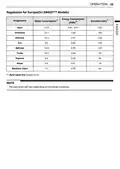
- Page 32: Operation Regulation for Europe (On DB425*** Models) Energy consumption Water consumption Duration (min) Auto Intensive Delicate Eco Machine clean The data given will vary depending on individual conditions.
- Page 33: Operation Regulation for Europe (On DB325 Models) Energy consumption (kWh) Water consumption Duration (min) The data given will vary depending on individual conditions. Regulation EU 2019/2022, valid from 1st March 2021, is related to the energy efficiency classes by Regulation EU 2019/2017. Scan the QR code on the energy label supplied with the appliance for performance information. Keep the energy label for reference together with the owner's manual and all other documents supplied with the appliance. The model name can be found on the rating label of the appliance.
- Page 34: Operation Available options The Energy Saver option is not available with the High Temp or Extra Dry option. The Delay Start option can be selected for every washing programme in this table. For steam models.
- Page 35: Operation Loading the dishes Correct loading is done in accordance with the images provided in this chapter. Incorrect loading may result in lower drying or cleaning performance. Water consumption: 4 liter Energy consumption: 30 W Duration: 4 minutes Capacity: 14 place settings The Eco programme is used to assess compliance with the EU ecodesign legislation. Rinse aid setting: L4
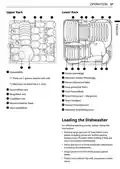
- Page 36: Operation Upper rack Lower rack Loading the dishwasher For effective washing results, always follow the instructions. Remove large particles of food debris from plates including bones before loading. Always rinse off plates when loading if they are not to be washed immediately. Items with burnt on food should be soaked prior to loading the dishwasher. Deep based items should be placed upside down. Plastic items will not dry well, compared to other items.
- Page 37: Operation Make sure that all items do not touch each other. To make it easier to load larger dishes, the front row of tines can be folded down. Items not suitable for dishwashers include copper or anodised aluminium, hand painted silver or gold leaf crockery, wood or bone handled utensils, iron or non rust proof utensils, plastic items which are not appliance safe, expensive ware such as silver and dishes with golden rings, and fragile items such as crystal glasses. The spray arms must not be blocked by items that are too tall or hang through the baskets. Test for free movement by manually rotating the spray arms. Do not place pots or pans with plastic handles in the appliance as the handles may deteriorate due to the heat and detergent. Waterproof or long lasting lipstick smudges on glasses may not be removed during the wash. The lower rack is suitable for dinner plates, soup bowls, dishes, pots, pans, lids, and even a grill tray. Fold tines down to fit larger dishes; pull tines back up to fit smaller dishes. Plates should be positioned upright and facing the centre of the rack and pots, pans, and large dishes must be turned upside down.
- Page 38: Operation Loading the upper rack The upper rack is suitable for delicate items such as small plates, long cutlery, cups, glasses, and appliance safe plastic items. Caution The spray arms must not be blocked by items that are too tall or hang through the baskets. Cups, glasses, and bowls must be positioned upside down. Plates should be positioned upwards with the plate. Removing and replacing cup racks The left and right cup racks are interchangeable and can be removed. The cup racks provide support for long steam glasses. Slide cup rack down into its closed position. The left side row of tines can be folded down or the cup racks can be folded up out of the way for tall crockery items.
- Page 39: Operation The rack on the left pops free at the back. The rack on the right pops free at the front. There are three available positions for adjusting the height of the upper rack to create more space. Hold the rack at the centre of each side to support its weight. Push the button on each side to release the rack and lower it to the lower position. Slide cup rack off support bar on opposite side. Reverse instructions to replace cup rack. The height of the upper rack can be adjusted when you load glasses with long stems or tall crockery items.
- Page 40: Operation Raising the rack involves lifting it at the center of each side until it locks into place. There is a 56 mm gain in height when the upper rack is moved to the lower position. After adjusting the rack levels, ensure that the spray arms are free to rotate. When the upper rack is in the lower position, check if it disturbs items on the lower rack. Pull out the lower rack first, and then the upper rack. The cutlery rack is best suited for flatware and most cooking or serving utensils. Before adjusting, ensure the rack is empty of all dishes to avoid damage or injury. Raise the upper rack without pushing the buttons on each side to ensure it locks into position. To set the rack to the middle position, it may be easier to lower the rack all the way down.
- Page 41: Operation Rack helps keep utensils separated to avoid damage and improve cleaning. Remove dishes before adjusting the tray. Adjust the tray by sliding the lever. The entire cutlery rack can be removed if more space is needed on the upper rack for larger items. Always remove the cutlery from the rack before removing the rack. Pull the rack out to the end of the rails. Be careful when loading and unloading items with sharp edges. Load sharp knives with the blade down to reduce the risk of injury. Remove the label on the dispenser prior to running the appliance for the first time.
- Page 42: Operation The amount of detergent needed depends on the cycle, load size, and soil level of dishes. Put detergent into the detergent compartment before starting any cycle, except the rinse cycle. Add dishwashing detergent to the main wash compartment until the level is between the lines marked 15 and 25. Fill to over the 25 line for hard water or heavily soiled loads. Fill to the 15 line for soft water or lightly soiled loads. Dishwasher detergent and rinse aid contain chemical components and must be kept out of the reach of children. Use only detergent intended for dishwashers. Incorrect detergent may cause the appliance to fill with suds during operation. To avoid damaging the appliance, do not pull up on the dispenser to close the appliance door. Use of an unsuitable detergent and rinse aid may result in a risk of damage, corrosion, poor washing results, poor drying, or leakage.
- Page 43: Operation Spilled salt inside the appliance may cause rust or damage if left unwashed. When the salt refill icon illuminates, it means the salt is almost empty. Only use detergent and rinse aid that has been qualified with standard. If too much detergent is used, it may cause leakage of suds and stain the dishes. Do not add detergent or any other solution into the water softener housing other than dishwasher salt. After washing, check whether the detergent was completely washed out. Plastic items may cause poor drying results compared to other items. Never use liquid dishwashing detergent in the appliance. To maintain effective wash results, check and refill dishwasher salt regularly. Before unloading the dishes, check if they have cooled down to a hand-warm condition.
- Page 44: SMART FUNCTIONS LG ThinQ application allows you to communicate with the appliance using a smartphone. If you change your wireless router, delete the registered appliance from the LG ThinQ application and register it again. The application is subject to change for appliance improvement purposes without notice to users. Monitoring checks the current status, cycle options, running time, and cycle end time on a single screen. You can download new and special cycles that are not included in the basic cycles on the appliance. Only one cycle can be stored on the appliance at the same time. Machine Clean Reminder shows how many cycles remain before it is time to run the Machine Clean cycle. Smart Diagnosis provides useful information for diagnosing and solving issues with the appliance based on the pattern of use. Push Alert allows you to receive notifications on a smartphone when the cycle is complete or if the appliance has problems.
- Page 45: SMART FUNCTIONS To verify the Wi-Fi connection, check that the icon on the control panel is lit. The appliance supports 2.4 GHz Wi-Fi networks only. LG ThinQ is not responsible for any network connection problems or any faults, malfunctions, or errors caused by network connection. If the appliance is having trouble connecting to the Wi-Fi network, it may be too far from the router. The network connection may not work properly depending on the Internet service provider. The surrounding wireless environment can make the wireless network service run slowly. If the firewall on your wireless router is enabled, disable the firewall or add an exception to it. The wireless network name (SSID) should be a combination of English letters and numbers. Smartphone user interface (UI) may vary depending on the mobile operating system (OS) and the manufacturer. Hereby, LG Electronics declares that the radio equipment type Dishwasher is in compliance with Directive 2014/53/EU.
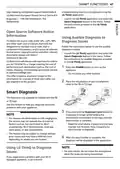
- Page 46: Smart functions Launch the LG ThinQ application and select the Smart Diagnosis feature in the menu. Follow the instructions provided in the LG ThinQ application. Using audible diagnosis to diagnose issues. Press the POWER button to turn on the appliance. Place the mouthpiece of your smartphone close to the logo. Use this feature to help you diagnose and solve problems with your appliance. Press and hold the Download Cycle button for 3 seconds or longer while holding the smartphone mouthpiece to the logo until the data transfer is complete. Keep the smartphone in place until the data transfer has finished. The feature may be subject to change without prior notice. After the data transfer is complete, the diagnosis will be displayed in the application.
- Page 47: Smart functions Customer care and service Contact an LG Electronics customer information centre. To find an LG Electronics authorised service personnel, visit our website and follow the instructions found there. Self-repair is not recommended as it could further damage the device and void the guarantee. Spare parts referenced in Regulation 2019/2022 are available for a minimum duration of 10 years.
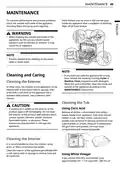
- Page 48: maintenance To maintain performance and prevent problems, check the outside and inside of the appliance, including filters and spray arms regularly. Food residue may be stuck in the narrow gaps inside the appliance after completion of washing. Wipe off all food residue. When cleaning the outside and inside of the appliance, do not use any solvent based solutions such as thinners or acetone. It may cause fire or explosion. Prevent animals from nibbling on the power cable or water hose. If you have not used the appliance for a long time, refresh the inside by running Turbo or Machine Clean programme with detergent. In most cases, the exterior of the appliance can be cleaned with a soft damp cloth or sponge, then dried with a soft cloth. Remove all dishes, cutlery basket and cutlery basket holder from appliance. Only racks should remain in tub. If cooking oil is spilled on the exterior of the product, wipe it off immediately. It is recommended to clean the interior, spray arms, or filters once every two weeks. Clean the interior of the appliance periodically with a soft, damp cloth or sponge to remove food and dirt particles.
- Page 49: Maintenance Clean the filters with a soft brush under running water. Reassemble the filters before reinstalling them. Do not pour vinegar directly into the base. To replace the assembled filters, position the spray arm so the wider vee is toward the front. Excessive use of vinegar may cause damage to the appliance. Remove the lower rack and position the bottom spray arm so a wider vee is open to the front. Turn the inner filter counter-clockwise and take out the assembled inner filter and stainless steel filter. Be cautious of sharp edges when handling the stainless steel filter. After using the appliance, particles of food are filtered by the filters. Any unremoved food residue may cause bad smell. Drainage may have a problem due to food residue stuck in the filters.
- Page 50: Maintenance When cleaning is necessary, remove the upper spray arm by turning the nut on the bottom of the spray arm 1/8 turn counterclockwise and pulling down. When assembling, rotate it firmly until it clicks. If the spray arm holes are blocked by any food residue, dishes may not be cleaned well due to improper water spray. Remove food particles by rinsing or shaking the spray arm. If any food residue blocks the spray arm holes, remove it with a pin or any sharp tool. Make sure that the water jet holes are not blocked by food particles. After removing the food residue, clean the spray arms holes under running water. After cleaning the upper spray arm, press it up into place. Turn the nut 1/8 turn clockwise to make sure that the nut locks back into place. To avoid breaking the variable angle spray arm end sections, do not pull or manually rotate them. Pull the upper rack forward. Make sure that the water jet holes are not blocked by food particles.
- Page 51: Maintenance After assembly, check whether the spray arms rotate freely. When reassembling the seal and the filter, ensure that they are free from dirt or grit. Unplug the appliance. If you will be absent for an extended period during warmer months, close the water valve and unplug the power cord. Clean the filter, tub, and dispenser to prevent odour. If you will be absent during colder months, winterize the water supply lines and the appliance. Winterization must be performed by qualified service personnel. A filter is fitted into the inlet of the water supply hose connection. If insufficient water flows into the appliance, check that the filter is not blocked. Never over tighten the water supply valve or use mechanical devices to tighten.
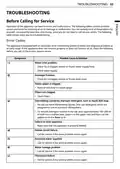
- Page 52: Troubleshooting Before calling for service, operation of the appliance can lead to errors and malfunctions. The following tables contain possible causes and notes for resolving an error message or malfunction. Error codes The appliance is equipped with an automatic error-monitoring system to detect and diagnose problems at an early stage. Water inlet problem: Check for a clogged, kinked or frozen water supply hose. Check water supply. Drainage problem: Check for a clogged, kinked or frozen drain hose. Waste spigot is clogged. Clean filters. Oversudsing caused by improper detergent: Do not use hand dishwashing liquids. Only use detergents designed for automatic dishwashers. To remove detergent residue in the tub, pour approximately 100~200 ml of milk into a shallow bowl and run the appliance on the Auto cycle. Failure to level appliance: Make sure that the appliance is properly leveled. Heater circuit failure: Call for service if the same problem occurs again. Excessive water supplied: Call for service if the same problem occurs again. Water leakage problem: Call for service if the same problem occurs again. Thermistor failure: Call for service if the same problem occurs again.
- Page 53: Troubleshooting Motor trouble Call for service if the same problem occurs again. Some level of noise is normal during operation. Adjust leveling feet. Reposition the dishes. Adjust water pressure. Level the appliance again. Connect the power supply or cord properly. Deactivate the Control Lock button. Replace the fuse or reset the circuit breaker. Close the door until the appliance and dishes have cooled down.
- Page 54: Troubleshooting Water remains in sump after completion of cycle. Drain hose is kinked or clogged. Adjust hose or clear blockage. Power supply was lost before normal end of the course or was manually disconnected. Re-start the course. Holes of spray arms are blocked by food particles. Clean the holes of spray arms. Sprays arms do not rotate smoothly. Upper rack is crooked. Rack is poorly adjusted. See the Height Adjustable Upper Rack section. Lamps do not illuminate. Power is not connected. Connect power supply. Failure to use the detergent exclusive for appliance. Use the detergent exclusive for appliance. An excessive amount of rinse may cause foam. Reduce the rinse aid dispensing level. There is excessive foam inside the appliance. Unbalanced upper rack. Adjust the left/right height of the upper rack. Detergent may not be dispensed because poor stacking of the dishes prevent automatic opening of the detergent dispenser. Correctly arrange the dishes and always dry out the dispenser before adding new detergent so that it does not clump together. Water leaks outside the appliance. The door may not be closed due to tilted appliance. Check the levelling by adjusting the leg. Wrong installation of drainage hose may cause water leak. Check the connecting part of drainage hose. If the power is off, a water leak may be caused by a poor connection to the tap. Check the connection water supply hose. Cloudiness on glassware. Combination of excessive detergent and hard water. Use less detergent and use a rinse aid to minimize the problem. Check the setting of softening system.
- Page 55: Troubleshooting Black or gray marks on aluminum items rubbing dishes during cycle. Reposition the dishes. Yellow or brown film on inside surfaces of appliance. Eliminate the stain by using a stain removal product. Yellow water may generate in the water softener tank when initially using the appliance. This is a normal condition and harmless to humans. Spots and filming on dishes may be caused by the wrong amount of detergent used. Use the recommended amount of detergent. Overloading the appliance can lead to issues. Do not overload the appliance. Improper loading can affect cleaning. See the operation section. Insufficient water pressure should be between 0.05 - 1.0 MPa. The rinse aid dispenser may be empty. Refill rinse aid dispenser. Hard water buildup in the tub can be addressed by using citric acid powder or white vinegar. Run the Auto cycle without detergent.
- Page 56: Troubleshooting Odour Possible cause & solution The previous cycle was stopped before completion and residual water remains in the appliance. Turn on the power, run the Cancel cycle option to remove the residual water, then run the Turbo cycle using detergent but with the appliance empty. There is food in the bottom of the unit or in the filter. Clean the filter and the interior according to the Maintenance section of the owner’s manual. Unwashed dishes are left in the unit for a long time. Cycle with one cup of white vinegar in a appliance safe glass or bowl placed on the upper rack. Food soil remains on dishes. Select correct cycle based on soil level and type of dishware being washed. Water temperature is too low. Check water supply connection or water heater setting. Dishwashing detergent was not used. Use recommended detergent.
- Page 57: Troubleshooting Drying Dishes don’t dry. Check and refill the rinse agent dispenser if empty. For better drying result, slightly open the door after operation. Tablets used may not have a built-in rinse aid. Change to a tablet that includes a rinse agent or use a liquid rinse agent in the dispenser. A cycle without the Extra Dry option was selected. Select a cycle that defaults to the Extra Dry option. Wi-Fi Your home appliance and smartphone are not connected to the Wi-Fi network. The password for the Wi-Fi that you are trying to connect to is incorrect. Mobile data for your smartphone is turned on. Turn off the Mobile data of your smartphone and register the appliance using the Wi-Fi network. The wireless network name (SSID) should be a combination of English letters and numbers. Do not use special characters. The router frequency is not 2.4 GHz. Only a 2.4 GHz router frequency is supported. The distance between the appliance and the router is too far. Move the location of the router so that it is closer to the appliance.
- Page 58: Page 58

BOSCH SMS4HVI03E Dishwasher

BOSCH SMU6ECS12E Dishwasher

Electrolux EEC87400W Sliding Door Dishwasher

Hotpoint H2IHKD526UK Dishwasher

FISHER PAYKEL DD24DTX6I1 Sanitize Integrated Dishwasher

BOSCH SMS26DI00T Dishwasher

BOSCH SMS6ZCI42E Free-Standing Dishwasher

BOSCH SBV4HAX20N Dishwasher

GE APPLIANCES PDT755SY UltraFresh System Dishwasher

IKEA LAGAN 104.756.20 Dishwasher