
LG LDFN4542S Dishwasher














Scan to see the online manual.
OWNER'S MANUAL
DISHWASHER
Read this owner's manual thoroughly before operating the
appliance and keep it handy for reference at all times.
ENGLISH
LDF554#** LDB454***
MFL71917402
Rev.02_061223
Copyright © 2022-2023 LG Electronics Inc. All Rights Reserved.


| General | Details |
|---|---|
| Name | LG LDFN4542S Dishwasher |
| Make | LG |
| Language | English |
| Filetype | PDF (Download) |
| File size | 4.33 MB |
 (1 votes, average: 5.00 out of 5)
 Loading...

LG LDTH7972SS Black Dishwasher

LG SDWB24S3 STUDIO Smart Dishwasher

LG LDTH7972D Smart Tub Dishwasher

LG LDPH7972D Smart Dishwasher

LG XD3A25UMB 15 Place QuadWash Dishwasher

LG LDT779 Dishwasher

LG LDT7808BD Dishwasher

LG DFB424 Dishwasher

LG LDTS5552D PrintProof Black Dishwasher

LG LDPH7972S Smart Dishwasher
LG LDFN4542S Dishwasher Overview
Summary of Contents
- Page 1: Owner's manual for the dishwasher. Read this owner's manual thoroughly before operating the appliance and keep it handy for reference at all times. Copyright © 2022-2023 LG Electronics Inc. All rights reserved.
- Page 2: Important safety instructions Read all instructions before use Warning statements Caution statements Product overview Product features Installation Before installing Preparing cabinet opening Final installation check Operation
- Page 3: IMPORTANT SAFETY INSTRUCTIONS READ ALL INSTRUCTIONS BEFORE USE Your safety and the safety of others are very important. This is the safety alert symbol. WARNING: You may be killed or seriously injured if you do not follow instructions. CAUTION: You may be injured or cause damage to the product if you do not follow instructions. All safety messages will tell you what the potential hazard is, how to reduce the chance of injury, and what may happen if the instructions are not followed. To reduce the risk of explosion, fire, death, electric shock, scalding or injury to persons when using this product, follow basic precautions. The appliance must be installed and electrically grounded by qualified service personnel in accordance with local codes. Keep packing materials out of the reach of children. Packaging material can be dangerous for children. Moving or installation of the appliance requires two or more people.
- Page 4: IMPORTANT SAFETY INSTRUCTIONS When installing or moving the appliance, be careful not to pinch, crush, or damage the power supply line. Do not install the appliance in humid spaces. Destroy the carton, plastic bag, and other packing materials after the appliance is unpacked. Never attempt to operate this appliance if it is damaged, malfunctioning, partially disassembled, or has missing or broken parts. The installer must ensure that the dishwasher is completely enclosed at the time of installation. Use new hoses when connecting the appliance to the water supply. If you detect a strange sound, a chemical or burning smell, or smoke coming from the appliance, unplug it immediately. Do not use an extension cable or adapter with this appliance. This appliance is not intended for use by persons with reduced physical, sensory or mental capabilities unless supervised. In the event of a gas leak, do not operate this or any other appliance.
- Page 5: IMPORTANT SAFETY INSTRUCTIONS Fix the drain hose securely in place. Use only detergents or wetting agents recommended for use in a dishwasher. Do not let children eat detergent or dishwasher rinse agent. When loading items to be washed, locate sharp items so that they are not likely to damage the door seal. Do not wash plastic items unless they are marked dishwasher safe. Do not touch the heating element during or immediately after use. Do not operate your dishwasher unless all enclosure panels are properly in place. Do not open the appliance door while it is operating. Do not plug the dishwasher into a damaged outlet. Disconnect this appliance from the power supply before cleaning and attempting any user maintenance.
- Page 6: IMPORTANT SAFETY INSTRUCTIONS For a cord connected dishwasher: This appliance must be grounded. This appliance is equipped with a cord having an equipment-grounding conductor and a grounding plug. The plug must be plugged into an appropriate outlet that is installed and grounded in accordance with all local codes and ordinances. Improper connection of the equipment-grounding conductor can result in a risk of electric shock. Do not use the dishwasher until completely installed. Do not push down on the open dishwasher door. To reduce the risk of minor or moderate injury to persons, malfunction, or damage to the product or property when using this product, follow basic precautions. Install the product on a firm and level floor. This dishwasher must be connected to a hot water supply with a temperature range between 120 °F (49 °C) and 149 °F (65 °C). Do not put the drain hose under the dishwasher during installation.
- Page 7: IMPORTANT SAFETY INSTRUCTIONS Do not place objects on top of the appliance. Turn off the water faucets and unplug the appliance if it is to be left for an extended period. Do not store or spill liquid detergents, cleaners, or bleaches on the appliance. Do not touch draining water which may be hot. If the drain hose and the water supply hose are frozen in winter, defrost before using the appliance. Do not put hands, feet, or metal objects below or behind the appliance. If cooking oil is spilled on the exterior of the product, wipe it off immediately. Do not clean the exterior of the product with cleaners which contain alcohol, thinners, bleach, benzene, flammable liquids, or abrasives. SAVE THESE INSTRUCTIONS
- Page 8: Product overview The images in this guide may be different from the actual components and accessories, which are subject to change by the manufacturer without prior notice for product improvement purposes. For your safety and for extended product life, use only authorized components. The manufacturer is not responsible for product malfunction or accidents caused by the use of separately purchased unauthorized components or parts. Do not remove the safety cover at any time. To ensure reliability, each LG dishwasher goes through thorough quality control before it leaves the factory. You may find water droplets or water spots from this process inside your new dishwasher. The top-control models have 3 indicator LEDs centered at the top of the front cover. Red indicates an error, while white (steady) signifies normal operation, and white (blinking) means the cycle has been paused. Green indicates the cycle finished normally. The default ON setting keeps the green light on until the door is opened.
- Page 9: Product overview Installation brackets (2 ea) Top wash impeller Upper spray arm Lower spray arm Filtration system Detergent and rinse aid dispenser Drying vent cover Lower rack Silverware basket The appearance and specifications listed in this manual may vary due to constant product improvements.
- Page 10: Installation Before installing This QR code is for reference only. For complete installation instructions, see the owner's manual supplied with each dishwasher. Electrical cable: 16 AWG, with 2 conductors and 1 ground. Water supply tube: Minimum 3/8″ O.D. copper tubing or stainless steel braided water supply line. Power cord installation kit is available on LG.com, part number AEM75698901. Inlet hose installation kit is available on LG.com, part number AEM75698902. Drain extension hose installation kit is available on LG.com, part number AEM75698903. This guide is strictly confidential and shall not be copied, disclosed, distributed, disseminated, publicized or reproduced without prior written authorization of LG Electronics. The guide may contain inaccuracies and/or typographical errors and may be changed or updated at any time by LGE without notice.
- Page 11: Installation Preparing dishwasher Sliding dishwasher into cabinet opening Connecting water supply line and power Connecting the drain hose Leveling dishwasher Securing dishwasher in cabinet opening Final installation check Installation overview Please read the following installation instructions first after purchasing this dishwasher or transporting it to another location.
- Page 12: Installation Choose a location as close to the sink as possible for easy connections to the water supply line, drain hose, and electrical connection. Use the template included with the literature to determine the clearance on the side of the cabinet where it meets the back wall. This dishwasher is designed to fit a standard dishwasher opening. An opening may be needed on both sides to route plumbing and electrical connections. To ensure proper drainage, install the dishwasher no more than 12 ft. (3.65 m) from the sink. The location must have sufficient space for the dishwasher door to open easily and provide at least 0.1” (2 mm) between the dishwasher and the cabinet sides. The opening must be at least 2 1/2 (63.5 mm) in diameter to prevent damage to the cables and hoses during installation. If installing the dishwasher in a corner, leave a minimum of 2” (50 mm) between the dishwasher and the adjacent wall. Installation damage is not covered by the warranty, and leaks caused by improper installation may result in property damage. Failure to properly locate the hole for the water and drain lines may prevent the dishwasher from installing flush with the cabinets and could result in kinked, pinched, crushed, stressed, or damaged lines.
- Page 13: Installation Routing water supply line and preparing water and electrical connections There are 2 channels in the bottom of the dishwasher for routing the water and electrical connections. Do not reuse an old hose. Use only a new hose when installing the dishwasher. Use a time-delay fuse or circuit breaker for electrical connection. Operate this appliance with the correct voltage as shown in this manual. The wiring must be grounded properly. Turn off the house water supply and the circuit breaker before connecting the dishwasher. Do not use an extension cable or adapter with this dishwasher. Sealing tape or compound should be used on pipe threads to avoid leaks. Water supply pressure must be between 20 psi and 80 psi.
- Page 14: Installation Preparing dishwasher Warning: Do not remove safety cover. Removal can result in fire, electric shock or death. Remove the lower cover. If there is insulation padding behind the lower cover, remove it. Releasing drain hose: Remove the twist tie holding the drain hose to the back of the shipping brace. Set the parts aside until the installation is complete. Removing packing materials from the interior: Remove all packing materials from the interior of the dishwasher before installing the appliance. Removable shipping brace: The rear shipping brace can be removed if additional clearance is needed when installing the dishwasher under a low countertop. Attaching installation brackets: Use the metal installation brackets for wood countertops and wood screws for granite or marble countertops. Caution: If you lay the dishwasher on its back, do so carefully to avoid damaging the drain hose and the tub. Note: Installation brackets and screws can be found in the silverware basket.
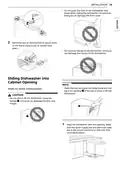
- Page 15: Installation Do not push the door of the dishwasher with knees when sliding the dishwasher into position. Doing so can damage the front cover. Bend the tabs on the brackets to secure them to the frame using a pair of needle nose pliers. Do not push the top of the dishwasher. Doing so can damage the interior of the dishwasher. Open the door and grab the body frame and the top front opening of the tub to move or lift the dishwasher. Do not pull or lift the dishwasher using the handle. Doing so can damage the door and hinges. Align the dishwasher with the opening. Make sure the water supply line and electrical cable are in the correct positions to slide into their channels properly.
- Page 16: Installation Smooth out or pad the edges of the hole drilled for the water supply to avoid damaging the drain hose. Make sure the drain hose is straight before feeding the end of it through the hole for the water supply. Be careful not to kink, pinch, crush, or stress the drain hose during installation to avoid leaking and water damage. Remove the tape from the water supply line and the electrical cable. Gradually slide the dishwasher into the opening, ensuring that the water supply line and electrical cable pass freely. Do not turn the dishwasher upside down to connect the water supply line or electrical supply. To avoid malfunctions or leakage, it is important that the drain hose not get kinked, pinched, stressed, or crushed. Damage resulting from improper installation is not covered under the warranty. Tape or compound should not be used on the dishwasher inlet valve. Tighten the compression nut.
- Page 17: Installation instructions detail the steps for connecting the dishwasher. Use a Phillips screwdriver to remove 2 screws. Slide the water supply line back through the channel, ensuring it is not kinked or pinched. The dishwasher requires a dedicated properly grounded branch circuit for the power connection. A 3-prong power supply should be located within 4 ft. of the dishwasher and not behind it. Remove the junction box from the appliance. The best location for the electrical conduit is on the right side of the back wall. Insert a 3/8” strain relief through the hole in the junction box and secure it. Turn off electrical power to the unit at the circuit breaker before proceeding. Insert the electrical cable through the strain relief and tighten screws to secure it.
- Page 18: Installation Fold the connected wires back into the junction box and screw on the junction box cover. Verify that the black wire is hot (120 V). If not, or if you are unsure of the power supply, have it checked by a licensed electrician. Pull the existing wires through the openings in the junction box. Tighten 2 screws to reassemble the junction box in the appliance. Do not leave stripped wire exposed. Trim stripped wire to fit completely inside wire nuts. If the end of the drain hose does not fit the drain line, use a heat and detergent resistant adapter. Cut the adapter to match the size of the drain connection as shown. Pair the white, black, and green wires to the matching colored wires from the dishwasher. For drain hose installation, use the screw style hose clamp provided with this dishwasher. Follow local codes and ordinances for drain hose requirements. Do not exceed 12 ft. (3.65 m) distance to drain.
- Page 19: Installation Height of the drain hose end must be at least 12 (305 mm) and within 40 (1016 mm) from the base of the dishwasher to avoid water being siphoned from the tub. Connecting waste tee without air gap requires the same height specifications for the drain hose. If the knockout plug has not been removed, the dishwasher will not be able to drain properly. Remove the knockout plug on the disposal with a hammer and screwdriver. Attach the drain hose to the waste tee with the hose clamp provided. Move the clamp into position and tighten it with a flat-blade screwdriver. Connecting to disposal or waste tee with air gap also requires removing the knockout plug. Attach the drain hose to the disposal with the hose clamp provided. Move the hose clamp into position and tighten it with a flat-blade screwdriver.
- Page 20: Installation Check that the dishwasher is level from side to side. Connect the end of the drain hose to the air gap with the hose clamp provided. If you do not have a level, try using a smartphone level application instead. Make sure that the gap between the tub walls and the door liner is the same on either side. Failure to level the dishwasher may result in leakage, problems closing the door, or noise. The dishwasher must be carefully leveled and aligned to avoid leaks and operational issues. Adjust the front and rear leveling feet until they are all in firm contact with the floor. Use a flat-blade screwdriver to turn the front leveling feet and adjust the front of the tub. To check that the tub is level from front to back, pour 169 oz. (5 L) of water into the bottom of the tub. The adjustments work identically for both front leveling feet.
- Page 21: Installation instructions include securing the dishwasher to the countertop and cabinet frame. Use a drive wrench with a 1/2 socket to adjust the front leveling feet. Installation brackets and screws are located in the silverware basket. Cover the filter hole with towels to prevent screws from falling into the pump. Use a Phillips screwdriver to adjust the rear leveling foot. Turn the center screw clockwise to raise the rear of the tub and counterclockwise to lower it. Remove the plastic caps from the mounting bracket access holes before securing. Avoid using an electric screwdriver to prevent damaging the screw. Secure the dishwasher to the countertop with brackets if the material allows drilling. Ensure the dishwasher is level before attaching it to avoid door closure issues or leaks.
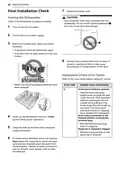
- Page 22: Installation Replace the lower cover. Only install the lower cover provided with the dishwasher. Check if the dishwasher is properly installed. Turn on the circuit breaker. Turn on the house water supply. Make sure that the door opens and closes smoothly. Remove the protective film from the door, if present. Refer to the chart below before calling for service. Make sure that all packaging materials have been removed. Power on the dishwasher and run a Turbo cycle to verify proper operation.
- Page 23: Installation instructions include checking for error codes. Error code IE indicates a possible issue with the water supply line being kinked under the dishwasher. To resolve this, feed the drain and water supply hoses through the hole under the sink. Gradually slide the dishwasher into the cabinet while pulling on the hoses to avoid kinking. Ensure the house water supply is turned on by checking the water faucet.
- Page 24: Before using the appliance, read the safety instructions to reduce the risk of fire, electric shock, or injury. Connect to the hot water supply only, with a minimum water temperature of 120 °F for better washing performance. Follow the instructions for loading the dishwasher to ensure effective cleaning. Remove insoluble items such as bones and pieces of paper while loading. Select the cycle and options that best fit the load by referring to the Cycle Guide. Load the dishes by pulling each rack out and ensuring only dishwasher-safe items are loaded. Scrape dishes free of excess food and remove solid, burned-on scraps before loading. Press the Start button and close the door within four seconds to operate the dishwasher. Fill the detergent cup with the recommended amount of detergent and close the lid. The Rinse Aid icon will flash if the level is low; add rinse aid to maintain drying effectiveness.
- Page 25: Operation Save energy by pressing and holding High Temp for three seconds to set the End display to automatically turn off. It is normal for the dishwasher to chime continuously if you open it during operation or just after the cycle ends. The dishwasher indicates that the interior temperatures are hot and to use caution when reaching inside. Do not open the door during operation or immediately after the wash cycle as escaping steam may cause scalding. Empty the lower rack first and then the upper rack to avoid water dripping onto dishes. The dishwasher automatically turns off after four minutes of inactivity if paused or if no cycle is started.
- Page 26: Operation Control panel features Power on/off button Press this button to turn the washer on or off. After the cycle is complete, the power automatically turns off for purposes of safety and economy. If there is a power surge, power outage, or disruption of any kind, power is automatically turned off for safety. When power is connected again, the dishwasher will turn on automatically and resume the cycle. Display Rinse aid icon illuminates when the rinse aid level is low. Machine clean & sanitized icon flashes every 30 cycles. Digital display shows the estimated cycle time and remaining estimated operating time. Control lock feature helps prevent settings from being changed during a cycle.
- Page 27: Operation Chime On/Off Button • To activate or deactivate the button sounds, press and hold Dual Zone and Energy Saver simultaneously for three seconds. The error alert sound cannot be turned off. Cancel Button • The drain pump activates and the cycle cancels. Once the dishwasher finishes draining, the power turns off. Start Button • To operate the machine, either press Start and close the door within four seconds or close the door and press Start. If more than 4 seconds have passed since pressing Start, an alarm will sound when the door is closed. Turbo Wash Cycles • This cycle will clean heavily soiled dishes in an hour using slightly more energy and water. This cycle does not have drying. Auto • This cycle senses the soil amount and soil toughness and is optimized to achieve the best cleaning. Download Cycle • Use a dedicated cycle downloadable via Wi-Fi or NFC. This cycle is for heavily soiled dishes and defaults to the strongest spray intensity. Delicate • Use this cycle to clean delicate items such as fine china and stemware. Machine Clean • This cycle is for cleaning the inside of the dishwasher. It eliminates residual soils, odor, white spots, and other dirt. Normal • This cycle is for daily, regular, or typical use to completely wash a full load of normally soiled dishes. Rinse • This cycle is a quick rinse for dishes that will not be washed immediately. No detergent should be used.
- Page 28: Operation This cycle does not have drying. Press and hold Normal for three seconds to activate. This high temperature rinse sanitizes dishes and glassware in accordance with the NSF/ANSI Standard 184 for residential dishwashers. Certified residential dishwashers are not intended for use in licensed food establishments. This cycle will quickly clean lightly soiled dishes. Select the Extra Dry option for better drying performance. This option automatically sets the spray intensity to soft for the upper spray arm and strong for the lower spray arm. Dishes are often left in the dishwasher overnight after the cycle ends. This option saves energy by reducing the wash and rinse temperatures. Each time the Delay Start button is pressed, the delay time increases by an hour.
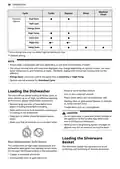
- Page 29: Operation cycle guide shows available options for each cycle. The cycles include Auto, Heavy, Delicate, Turbo, Express, and Rinse. Water usage varies by cycle, with values ranging from 1.8 to 27.5 liters. Wash time with options ranges from 34 to 216 minutes. Energy Saver cannot be used simultaneously with Extra Dry or High Temp. Actual water consumption depends on soil level and hardness of water. Running time and cycle time displayed may vary based on options chosen. Options are not available for Download Cycle. Soil levels include Heavy, Light, and Normal. Available options include Dual Zone, Half Load, High Temp, Extra Dry, Night Dry, and Delay Start.
- Page 30: Operation Machine Clean Cycle Turbo Express Rinse Available options Loading the dishwasher Non-dishwasher safe items
- Page 31: Loading silverware into the basket. Loading 10 place settings. Loading the lower rack. Loading dishes into the lower rack. Loading 12 place settings. Lower rack loading tips: Plates should be positioned upright and facing the center of the rack, and pots, pans, and large dishes must be turned upside down. Silverware loading tips: Use the top separators in the basket when loading silverware to prevent nesting. Load sharp items, such as knives, pointing down. When unloading the dishwasher, start with the silverware basket to prevent water droplets from falling on your silverware. Be careful when loading and unloading sharp items.
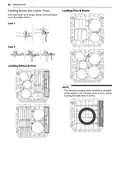
- Page 32: Operation Loading pots & bowls Folding down the lower tines Fold tines down to fit larger dishes; pull tines back up to fit smaller dishes. Loading dishes & pots The silverware basket ships installed at the back of the bottom rack. For best performance, install it along the right side as shown.
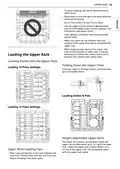
- Page 33: Operation To avoid chipping, do not let stemware touch other items. Place items so that the open end faces down for cleaning and drying. Do not stack items on top of each other. Use the upper rack for small or delicate items such as small plates, cups, saucers, glasses, and dishwasher-safe plastic items. Cups, glasses, and bowls must be positioned upside down. Make sure items do not interfere with the rotation of the spray arms above and below the upper rack. When loading larger items in the upper rack, it may be necessary to remove the cutlery rack if one is present. The upper rack adjusts up and down to allow items of varying heights. Place cups and glasses in the rows between the rack tines to avoid breakage and water spots.
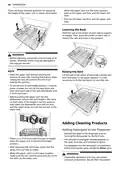
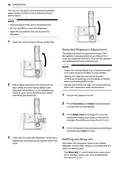
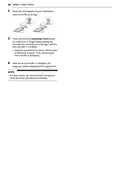
- Page 34: Operation There are three available positions for adjusting the height of the upper rack to create more space. Lowering the rack requires holding the rack at the center of each side to support its weight. Before adjusting, ensure the rack is empty of all dishes to avoid damage or injury. Raising the rack involves lifting it at the center of each side until it locks into place. To set the rack to the middle position, it may be easier to lower the rack all the way down first. Before pushing the upper rack into the dishwasher, ensure the rack height is the same on both sides. Adding cleaning products includes removing the label on the dispenser prior to the first use. The amount of detergent needed depends on the cycle, load size, and soil level of dishes. Put detergent into the detergent compartment before starting any cycle, except the rinse cycle. Check that the spray arms are free to rotate after adjusting the rack levels.
- Page 35: Operation Use only detergent intended for dishwashers. Incorrect detergent may cause the dishwasher to fill with suds during operation. Add dishwashing detergent to the main wash compartment until the level is between the lines marked 15 and 25. Fill to over the 25 line for hard water or heavily soiled loads. Fill to the 15 line for soft water or lightly soiled loads. After completion of the wash program, check whether the detergent was completely washed out. Slide the detergent lid closed until it clicks. Some dishwasher detergent tablets may become stuck in the dispenser due to their excessive size. Too much detergent can leave a film on dishes and in the dishwasher, resulting in poor wash performance. Using liquid rinse aid improves drying performance by allowing water to drain off of dishes after the final rinse. Do not use detergent tablets for shorter wash cycles. The tablet may not dissolve completely, causing detergent residue on dishes. Using a wash booster helps remove spots, residue, and the white film caused by hard water. The rinse aid icon appears in the display when more rinse aid is needed.
- Page 36: The use of rinse aid is recommended to prevent water spots on dishes and to enhance drying performance. Only use liquid rinse aid in the dishwasher. Do not overfill the rinse aid dispenser. The dispenser has five adjustment levels, programmed at the factory for a rinse aid dispenser level of 2. Adjust the setting higher if you have hard water and notice calcium buildup on your dishes. Setting the rinse aid control too low will contribute to spotting and streaking on dishes and poor drying performance. Add a liquid rinse aid to the maximum fill level. Ensure the appliance is off before checking or adjusting the rinse aid dispenser setting. The Rinse Aid icon flashes when more rinse aid is needed, unless the rinse aid dispenser setting is set to L0. Rinse aid is dispensed automatically during the final rinse cycle.
- Page 37: SMART FUNCTIONS The location of the smartphone’s NFC module may vary depending on the phone, and NFC use may be restricted on some smartphones due to differences in transmission methods. The LG ThinQ application allows you to communicate with the appliance using a smartphone. The Tag On function can only be used with most smartphones equipped with the NFC function and based on the Android OS. Installing the LG ThinQ Application allows you to download new and specialized cycles that are not included in the standard cycles on the appliance. Only one downloaded cycle can be stored on the appliance at a time. Use the Smart Diagnosis function to help diagnose and solve problems with your appliance. The Machine Clean Coach function shows how many cycles remain before running the Machine Clean cycle. Set the Rinse Aid Dispenser Level, Machine Clean Reminder, Signal Level, and Clean Indicator Light in the settings. Follow the instructions in the LG ThinQ application for audible diagnosis. When using the Tag On function, position the smartphone so that the NFC antenna matches the position of the Tag On icon on the appliance.
- Page 38: Smart functions Place the mouthpiece of your smartphone close to the logo. Press and hold the Download Cycle button for 3 seconds or longer while holding the smartphone mouthpiece to the logo until the data transfer is complete. Keep the smartphone in place until the data transfer has finished. Time remaining for data transfer is displayed. After the data transfer is complete, the diagnosis will be displayed in the application. For best results, do not move the smartphone while the tones are being transmitted.
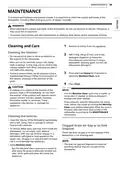
- Page 39: Maintenance To maintain performance and prevent trouble, it is important to check the outside and inside of the dishwasher, including filters and spray arms, at regular intervals. Warning When cleaning the outside and inside of the dishwasher, do not use benzene or thinner. Otherwise, it may cause fire or explosion. To prevent injury during care and maintenance or cleaning, wear gloves and/or protective clothing. Cleaning and Care Do not use scrub pads or abrasive cleaners on the exterior of the dishwasher. Most soil can be removed using a soft, damp cloth or sponge. A mild soap can be used to help release stubborn soil. Run the Machine Clean cycle once a month, or more often if needed, to remove detergent buildup and other residue. Clean the interior of the dishwasher periodically with a soft, damp cloth or sponge to remove food and dirt particles. Check the drain air gap or in-sink disposal if the dishwasher is not draining well. To remove white spots and odor from inside the dishwasher, run an empty cycle, without detergent, with one cup of white vinegar in a dishwasher safe glass or bowl placed on the upper rack. Using Machine Clean - Run the Machine Clean cycle once a month or after every 30 cycles to eliminate residual soil, odor, white spots and other dirt inside the appliance.
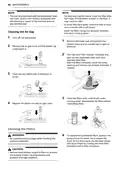
- Page 40: Maintenance The warranty provided with the dishwasher does not cover service costs directly associated with the cleaning or repair of the external drain air gap and disposal. For best wash performance, clean the filter after each load. If food debris remains in the filter, it may cause an odor. In areas with hard water, clean the filter at least once a month with a soft brush. Clean the filters using non-abrasive materials and warm running water. Cleaning the air gap involves turning off the dishwasher, removing the lower rack, and checking the sump opening for foreign materials. Clean out any debris with a toothpick or brush. To replace the assembled filters, position the spray arm so the wider vee is toward the front and secure them by turning the inner filter clockwise until it clicks into place. Be cautious of sharp edges when handling the stainless steel filter. Remove food residue caught in filters to prevent the buildup of odor-causing bacteria and possible drainage problems.
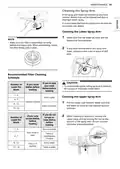
- Page 41: Maintenance Cleaning the spray arm is essential for proper water spray and effective dish cleaning. It is recommended to clean the spray arms once every two weeks. Ensure the water jet holes are not blocked by food particles before starting a cycle. Remove any food residue blocking the spray arm holes with a pin or stiff wire. To avoid breaking the rolling spray arm sections, do not pull or manually rotate them. Recommended filter cleaning schedule varies based on the number of loads per week. Cleaning the upper spray arm involves pulling the upper rack forward and checking for blockages. The upper spray arm can be removed by turning the nut counter-clockwise and pulling down. Different cleaning frequencies are suggested based on whether dishes are scraped or rinsed before loading. Regular maintenance helps ensure optimal performance of the dishwasher.
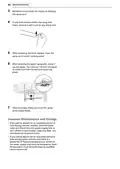
- Page 42: Maintenance Remove food particles by rinsing or shaking the spray arm. If any food residue blocks the spray arm holes, remove it with a pin or any sharp tool. After removing the food residue, clean the spray arms under running water. After cleaning the upper spray arm, press it up into place. Turn the nut 1/8 turn clockwise to make sure that the nut locks back into place. After assembly, make sure that the spray arms rotate freely. If you will be absent for an extended period of time during warmer months, close the water valve and disconnect the power supply line. Clean the filter, tub and dispenser to prevent odor. If you will be absent for an extended period of time during colder months, winterize the water supply lines and the dishwasher itself. Winterization must be performed by qualified service personnel.
- Page 43: Troubleshooting The washer is equipped with an automatic error-monitoring system to detect and diagnose problems at an early stage. Before calling for service, check the following if the washer does not function properly or at all. Rinse aid is strongly recommended to enhance the drying performance of the dishwasher. If a rinse aid is not used, water may remain on the dishes and the tub. The cloudy film on dishes is usually caused by minerals in the water reacting with the dishwasher detergent. Adding an extra rinse helps to rinse the film away. To remove white film on the tub, use citric acid powder and run a Machine Clean cycle without detergent. Drying performance is affected by the amount of heat that remains in the tub after the heated rinse. Using a rinse aid maximizes the amount of water that has been sheeted away from the dishes before the dry cycle begins. Allow the dishwasher to completely finish the dry cycle before opening the door to prevent dishes from remaining wet.
- Page 44: Troubleshooting The dishwasher does not rely on a heating element for the drying process; it uses retained heat from the dishes and tub. Rinse aid is required to enhance drying performance; without it, water may remain on the dishes. A whistling noise when water is drawn into the dishwasher is normal; high water pressure may increase the sound. Ensure that dishes placed in the dishwasher are dishwasher safe; plastic items may require hand drying. To drain standing water, press and hold Start for three seconds until the cycle stops. The dishwasher chimes if the door is opened during a cycle or right after it finishes, indicating hot interior temperatures. Control Lock prevents changes to the controls during the cycle; it can be activated by pressing and holding specific buttons. If a drain hose extension is needed, use a 5/8 or 7/8 inside diameter hose and a coupler. An LED blinking and chiming indicates the door must be closed within four seconds of pressing Start for the dishwasher to operate. Pre-rinsing dishes before loading is not necessary, especially when using Normal and Auto cycles.
- Page 45: Troubleshooting On the www.lg.com home page, click on the Support menu tab to bring up the menu selections. Select Video Tutorials. Select a product category and then pick a topic or search a keyword. Error Messages Water inlet problem. Check for a clogged, kinked or frozen water inlet hose. Drainage Problem. Check for a clogged, kinked or frozen water drain hose. Oversudsing caused by improper detergent, such as liquid dish soap. Do not use hand dishwashing liquids. Only use detergents which are designed for use in automatic dishwashers. Failure to level dishwasher. Make sure that the appliance is properly leveled. Water leakage. Turn off the water supply to the dishwasher and call an LG Electronics Customer Information Center.
- Page 46: Troubleshooting Heater circuit failure. Water temperature sensor error. Wash motor error. Vario motor error. The Download Cycle is selected. Test mode is selected. Rinse aid level setting mode is selected. Control Lock is activated. Dishwasher will not operate. Dishwasher operates too long.
- Page 47: Troubleshooting Some level of noise is normal during operation. The dishwasher is not level. Nozzle arm knocking against dishes. Lights do not illuminate. Spray arms do not rotate smoothly. Upper rack is crooked. Dishwasher continuously chimes when the door is opened during or right after a cycle has completed. Door does not close completely. Dishwasher chimes if control panel is touched during operation. Dishwasher did not finish cycle.
- Page 48: Troubleshooting Odor may be caused by food in the bottom of the appliance or in the filter. Clean the filter and the interior according to the maintenance section of the owner’s manual. Unwashed dishes left in the appliance for a long time can cause odor. Run a cycle with one cup of white vinegar in a dishwasher safe glass or bowl placed on the upper rack. Food soil remains on dishes due to improper cycle selection. Select the correct cycle based on soil level and type of dishware being washed. Cloudiness on glassware can result from a combination of excessive detergent and hard water. Use less detergent and a rinse aid to minimize the problem. Black or gray marks on dishes may occur from aluminum items rubbing against them during the cycle. Reposition the dishes. Yellow or brown film on inside surfaces of the dishwasher can be caused by coffee or tea stains. Eliminate the stain by using a stain removal product. Spots and filming on dishes can be due to low water temperature. The water supply should be at least 120 °F for best wash performance. Overloading the dishwasher can lead to poor cleaning results. Do not overload the dishwasher. Insufficient water pressure may affect performance. Water pressure should be between 20 and 80 psi. Insufficient detergent can lead to poor cleaning. Add the recommended amount of detergent.
- Page 49: Troubleshooting Spots and filming on dishes may be caused by hard water buildup in the tub. To address this, remove all dishes and silverware from the dishwasher, leaving only the racks. For best results, use citric acid powder, measuring 3 tablespoons and filling the main wash compartment. If citric acid powder is unavailable, pour approximately one cup of white vinegar into a shallow bowl and place it in the upper rack. Run the Machine Clean cycle without using detergent. Dishes not drying may indicate an empty rinse aid dispenser. Check and refill the rinse aid dispenser if it is empty.
- Page 50: Limited warranty This limited warranty contains an arbitration provision that requires you and LG Electronics to resolve disputes by binding arbitration instead of in court. Should your LG Dishwasher fail due to a defect in materials or workmanship under normal and proper use, LG will, at its option, repair or replace the product. This limited warranty is valid only to the original retail purchaser of the product and applies only when purchased lawfully and used within the United States. Warranty period: One year from the date of original retail purchase for labor and parts. Two years from the date of original retail purchase for main control board, racks, stainless steel door liner, and tub. Ten years from the date of original retail purchase for the direct drive motor. Proof of original retail purchase specifying the product model and date of purchase is required to obtain warranty service. Any implied warranty of merchantability or fitness for a particular purpose on the product is limited in duration to the duration of the above limited warranty. LG’s total liability shall not exceed the purchase price paid by you for the product. This limited warranty gives you specific legal rights and you may also have other rights that vary from state to state.
- Page 51: Limited warranty does not cover service trips for delivery, installation, or unauthorized repairs. Damage or failure due to power failures or inadequate electrical service is not covered. Damage caused by leaky or broken water pipes or inadequate water supply is excluded. Failure resulting from operating in a corrosive atmosphere or contrary to the owner's manual is not covered. Accidental damage or failure due to natural disasters is excluded from the warranty. Unauthorized modifications or improper installation void the warranty. Damage from incorrect electrical current or plumbing codes is not covered. Transportation or handling damage must be reported within one week of delivery. Costs associated with removal and reinstallation for repairs are the owner's responsibility. Disputes related to the warranty must be resolved through binding arbitration.
- Page 52: Limited warranty Notice of dispute Agreement to binding arbitration and class action waiver Arbitration rules and procedures Governing law Fees/costs Hearings and location You must notify LG in writing at least 30 days in advance of initiating arbitration. You and LG agree to engage in good faith discussions to resolve your claim. If you prevail in arbitration, LG will pay your reasonable attorneys’ fees and expenses.
- Page 53: Limited warranty You may opt out of this dispute resolution procedure. To opt out, you must send notice to LG no later than 30 calendar days from the date of purchase. Opting out will not affect the coverage of the limited warranty. Poor wash results can be caused by debris remaining in the filter. Clean the filter regularly. Make certain that no dishes or utensils are in the path of the spray arms. Poor drying results can be caused by lack of rinse aid. Water is not supplied because the water tap is not turned on. Check and turn on the water tap.
- Page 54: Limited warranty The disposal or air gap is blocked by debris. Clean the disposal or the air gap. Inlet valve and drain hose connection problem caused by improper installation. External leakage. Door movement or closing compromised by incorrect leveling. Adjust the lower front leveling feet to the required height. No power due to loose connection of power supply line or electrical outlet problem. Reconnect the power supply line or repair the electrical outlet. Pick-up, electrical wiring, plumbing. You will be charged for the installation.
- Page 55: Page 55
- Page 56: Page 56

BOSCH SMS8ZDW86M Dishwasher

AEG FFE83800PM Dishwasher

SIEMENS SN13ES79CS Undercounter Dishwasher

IKEA VÅGLIG Kitchen Door Dishwasher

BOSCH SMS4HVC03E Dishwasher

KitchenAid KDFE104KWH Two Rack Dishwasher

BOSCH SMS4IKW51T Dishwasher

IKEA AA-2412050-2-1 LAGAN Dishwasher

BOSCH SMS4IKC62T Dishwasher

BOSCH SHX4AEF5N Dishwasher