
LG DB425 Dishwasher


















29
OPERATION
dishwasher. The program is fully complete when
the display shows "End". The door opening time
varies depending on the program selected.
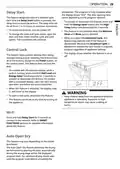
Delay Start
This feature delays the start of a selected cycle.
Each time the Delay Start button is pressed, the
delay time increases by an hour. The delay time can
be set from 1 to 12 hours, in one-hour increments.
ꢀ
To activate or deactivate this feature, press and
hold the Energy Saver button and the High
Temp button simultaneously for 3 seconds.
ꢀ
ꢀ
To cancel this feature, turn the power off.
ꢀ
ꢀ
This feature is not available when the Machine
To change the cycle and cycle option, open the
door and then select another cycle and cycle
option. The countdown will continue.
Clean and Rinse cycle is selected.
When you select the Download Cycle, this
feature may operate even if the feature is
deactivated. Because the Download Cycle is
designed to achieve the best results in a specific
purpose regardless of appliance settings.
Control Lock
ꢀ
The display shows whether this feature is on or
off.
This feature helps prevent settings from being
changed during a cycle. Selecting this feature locks
all of the buttons, except for the Power button, on
the control panel. This feature does not lock the
door.
ꢀ
On models with the external display, while a
cycle is running, press and hold Half Load and
Energy Saver simultaneously for 3 seconds to
activate or deactivate this feature. On models
with a concealed display, open the door during
operation and follow the same instruction.
ꢀ
When this feature is activated, the display code
CL will show on the display.
WARNING
ꢀ
ꢀ
To start a new cycle, deactivate this feature.
ꢀ
Keep children away from the appliance while the
appliance is operating. Exposure to high
temperature steam may cause scalding or
burns.
This feature can be set at any time by turning on
the appliance.
Wi-Fi
Press and hold Delay Start for 3 seconds to
connect to the network. Refer to SMART
FUNCTIONS sections for detailed information
about this feature.
Auto Open Dry
This feature may vary depending on the model
purchased.
The Auto Open Dry feature enhances the drying
performance by opening the door automatically
during the drying stage within the displayed
program time. For optimum drying results wait
until the program ends before unloading the

| General | Details |
|---|---|
| Name | LG DB425 Dishwasher |
| Make | LG |
| Language | English |
| Filetype | PDF (Download) |
| File size | 2.93 MB |
 (1 votes, average: 5.00 out of 5)
 Loading...

LG LDTH7972SS Black Dishwasher

LG SDWB24S3 STUDIO Smart Dishwasher

LG LDTH7972D Smart Tub Dishwasher

LG LDPH7972D Smart Dishwasher

LG XD3A25UMB 15 Place QuadWash Dishwasher

LG LDT779 Dishwasher

LG LDT7808BD Dishwasher

LG LDFN4542S Dishwasher

LG DFB424 Dishwasher

LG LDTS5552D PrintProof Black Dishwasher


BOSCH SMV8ZCX00X Dishwasher

Miele G 5000 SC Active Dishwasher

Electrolux KECA7400W Builtin Dishwasher

BOSCH SMS2HKW03E Dishwasher

KitchenAid KDTE304RBS Third Level Jet Rack Dishwasher

BOSCH SMS26AW08G Dishwasher

GE APPLIANCES PDT715SYV Interior Dishwasher with Hidden Controls

BOSCH SMI2ITS33E-6 Dishwasher

COMFEE CDC22P1ABB Countertop Dishwasher

FISHER AND PAYKEL DD24STI9N Dishwasher