
×
- 1. User Manual (Dishwasher → Myčka Nádobí → Umývačka Riadu)
- 2. Geschirrspülmaschine (Bedienungsanleitung → Teil I: Allgemeiner Teil)
- 3. Sehr Geehrter Kunde, Vielen Dank, Dass Sie Sich Für Dieses Gerät Entschieden Haben. Um Sicherzustellen, Dass Sie Die Besten Ergebnisse Mit I…
- 4. Tipps Zur Problembehebung (Gebrauchsanleitung)
- 5. Wichtige Sicherheitshinweise (Vor Dem Aufstellen → Vor Der Ersten Inbetriebnahme)
- 6. Bei Kindern Im Haushalt (Beim Täglichen Einsatz)
- 7. Störfälle (Reparaturen → Empfehlungen)
- 8. Was Nicht In Den Geschirrspüler Darf (Empfindliche Dekorgläser Und Porzellanteile → Gegenstände Aus Aluminium Und Silber → Nicht Hitzebeständige Kunststoffteile → Bestecke Mit Holz-, Horn-, Elfenbein- Oder Perlmuttgriffen)
- 9. Benutzerhinweise Zur Entsorgung Von Elektrischen Und Elektronischen Altgeräten (im Haushalt) (Für Unternehmen In Den Eu-ländern → Hinweise Zur Entsorgung In Anderen Ländern Außerhalb Der Eu)
- 10. Lernen Sie Ihr Gerät Kennen (Gerätebeschreibung → Komponenten Ihres Geräts → Hinweis:)
- 11. Vorbereitung Des Geräts Zum Gebrauch (Vor Dem Ersten Gebrauch → Bedeutung Der Entkalkung Von Wasser → Salz Einfüllen)
- 12. Nehmen (Stecken → Füllen → Drehen → Starten)
- 13. Hinweise Für Die Benutzung Des Korbs (Höhenverstellung Des Oberen Geschirrkorbs → Herunterklappen Der Ablagen Für Becher/tassen)
- 14. Einklappen Der Korbständer (Reinigung Und Wartung → Reinigung Der Außenflächen → Tür Und Türdichtung → Bedienblende Und Außenwände)
- 15. Reinigen Der Innenflächen (Filtersystem → Grobfilter → Hauptfilter → Feinfilter)
- 16. Drehen Sie Die Filter Nicht Zu Stark Fest. Setzen Sie Den Filter Sorgsam Ein Und Befestigen Sie Ihn Gut. Sonst Können Verunreinigungen In Di…
- 17. Reinigung Des Geschirrspülers (Frostschutz → Den Netzstecker Ziehen → Transport Des Geräts → Siegel)
- 18. Montageanleitung (Risiko Eines Elektrischen Schlages → Elektrischer Anschluss → Elektrische Anforderungen → Elektrische Verbindung)
- 19. Wasseranschluss (Versorgungsschlauch → Sicherheitsversorgungsschlauch → Sicherheitswasserschlauch → Anschluss Des Sicherheitswasserschlauchs)
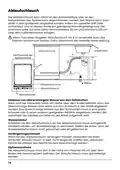
- 20. Ablaufschlauch (Arbeitstisch → Wasserablauf → Verlängerungsschlauch → Siphonanschluss)
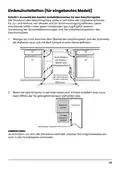
- 21. Einbauinstallation (für Eingebautes Modell) (Schritt 1. Auswahl Des Besten Installationsortes Für Den Geschirrspüler → Anschlüsse → Minimaler Freiraum 50 Mm → Anmerkung:)
- 22. Schritt 2. Abmessungen Und Montage Der Dekorplatte (Teileingebautes Modell → Volleingebautes Modell)
- 23. Installation Des Geschirrspülers (Befestigen → Schließen Sie Den Zulaufschlauch An → Schließen Sie Das Netzkabel An → Befestigen Sie Die Möbeltür An)
- 24. Schritt 5. Ausbalancierung Des Geschirrspülers (Platzieren → Richten → Achten → Anmerkung)
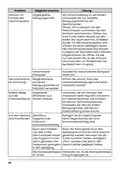
- 25. Massnahmen Bei Störungen (Bevor Sie Den Service Anrufen → Problem → Mögliche Ursache → Lösung)
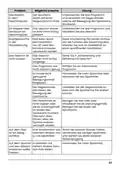
- 26. Problem (Mögliche Ursache → Lösung → Die Innenwanne → Die Weichspülerkappe)
- 27. Problem (Mögliche Ursache → Lösung → Das Geschirr Ist Nicht Sauber. → Auf Dem Glas Ist Ein Belag Sichtbar.)
- 28. Problem (Mögliche Ursache → Lösung → Verwendung → Verfügbarkeit Von Ersatzteilen)
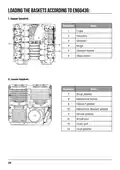
- 29. Einräumen Von Geschirr Nach En60436 (Oberkorb → Unterer Korb)
- 30. Besteckfach (Informationen Zu Den Prüfungen Nach Der Norm En 60436 → Volumen: 14 Standard-geschirrsets → Lage Des Oberen Geschirrkorbs: Untere Position → Programm: Eco)
- 31. Geschirrspülmaschine (Bedienungsanleitung → Teil Ii: Besonderer Teil)
- 32. Kurze Gebrauchsanleitung (Gebrauch Des Geschirrspülers → Display / Bedienpanel → Wasserenthärter → Fehlercodes)
- 33. Anmerkung
- 34. Kurze Gebrauchsanleitung (Installation Des Geschirrspülers → Entfernen Von Größeren Essensresten Aus Dem Besteck Und Geschirr → Füllen Der Körbe → Programmauswahl Und -start)
- 35. Gebrauch Des Geschirrspülers (Display / Bedienpanel → Leistung → Programm → Startverzögerung → Automatisches Öffnen Der Tür)
- 36. Display (Eco → Auto → Hygiene → Selbstreinigung)
- 37. Intensives Spülen (Extra Trocknen → Zusatzfunktionen → Automatisches Öffnen Der Tür → Auslassen Von Wasser)
- 38. Wasserenthärter (Einstellung Des Salzverbrauchs → Wasserhärte)
- 39. Füllen Der Enthärtungsanlage Mit Salz (Vorbereitung Und Beladen Der Körbe Mit Geschirr → Reinigen Von Besteck/geschirr Im Geschirrspüler → Ungeeignet → Nur Beschränkt Geeignet)
- 40. Tipps Zum Beladen Des Geschirrspülers (Abräumen Des Geschirrs → Achtung)
- 41. Beladen Des Oberkorbs (Beladen Des Unterkorbs → Beladen Der Bestecksschublade)
- 42. Funktion Des Klarspülers Und Reinigungsmittels (Funktion Des Reinigungsmittels → Richtige Verwendung Des Reinigungsmittels → Funktion Des Klarspülers → Wann Muss Der Klarspülerbehälter Nachgefüllt Werden?)
- 43. Füllen Des Klarspülbehälters Und Auswahl Der Einstellungen (Einstellen Des Klarspülerbehälters)
- 44. Spülmittel Einfüllen (Transport → Hauptspülgang → Reinigungsmittelbehälter → Hinweis)
- 45. Geschirrspülmaschine Programmierung (Programmtabelle → Zyklusbeschreibung)
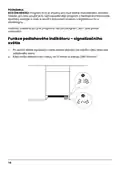
- 46. Eco (en 60436) (Funktion Der Fußbodenanzeige - Kontrollleuchte)
- 47. Energieersparnis (Einschalten Des Geräts → Programmwechsel)
- 48. Einräumen Von Geschirr Während Des Spülvorgangs (Automatisches Öffnen Der Tür → Anmerkung)
- 49. Fehlercodes (Massnahme → Warnhinweis → Identifikationskennzeichen Und Produktseriennummer → Reparaturen Des Gerätes)
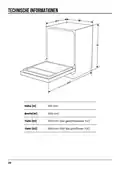
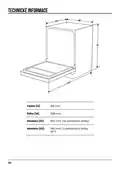
- 50. Technische Informationen (Höhe (h) → Breite (w) → Tiefe (d1) → Tiefe (d2))
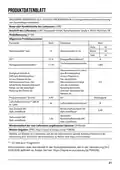
- 51. Produktdatenblatt (Delegierte Verordnung (eu) 2019/2017 Der Kommission Zur Energieverbrauchskennzeichnung → Allgemeine Produktparameter → Mindestlaufzeit Der Vom Lieferanten Angebotenen Garantie → Weitere Angaben)
- 52. Dishwasher (User Manual → Part I: Generic Version)
- 53. Thank You For Purchasing A Dishwasher. Read This Manual Carefully With Simple Instructions To Ensure The Best Possible Operation Of The Dish…
- 54. Note: Reviewing The Section On Troubleshooting Tips Will Help You Solve Some Common Problems By Yourself. If You Cannot Solve The Problems B…
- 55. Safety Information (Warning → Installation And Repair → Intended Use → Use By Children → Risk Of Electrical Shock)
- 56. Earthing Instructions (Improper Connection Of The Equipment-earthing Conductor → Check With A Qualified Electrician → Do Not Modify The Plug Provided → Warning: Knives And Other Utensils With Sharp Points)
- 57. Check That The Detergent Powder Is Empty After Completion Of The Wash Cycle. (Do Not Wash Plastic Items Unless They Are Marked Dishwasher Safe' Or The Equivalent. → Use Only Detergent And Rinse Agents Recommended For Use In An Automatic Dishwasher. → The Appliance Needs To Be Connected To The Main Water Valve Using New Hose Sets. → To Save Energy, In Stand By Mode, The Appliance Will Switch Off Automatically While There Is No Any Operation In 15 Minutes.)
- 58. Information For Users On The Disposal Of Electrical And Electronic Equipment (households) (For Business Users In European Union Countries → Information On Disposal In Other Countries Outside The European Union)
- 59. Product Overview (Important → Top Spray Arm → Lower Spray Arm → Filter Assembly)
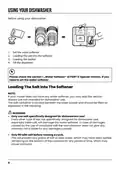
- 60. Using Your Dishwasher (Before Using Your Dishwasher: → Loading The Salt Into The Softener)
- 61. Adding Dishwasher Salt
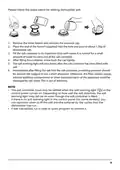
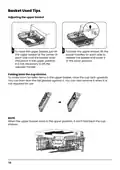
- 62. Basket Used Tips (Adjusting The Upper Basket → Folding Back The Cup Shelves)
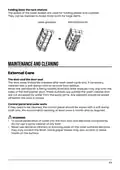
- 63. Folding Back The Rack Shelves (Maintenance And Cleaning → External Care → The Door And The Door Seal → Control Panel And Outer Walls)
- 64. Internal Care (Filtering System → Coarse Filter → Main Filter → Fine Filter)
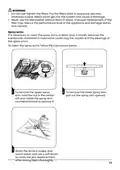
- 65. Do Not Over Tighten The Filters (Spray Arms)
- 66. Caring For The Dishwasher (Frost Precaution → After Every Wash → Remove The Plug → Moving The Appliance)
- 67. Installation Instruction (About Power Connection → Electrical Requirements → Electrical Connection)
- 68. Water Supply And Drain (Cold Water Connection → About The Safety Supply Hose → How To Connect The Safety Supply Hose → How To Disconnect The Safety Supply Hose)
- 69. Connection Of Drain Hoses (How To Drain Excess Water From Hoses → Water Outlet → Extension Hose → Syphon Connection)
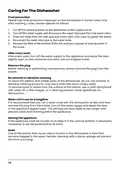
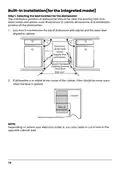
- 70. Built-in Installation(for The Integrated Model) (Selecting The Best Location For The Dishwasher → Electrical, Drain And Water Supply → Space Between Cabinet Bottom And Floor → Minimum Space Of 50mm)
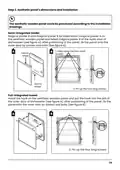
- 71. Step 2. Aesthetic Panels Dimensions And Installation (Semi-integrated Model → Full-integrated Model)
- 72. Step 3. Dishwasher Installation Steps (Connect The Inlet Hose To The Cold Water Supply. → Level The Dishwasher. → Install The Furniture Door To The Outer Door Of The Dishwasher. → The Dishwasher Must Be Secured In Place.)
- 73. Step 4. Levelling The Dishwasher (Check Level)
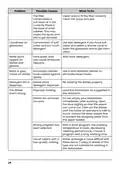
- 74. Troubleshooting Tips (Before Calling For Service → Problem → Possible Causes → What To Do)
- 75. Problem (Possible Causes → What To Do → Stained Tub → The Dishes Are Not Clean.)
- 76. Problem (Possible Causes → What To Do → The Filter → Cloudiness On Glassware. → Dishes Aren't Drying.)
- 77. Availability Of Spare Parts
- 78. Loading The Baskets According To En60436: (Upper Basket: → Lower Basket:)
- 79. Cutlery Rack (Information For Comparability Tests In Accordance With En60436 → Capacity: 14 Place Settings → Position Of The Upper Basket: Lower Position → Program: Eco)
- 80. Dishwasher (User Manual → Part Ii: Special Version)
- 81. Quick User Guide (Using Your Dishwasher → Control Panel → Water Softener → Programming The Dishwasher)
- 82. Note:
- 83. Quick User Guide (Install The Dishwasher → Removing The Larger Residue On The Cutlery → Loading The Baskets → Filling The Dispenser)
- 84. Using Your Dishwasher (Control Panel → Operation (button) → Power → Program → Delay → Function → Automatic Door Opening)
- 85. Display (Eco → Auto → Hygiene → Self-cleaning)
- 86. Power Wash (Extra Drying → Turbo Speed+ → Auto Open → Drain Water)
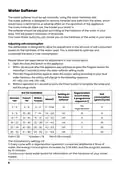
- 87. Water Softener (Adjusting Salt Consumption → Water Hardness → Regeneration)
- 88. Loading The Salt Into The Softener (Water Softener → Preparing And Loading Dishes → Are Not Suitable → Are Of Limited Suitability)
- 89. Recommendations For Loading The Dishwasher (Removing The Dishes)
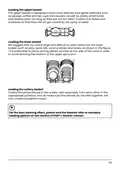
- 90. Loading The Upper Basket (Loading The Lower Basket → Loading The Cutlery Basket)
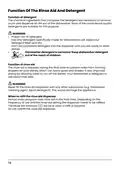
- 91. Function Of The Rinse Aid And Detergent (Proper Use Of Detergent → Function Of Rinse Aid → When To Refill The Rinse Aid Dispenser)
- 92. Filling The Rinse Aid Reservoir (Adjusting The Rinse Aid Reservoir)
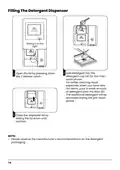
- 93. Filling The Detergent Dispenser (Add Detergent Into The Detergent Cup For The Main Wash Phase. → For Better Cleaning Result, Especially When You Have Very Dirt Items. → Close The Dispenser Lid By Sliding The Lid Down Until Latched. → Please Observe The Manufacturers Recommendations On The Detergent Packaging.)
- 94. Programming The Dishwasher (Wash Cycle Table For En60436 → Description Of Cycle → Detergent → Running Time(min))
- 95. Eco Program (Function Of Floor Indicator Lamp-signalight)
- 96. Saving Energy (Starting A Cycle Wash → Changing The Program Mid-cycle)
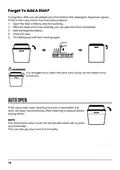
- 97. Forget To Add A Dish? (Auto Open → Note)
- 98. Error Codes (Meanings → Possible Causes → Warning → Authorized Service Centre Contact Information)
- 99. Technical Information (Height (h) → Width (w) → Depth (d1) → Depth (d2))
- 100. Product Information Sheet (General Product Parameters → Additional Information)
- 101. My Čka Nádobí (Návod K Obsluze → Část I: Obecná Část)
- 102. Děkujeme Vám Za Zakoupení Myčky. Přečtěte Si Pozorně Tento Návod S Jednoduchými Pokyny, Abyste Zajistili Nejlepší Možný Provoz Myčky.
- 103. Tipy Pro Řešení Problémů (Pokud Nemůžete Problém Vyřešit Sami → Výrobce Může Na Základě Zásad Neustálého Vývoje A Aktualizace Výrobku Provádět Změny → V Případě Ztráty Můžete Obdržet Nový Návod K Obsluze → Před Použitím Myčky Nádobí Si Tento Návod K Obsluze Pečlivě Přečtěte)
- 104. Bezpečnostní Informace (Výstraha → Instalaci A Opravy Smí Provádět Pouze Kvalifikovaný Technik → Tento Spotřebič Je Určen K Použití V Domácnosti → Obalový Materiál Může Být Nebezpečný Pro Děti!)
- 105. Pokyny K Uzemnění (Využijte Služeb Kvalifikovaného Elektrikáře → Nepoužívejte Myčku, Pokud Na Ní Nejsou Správně Umístěny Všechny Krycí Panely → Při Vkládání Předmětů K Umytí)
- 106. Detergenty Pro Myčky Nádobí (Bezpečnostní Opatření → Používání Myčky → Instalace A Připojení → Úspora Energie)
- 107. Informace Pro Uživatele K Likvidaci Elektrických A Elektronických Zařízení (domácnosti) (Pro Podnikové Uživatele V Zemích Evropské Unie → Informace K Likvidaci V Ostatních Zemích Mimo Evropskou Unii)
- 108. Popis Výrobku (Důležité: → Vrchní Rameno Ostřikovače → Spodní Rameno Ostřikovače → Zásobník Soli)
- 109. Před Použitím Myčky Nádobí (Nastavte Změkčovač Vody → Plnění Soli Do Změkčovače)
- 110. Při Doplňování Soli Do Myčky Postupujte Podle Následujících Pokynů: (Vložte Konec Násypky Do Otvoru A Vsypte Asi 0,6 Kg Soli Pro Myčky Nádobí. → Kontrolka Nedostatku Soli Přestane Po Naplnění Zásobníku Soli Svítit. → Ihned Po Naplnění Soli Do Zásobníku Soli By Měl Být Spuštěn Mycí Program Bez Nádobí. → Zásobník Na Sůl Se Musí Doplňovat Pouze Tehdy, Když Se Kontrolka Nedostatku Soli Na Ovládacím Panelu Rozsvítí.)
- 111. Tipy Pro Používání Koše (Nastavení Horního Koše → Sklopení Přihrádky Na Šálky)
- 112. Sklopení Přihrádek (Údržba A Čištění → Péče O Vnější Část → Dvířka A Těsnění Dvířek → Ovládací Panel A Vnější Stěny)
- 113. Péče O Vnitřní Část (Filtrační Systém → Hrubý Filtr → Hlavní Filtr → Jemný Filtr)
- 114. Výstraha (Ostřikovací Ramena)
- 115. Péče O Myčku Nádobí (Ochrana Před Mrazem → Po Každém Mytí → Vytáhněte Zástrčku Ze Zásuvky → Pokud Se Spotřebič Po Delší Dobu Nepoužívá)
- 116. Pokyny Pro Instalaci (Nebezpečí Úrazu Elektrickým Proudem → Připojení K Elektrické Síti → Elektrické Požadavky → Elektrické Připojení)
- 117. Připojení Vody A Odpadu (Připojení Studené Vody → Bezpečnostní Přívodní Hadice → Jak Připojit Bezpečnostní Přívodní Hadici → Jak Odpojit Bezpečnostní Přívodní Hadici)
- 118. Připojení Vypouštěcích Hadic (Jak Vypustit Přebytečnou Vodu Z Hadic → Odtok Vody → Prodlužovací Hadice → Sifonové Připojení)
- 119. Vestavná Instalace (pro Integrovaný Model) (Krok 1. Výběr Nejlepšího Místa Pro Myčku Nádobí → Montážní Poloha Myčky By Měla Být V Blízkosti Stávajících Přípojek Pro Přívod A Vypouštění A Napájení.)
- 120. Krok 2. Rozměry A Instalace Dekorativního Panelu (Částečně Integrovaný Model → Plně Vestavný Model)
- 121. Krok Instalace Myčky (Připevněte Kondenzační Pásku → Připojte Přívodní Hadici → Připojte Vypouštěcí Hadici → Nainstalujte Nábytková Dvířka)
- 122. Krok 4. Vyrovnání Myčky (Myčka Musí Být Ve Vodorovné Poloze, Aby Byla Zajištěna Správná Funkce Držáku Nádobí I Mytí. → Zkontrolujte)
- 123. Tipy Pro Řešení Problémů (Než Zavoláte Servis → Problém → Možná Příčina → Náprava)
- 124. Problém (Možná Příčina → Náprava → Nádobí Není Čisté → Zvuk Klepání V Myčce Na Nádobí)
- 125. Problém (Možná Příčina → Náprava → Sestava Filtrů → Nádobí Není Suché)
- 126. Dostupnost Náhradních Dílů (Svépomocná Oprava Nebo Neodborná Oprava Může Způsobit Vážné Ohrožení)
- 127. Horní Koš (Dolní Koš)
- 128. Přihrádka Na Příbory (Informace Pro Srovnávací Test Podle En60436 → Kapacita: 14 Souprav → Program: Eco → Nastavení Oplachového Prostředku: Max)
- 129. My Čka Nádobí (Návod K Obsluze → Část Ii: Speciální Část)
- 130. Rychlý Návod K Obsluze (Používání Myčky Nádobí → Ovládací Panel → Změkčovač Vody → Programování Myčky)
- 131. Poznámka
- 132. Rychlý Návod K Obsluze (Instalace Myčky. → Odstraňování Větších Zbytků Z Příborů. → Plnění Košů. → Výběr Programu A Spuštění Myčky.)
- 133. Používání Myčky Nádobí (Ovládací Panel → Napájení → Program → Odložený Start)
- 134. Displej (Eco → Automatický → Hygiena → Rychlý)
- 135. Silné Mytí (Extra Sušení → Turbo Rychlost+ → Automatické Otevření → Vypuštění Vody)
- 136. Změkčovač Vody (Úprava Spotřeby Soli → Tvrdost Vody → Regenerace)
- 137. Plnění Soli Do Změkčovače (Změkčovač Vody → Příprava A Plnění Nádobí → Mytí Následujících Příborů/nádobí → Nevhodné)
- 138. Doporučení Pro Plnění Myčky (Předměty Do Myčky Umístěte Následujícím Způsobem: → Vyjmutí Nádobí)
- 139. Plnění Horního Koše (Plnění Dolního Koše → Plnění Košíku Na Příbory)
- 140. Funkce Oplachového A Mycího Prostředku (Správné Použití Mycího Prostředku → Funkce Leštidla → Kdy Doplnit Dávkovač Leštidla)
- 141. Plnění Nádrže Na Oplachovací Prostředek (Nastavení Dávkování Oplachovacího Prostředku)
- 142. Plnění Dávkovače Mycího Prostředku (Přidejte Čisticí Prostředek Do Zásobníku Na Čisticí Prostředek → Otevřete Kryt Stisknutím 2 Uvolňovací Západky → Zavřete Víko Dávkovače Posunutím Víka Dolů)
- 143. Programování Myčky (Tabulka Mycích Cyklů Podle En60436 → Mycí Prostředek)
- 144. Eco (en 60436) (Funkce Podlahového Indikátoru Signalizačního Světla)
- 145. Úspora Energie (Mytí Nádobí V Myčce → Spuštění Mycího Cyklu → Změna Programu Uprostřed Cyklu)
- 146. Zapomněli Jste Vložit Nějaké Nádobí? (Automatické Otevření → Poznámka)
- 147. Kódy Poruch (Výstraha → Identifikační Značka Modelu A Sériové Číslo Výrobku → Opravy Svépomocí Nebo Neodborné Opravy Jsou Nebezpečné. → Náhradní Díly Dle Příslušného Nařízení Ekodesign Obdržíte U Autorizovaného Servisu.)
- 148. Technické Informace (Výška (h) → Šířka (w) → Hloubka (d1) → Hloubka (d2))
- 149. Informační List Výrobku (Nařízení Komise V Přenesené Pravomoci (eu) 2019/2017 → Obecné Parametry Produktu → Minimální Doba Trvání Záruky Nabízené Dodavatelem → Další Informace)
- 150. Umývačka Riadu (Návod Na Obsluhu → Časť I: Všeobecná Časť)
- 151. Ďakujeme Vám Za Zakúpenie Umývačky. Prečítajte Si Pozorne Tento Návod S Jednoduchými Pokynmi, Aby Ste Zaistili Najlepšiu Možnú Prevádzku Umý…
- 152. Tipy Pri Riešení Problémov (Informácie O Výrobku → Získanie Nového Návodu Na Obsluhu → Použitie Umývačky Riadu)
- 153. Bezpečnostné Informácie (Výstraha)
- 154. Pokyny Na Uzemnenie (Využite Služby Kvalifikovaného Elektrikára A Nechajte Nainštalovať Správny Typ Zásuvky. → Pri Vkladaní Predmetov Na Umývanie:)
- 155. Bezpečnostné Upozornenia (Používanie Čistiacich Prostriedkov → Inštalácia A Pripojenie → Úspora Energie → Maximálne Kapacity A Tlak Vody)
- 156. Informácie O Likvidácii Opotrebovaného Elektrického Zariadenia (súkromné Domácnosti) (Pre Právnické Osoby V Európskej Únii → Informácie O Likvidácii V Krajinách Mimo Európskej Únie)
- 157. Popis Výrobku (Dôležité: → Vrchné Rameno Ostrekovača → Spodné Rameno Ostrekovača → Zásobník Soli → Zostava Filtra)
- 158. Používajte Iba Soľ Určenú Pre Umývačky Riadu. (Nastavte Zmäkčovač Vody → Dajte Soľ Do Zmäkčovača → Naplnte Košík → Dajte Dávkovač Prípravkov)
- 159. Pri Doplňovaní Soli Do Umývačky Postupujte Podľa Nasledujúcich Pokynov:
- 160. Tipy Pri Používaní Koša (Nastavenie Horného Koša → Sklopenie Priehradky Na Šálky)
- 161. Sklopenie Priehradiek (Údržba A Čistenie → Starostlivosť O Vonkajšiu Časť → Ovládací Panel A Vonkajšie Steny)
- 162. Starostlivosť O Vnútornú Časť (Filtračný Systém → Hrubý Filter → Hlavný Filter → Jemný Filter)
- 163. Výstraha (Ostrekovacie Ramená)
- 164. Starostlivosť O Umývačku Riadu (Ochrana Pred Mrazom → Po Každom Umytí → Vytiahnite Zástrčku Zo Zásuvky → Ak Sa Spotrebič Dlhší Čas Nepoužíva)
- 165. Pokyny Pri Inštalácii (Nebezpečenstvo Úrazu Elektrickým Prúdom → Pripojenie K Elektrickej Sieti → Elektrické Požiadavky → Elektrické Pripojenie)
- 166. Pripojenie Vody A Odpadu (Pripojenie Studenej Vody → Bezpečnostná Prívodná Hadica → Ako Pripojiť Bezpečnostnú Prívodnú Hadicu → Ako Odpojiť Bezpečnostnú Prívodnú Hadicu)
- 167. Pripojenie Vypúšťacích Hadíc (Ako Vypustiť Prebytočnú Vodu Z Hadíc → Odtok Vody → Predlžovacia Hadica → Sifónové Pripojenie)
- 168. Vstavaná Inštalácia (pre Integrovaný Model) (Krok 1. Výber Najlepšieho Miesta Pre Umývačku Riadu → Montážna Poloha Umývačky By Mala Byť V Blízkosti Pôvodných Prípojok Pre)
- 169. Krok 2. Rozmery A Inštalácia Dekoratívneho Panelu (Čiastočne Integrovaný Model → Plne Vstavaný Model)
- 170. Krok Inštalácie Umývačky (Kondenzačnú Pásku Pripevnite Pod Pracovnú Plochu Skrine. → Prívodnú Hadicu Pripojte K Prívodu Studenej Vody. → Pripojte Vypúšťaciu Hadicu. → Umývačku Riadu Umiestnite Na Miesto.)
- 171. Krok 4. Vyrovnanie Umývačky (Umývačka Musí Byť Vo Vodorovnej Polohe, Aby Sa Zaistila Správna Funkcia)
- 172. Tipy Pri Riešení Problémov (Než Zavoláte Servis → Problém → Možná Príčina → Náprava)
- 173. Problém (Možná Príčina → Náprava → Biely Povlak Na Vnútornom Povrchu → Riad Nie Je Čistý)
- 174. Problém (Možná Príčina → Náprava → Zostava Filtrov → Riad Nie Je Suchý)
- 175. Dostupnosť Náhradných Dielov (Svojpomocná Oprava Alebo Neodborná Oprava Môže Spôsobiť Vážne Ohrozenie Bezpečnosti Používateľa Spotrebiča A Ovplyvniť Záruku.)
- 176. Horný Kôš (Dolný Kôš)
- 177. Priehradka Na Príbor (Informácie Pre Porovnávací Test Podľa En 60436 → Kapacita: 14 Súprav → Poloha Horného Koša: Dolná Pozícia → Program: Eco)
- 178. Umývačka Riadu (Návod Na Obsluhu → Časť Ii: Špeciálna Časť)
- 179. Rýchly Návod Na Obsluhu (Používanie Umývačky Riadu → Ovládací Panel → Zmäkčovač Vody → Programovanie Umývačky)
- 180. Poznámka
- 181. Rýchly Návod Na Obsluhu (Inštalácia Umývačky → Odstraňovanie Väčších Zvyškov Z Príboru → Plnenie Košov → Výber Programu A Spustenie Umývačky)
- 182. Používanie Umývačky Riadu (Ovládací Panel → Napájanie → Program → Odložený Štart → Automatické Otvorenie Dverí)
- 183. Displej (Eco → Automatický → Hygiena → Rýchly)
- 184. Silné Umývanie (Extra Sušenie → Turbo Rýchlosť+ → Automatické Otvorenie → Vypustenie Vody)
- 185. Zmäkčovač Vody (Úprava Spotreby Soli → Tvrdosť Vody → Regenerácia)
- 186. Zmäkčovač Vody (Príprava A Plnenie Riadom → Umývanie Nasledujúcich Príborov/riadu → Nevhodné → Vhodné Iba Obmedzene)
- 187. Rady Pri Plnení Umývačky (Vybratie Riadu → Dbajte Na To, Aby Ste Umývačku Nepreťažovali → Výstraha → Poznámka)
- 188. Plnenie Horného Koša (Plnenie Spodného Koša → Plnenie Košíka Na Príbor)
- 189. Funkcia Oplachovacieho A Čistiaceho Prípravku (Správne Použitie Čistiaceho Prípravku → Funkcia Leštidla → Kedy Doplniť Dávkovač Leštidla)
- 190. Plnenie Zásobníka Leštidla (Nastavenie Dávkovania Leštidla)
- 191. Plnenie Dávkovača Čistiaceho Prípravku (Pridajte Čistiaci Prostriedok → Otvorte Kryt Stlačením 2 → Zatvorte Veko Dávkovača)
- 192. Programovanie Umývačky (Tabuľka Umývacích Cyklov Podľa En60436 → Čistiaci)
- 193. Čistiaci Prípravok (Program → Popis Cyklu → Poznámka: → Funkcia Podlahového Indikátora - Signalizačného Svetla)
- 194. Úspora Energie (Umývanie → Spustenie Umývacieho Cyklu → Zmena Programu Uprostred Cyklu)
- 195. Zabudli Ste Vložiť Nejaký Riad? (Automatické Otvorenie → Výstraha → Poznámka)
- 196. Kódy Porúch (Výstraha → Možná Príčina → Prívod Vody Nie Je Otvorený → Porucha Motora)
- 197. Technické Informácie (Výška (h) → Šírka (w) → Hĺbka (d1) → Hĺbka (d2))
- 198. Informačný List Výrobku (Delegované Nariadenie Komisie (eú) 2019/2017, Pokiaľ Ide O Energetické Označovanie → Všeobecné Parametre Výrobku → Doplňujúce Informácie → Informácie O Modeli V Databáze Výrobkov Definované V Nariadení (eú) 2019/2016)
- 199. Changes And Printing Errors Excepted.
×
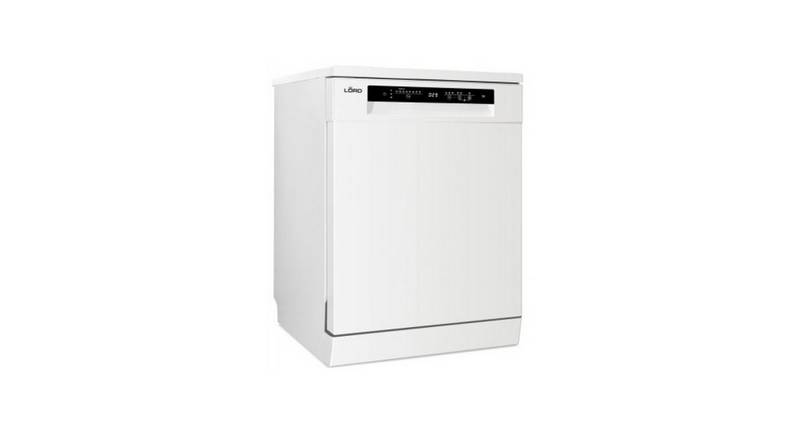
lord D1000 Dishwasher




















































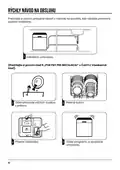







USING YOUR DISHWASHER
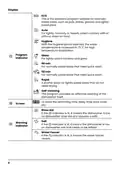
Control Panel
6
4
ꢄ
ꢀ5
ꢀ
ꢁ
ꢂ
ꢃ
3
-
Operation (Button)
Press this button to turn on your dishwasher,
the screen lights up.
1
Power
Press this button to select the appropriate
washing program, the selected program
indicator will be lit
2
Program
Press this button to set the delayed hours for
washing. You can delay the start of washing
up to 24 hours. One press on this button
delays the start of washing by one hour.
3
Delay
Press the button to select a function,
corresponding indicator will be lit.
4
Function
Press the button to select either upper basket
or lower basket loaded, and the response
ꢀꢀꢀꢀ ꢀꢀꢀꢀ
5
Alt
indicators (
) will be lit.
The automatic door opening function is
started by simultaneously pressing buttons 4
and 5 for 3 seconds. It can only be used with
programs ECO, Auto, Hygiene, Glass, 90 min
and 58 min.
Automatic door
opening
4+5
5

| General | Details |
|---|---|
| Name | lord D1000 Dishwasher |
| Make | LORD |
| Language | English |
| Filetype | PDF (Download) |
| File size | 31.24 MB |
 (1 votes, average: 5.00 out of 5)
 Loading...

lord D5 Dishwasher

lord D8 Dishwasher
lord D3 Dishwasher


AMANA ADB1400AMS Undercounter Dishwasher

bellini BDW96W, BDW96X Series 45cm Dishwasher

Whirlpool WFE2B19X Dishwasher

SIEMENS SN63EX02CE Dishwasher

SIEMENS SN73HX15VE Dishwasher

BOSCH SMS4EKI02E-30 Dishwasher

medion MD 37496 Table Top Dishwasher

Electrolux EFC3862MS UltimateCare 300 Compact Dishwasher

HAFELE HDW-F605B Free Standing Dishwasher

ETA 274890010D Dishwasher
Table of Contents
- 1. User Manual - Dishwasher →
- 2. Geschirrspülmaschine - Bedienungsanleitung →
- 3. Sehr Geehrter Kunde, Vielen Dank, Dass Sie Sich Für Dieses G... →
- 4. Tipps Zur Problembehebung - Gebrauchsanleitung →
- 5. Wichtige Sicherheitshinweise - Vor Dem Aufstellen →
- 6. Bei Kindern Im Haushalt - Beim Täglichen Einsatz →
- 7. Störfälle - Reparaturen →
- 8. Was Nicht In Den Geschirrspüler Darf - Empfindliche Dekorglä... →
- 9. Benutzerhinweise Zur Entsorgung Von Elektrischen Und Elektro... →
- 10. Lernen Sie Ihr Gerät Kennen - Gerätebeschreibung →
- 11. Vorbereitung Des Geräts Zum Gebrauch - Vor Dem Ersten Gebrau... →
- 12. Nehmen - Stecken →
- 13. Hinweise Für Die Benutzung Des Korbs - Höhenverstellung Des ... →
- 14. Einklappen Der Korbständer - Reinigung Und Wartung →
- 15. Reinigen Der Innenflächen - Filtersystem →
- 16. Drehen Sie Die Filter Nicht Zu Stark Fest. Setzen Sie Den Fi... →
- 17. Reinigung Des Geschirrspülers - Frostschutz →
- 18. Montageanleitung - Risiko Eines Elektrischen Schlages →
- 19. Wasseranschluss - Versorgungsschlauch →
- 20. Ablaufschlauch - Arbeitstisch →
- 21. Einbauinstallation (für Eingebautes Modell) - Schritt 1. Aus... →
- 22. Schritt 2. Abmessungen Und Montage Der Dekorplatte - Teilein... →
- 23. Installation Des Geschirrspülers - Befestigen →
- 24. Schritt 5. Ausbalancierung Des Geschirrspülers - Platzieren →
- 25. Massnahmen Bei Störungen - Bevor Sie Den Service Anrufen →
- 26. Problem - Mögliche Ursache →
- 27. Problem - Mögliche Ursache →
- 28. Problem - Mögliche Ursache →
- 29. Einräumen Von Geschirr Nach En60436 - Oberkorb →
- 30. Besteckfach - Informationen Zu Den Prüfungen Nach Der Norm E... →
- 31. Geschirrspülmaschine - Bedienungsanleitung →
- 32. Kurze Gebrauchsanleitung - Gebrauch Des Geschirrspülers →
- 33. Anmerkung →
- 34. Kurze Gebrauchsanleitung - Installation Des Geschirrspülers →
- 35. Gebrauch Des Geschirrspülers - Display / Bedienpanel →
- 36. Display - Eco →
- 37. Intensives Spülen - Extra Trocknen →
- 38. Wasserenthärter - Einstellung Des Salzverbrauchs →
- 39. Füllen Der Enthärtungsanlage Mit Salz - Vorbereitung Und Bel... →
- 40. Tipps Zum Beladen Des Geschirrspülers - Abräumen Des Geschir... →
- 41. Beladen Des Oberkorbs - Beladen Des Unterkorbs →
- 42. Funktion Des Klarspülers Und Reinigungsmittels - Funktion De... →
- 43. Füllen Des Klarspülbehälters Und Auswahl Der Einstellungen -... →
- 44. Spülmittel Einfüllen - Transport →
- 45. Geschirrspülmaschine Programmierung - Programmtabelle →
- 46. Eco (en 60436) - Funktion Der Fußbodenanzeige - Kontrollleuc... →
- 47. Energieersparnis - Einschalten Des Geräts →
- 48. Einräumen Von Geschirr Während Des Spülvorgangs - Automatisc... →
- 49. Fehlercodes - Massnahme →
- 50. Technische Informationen - Höhe (h) →
- 51. Produktdatenblatt - Delegierte Verordnung (eu) 2019/2017 Der... →
- 52. Dishwasher - User Manual →
- 53. Thank You For Purchasing A Dishwasher. Read This Manual Care... →
- 54. Note: Reviewing The Section On Troubleshooting Tips Will Hel... →
- 55. Safety Information - Warning →
- 56. Earthing Instructions - Improper Connection Of The Equipment... →
- 57. Check That The Detergent Powder Is Empty After Completion Of... →
- 58. Information For Users On The Disposal Of Electrical And Elec... →
- 59. Product Overview - Important →
- 60. Using Your Dishwasher - Before Using Your Dishwasher: →
- 61. Adding Dishwasher Salt →
- 62. Basket Used Tips - Adjusting The Upper Basket →
- 63. Folding Back The Rack Shelves - Maintenance And Cleaning →
- 64. Internal Care - Filtering System →
- 65. Do Not Over Tighten The Filters - Spray Arms →
- 66. Caring For The Dishwasher - Frost Precaution →
- 67. Installation Instruction - About Power Connection →
- 68. Water Supply And Drain - Cold Water Connection →
- 69. Connection Of Drain Hoses - How To Drain Excess Water From H... →
- 70. Built-in Installation(for The Integrated Model) - Selecting ... →
- 71. Step 2. Aesthetic Panels Dimensions And Installation - Semi-... →
- 72. Step 3. Dishwasher Installation Steps - Connect The Inlet Ho... →
- 73. Step 4. Levelling The Dishwasher - Check Level →
- 74. Troubleshooting Tips - Before Calling For Service →
- 75. Problem - Possible Causes →
- 76. Problem - Possible Causes →
- 77. Availability Of Spare Parts →
- 78. Loading The Baskets According To En60436: - Upper Basket: →
- 79. Cutlery Rack - Information For Comparability Tests In Accord... →
- 80. Dishwasher - User Manual →
- 81. Quick User Guide - Using Your Dishwasher →
- 82. Note: →
- 83. Quick User Guide - Install The Dishwasher →
- 84. Using Your Dishwasher - Control Panel →
- 85. Display - Eco →
- 86. Power Wash - Extra Drying →
- 87. Water Softener - Adjusting Salt Consumption →
- 88. Loading The Salt Into The Softener - Water Softener →
- 89. Recommendations For Loading The Dishwasher - Removing The Di... →
- 90. Loading The Upper Basket - Loading The Lower Basket →
- 91. Function Of The Rinse Aid And Detergent - Proper Use Of Dete... →
- 92. Filling The Rinse Aid Reservoir - Adjusting The Rinse Aid Re... →
- 93. Filling The Detergent Dispenser - Add Detergent Into The Det... →
- 94. Programming The Dishwasher - Wash Cycle Table For En60436 →
- 95. Eco Program - Function Of Floor Indicator Lamp-signalight →
- 96. Saving Energy - Starting A Cycle Wash →
- 97. Forget To Add A Dish? - Auto Open →
- 98. Error Codes - Meanings →
- 99. Technical Information - Height (h) →
- 100. Product Information Sheet - General Product Parameters →
- 101. My Čka Nádobí - Návod K Obsluze →
- 102. Děkujeme Vám Za Zakoupení Myčky. Přečtěte Si Pozorně Tento N... →
- 103. Tipy Pro Řešení Problémů - Pokud Nemůžete Problém Vyřešit Sa... →
- 104. Bezpečnostní Informace - Výstraha →
- 105. Pokyny K Uzemnění - Využijte Služeb Kvalifikovaného Elektriká... →
- 106. Detergenty Pro Myčky Nádobí - Bezpečnostní Opatření →
- 107. Informace Pro Uživatele K Likvidaci Elektrických A Elektroni... →
- 108. Popis Výrobku - Důležité: →
- 109. Před Použitím Myčky Nádobí - Nastavte Změkčovač Vody →
- 110. Při Doplňování Soli Do Myčky Postupujte Podle Následujících ... →
- 111. Tipy Pro Používání Koše - Nastavení Horního Koše →
- 112. Sklopení Přihrádek - Údržba A Čištění →
- 113. Péče O Vnitřní Část - Filtrační Systém →
- 114. Výstraha - Ostřikovací Ramena →
- 115. Péče O Myčku Nádobí - Ochrana Před Mrazem →
- 116. Pokyny Pro Instalaci - Nebezpečí Úrazu Elektrickým Proudem →
- 117. Připojení Vody A Odpadu - Připojení Studené Vody →
- 118. Připojení Vypouštěcích Hadic - Jak Vypustit Přebytečnou Vodu... →
- 119. Vestavná Instalace (pro Integrovaný Model) - Krok 1. Výběr N... →
- 120. Krok 2. Rozměry A Instalace Dekorativního Panelu - Částečně ... →
- 121. Krok Instalace Myčky - Připevněte Kondenzační Pásku →
- 122. Krok 4. Vyrovnání Myčky - Myčka Musí Být Ve Vodorovné Poloze... →
- 123. Tipy Pro Řešení Problémů - Než Zavoláte Servis →
- 124. Problém - Možná Příčina →
- 125. Problém - Možná Příčina →
- 126. Dostupnost Náhradních Dílů - Svépomocná Oprava Nebo Neodborn... →
- 127. Horní Koš - Dolní Koš →
- 128. Přihrádka Na Příbory - Informace Pro Srovnávací Test Podle E... →
- 129. My Čka Nádobí - Návod K Obsluze →
- 130. Rychlý Návod K Obsluze - Používání Myčky Nádobí →
- 131. Poznámka →
- 132. Rychlý Návod K Obsluze - Instalace Myčky. →
- 133. Používání Myčky Nádobí - Ovládací Panel →
- 134. Displej - Eco →
- 135. Silné Mytí - Extra Sušení →
- 136. Změkčovač Vody - Úprava Spotřeby Soli →
- 137. Plnění Soli Do Změkčovače - Změkčovač Vody →
- 138. Doporučení Pro Plnění Myčky - Předměty Do Myčky Umístěte Nás... →
- 139. Plnění Horního Koše - Plnění Dolního Koše →
- 140. Funkce Oplachového A Mycího Prostředku - Správné Použití Myc... →
- 141. Plnění Nádrže Na Oplachovací Prostředek - Nastavení Dávkován... →
- 142. Plnění Dávkovače Mycího Prostředku - Přidejte Čisticí Prostř... →
- 143. Programování Myčky - Tabulka Mycích Cyklů Podle En60436 →
- 144. Eco (en 60436) - Funkce Podlahového Indikátoru Signalizačníh... →
- 145. Úspora Energie - Mytí Nádobí V Myčce →
- 146. Zapomněli Jste Vložit Nějaké Nádobí? - Automatické Otevření →
- 147. Kódy Poruch - Výstraha →
- 148. Technické Informace - Výška (h) →
- 149. Informační List Výrobku - Nařízení Komise V Přenesené Pravom... →
- 150. Umývačka Riadu - Návod Na Obsluhu →
- 151. Ďakujeme Vám Za Zakúpenie Umývačky. Prečítajte Si Pozorne Te... →
- 152. Tipy Pri Riešení Problémov - Informácie O Výrobku →
- 153. Bezpečnostné Informácie - Výstraha →
- 154. Pokyny Na Uzemnenie - Využite Služby Kvalifikovaného Elektrik... →
- 155. Bezpečnostné Upozornenia - Používanie Čistiacich Prostriedko... →
- 156. Informácie O Likvidácii Opotrebovaného Elektrického Zariaden... →
- 157. Popis Výrobku - Dôležité: →
- 158. Používajte Iba Soľ Určenú Pre Umývačky Riadu. - Nastavte Zmä... →
- 159. Pri Doplňovaní Soli Do Umývačky Postupujte Podľa Nasledujúci... →
- 160. Tipy Pri Používaní Koša - Nastavenie Horného Koša →
- 161. Sklopenie Priehradiek - Údržba A Čistenie →
- 162. Starostlivosť O Vnútornú Časť - Filtračný Systém →
- 163. Výstraha - Ostrekovacie Ramená →
- 164. Starostlivosť O Umývačku Riadu - Ochrana Pred Mrazom →
- 165. Pokyny Pri Inštalácii - Nebezpečenstvo Úrazu Elektrickým Prú... →
- 166. Pripojenie Vody A Odpadu - Pripojenie Studenej Vody →
- 167. Pripojenie Vypúšťacích Hadíc - Ako Vypustiť Prebytočnú Vodu ... →
- 168. Vstavaná Inštalácia (pre Integrovaný Model) - Krok 1. Výber ... →
- 169. Krok 2. Rozmery A Inštalácia Dekoratívneho Panelu - Čiastočn... →
- 170. Krok Inštalácie Umývačky - Kondenzačnú Pásku Pripevnite Pod ... →
- 171. Krok 4. Vyrovnanie Umývačky - Umývačka Musí Byť Vo Vodorovne... →
- 172. Tipy Pri Riešení Problémov - Než Zavoláte Servis →
- 173. Problém - Možná Príčina →
- 174. Problém - Možná Príčina →
- 175. Dostupnosť Náhradných Dielov - Svojpomocná Oprava Alebo Neod... →
- 176. Horný Kôš - Dolný Kôš →
- 177. Priehradka Na Príbor - Informácie Pre Porovnávací Test Podľa... →
- 178. Umývačka Riadu - Návod Na Obsluhu →
- 179. Rýchly Návod Na Obsluhu - Používanie Umývačky Riadu →
- 180. Poznámka →
- 181. Rýchly Návod Na Obsluhu - Inštalácia Umývačky →
- 182. Používanie Umývačky Riadu - Ovládací Panel →
- 183. Displej - Eco →
- 184. Silné Umývanie - Extra Sušenie →
- 185. Zmäkčovač Vody - Úprava Spotreby Soli →
- 186. Zmäkčovač Vody - Príprava A Plnenie Riadom →
- 187. Rady Pri Plnení Umývačky - Vybratie Riadu →
- 188. Plnenie Horného Koša - Plnenie Spodného Koša →
- 189. Funkcia Oplachovacieho A Čistiaceho Prípravku - Správne Použ... →
- 190. Plnenie Zásobníka Leštidla - Nastavenie Dávkovania Leštidla →
- 191. Plnenie Dávkovača Čistiaceho Prípravku - Pridajte Čistiaci P... →
- 192. Programovanie Umývačky - Tabuľka Umývacích Cyklov Podľa En60... →
- 193. Čistiaci Prípravok - Program →
- 194. Úspora Energie - Umývanie →
- 195. Zabudli Ste Vložiť Nejaký Riad? - Automatické Otvorenie →
- 196. Kódy Porúch - Výstraha →
- 197. Technické Informácie - Výška (h) →
- 198. Informačný List Výrobku - Delegované Nariadenie Komisie (eú)... →
- 199. Changes And Printing Errors Excepted. →