
SHARP QW-NA24S42DI-EE Dishwasher







3. Delay Button
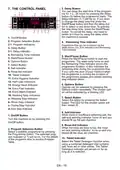
7. THE CONTROL PANEL
You can delay the start time of the program-
me for 1-2...24 hours by pressing the delay
button (3) before the programme starts. The
delay indicator (3.1) will be on. If you want
to change the delay time,first press the
Start/Pause button and then the delay but-
ton to select a new delay time. To activate
the new delay time, press the Start/Pause
button. To cancel the delay, you need to
switch to 0 hour by using the delay when
the machine is paused.
1
8
9
16
11 12 10
5
2
3
6
7
3.1
4
13 14 15
2.1
1. On/Off Button
2. Program Selection Button
2.1. Program Indicators
3. Delay Button
4. Remaining Time Indicator
Programme flow can be monitored via the
Wash,Rinse, Dry, End indicators and Remaining
Time Indicator.
3.1. Delay Indicator
4. Remaining Time Indicator
5. Start/Pause Button
6. Options Button
7. Select Button
8. Salt Indicator
5. Start/Pause Button
Press the Start/Pause button to start the
programme. The wash lamp turns on and
the Remaining Time Indicator shows the
programme duration. It also indicates the
remaining time during the programme flow.
If you open the door of your machine when
the programme is running the duration of
the programme pauses,and related washing
step indicator blinks.
9. Rinse Aid Indicator
10. Tablet Indicator
11. Extra Hygiene Indicator
12. Half Load Indicators
13. Energy Save Indicator
14. Extra Fast Indicator
15. Extra Silent Indicator
16. Washing Step Indicators
a- Washing Step Indicator
b- Rinse Step Indicator
c- Drying Step Indicator
d- End Step Indicator
6. Options Button
Options can be selected by pressing the
Options button repeatedly. The chosen opti-
on will be indicated by a blinking LED.
7. Select Button
Select the option by pressing the Select
button. The LED for the chosen option will
then remain lit.
8. Salt Indicator
When there is insufficient softening salt, the
salt lack warning indicator turns on and you
should fill up the salt chamber.
1. On/Off Button
Turn the machine on by pressing the
On/Off button.
9. Rinse Aid Indicator
When the rinse aid level is low, the rinse
aid lack warning indicator turns on and you
should fill the rinse aid chamber.
2. Program Selection Button
Select a suitable programme by pressing
the Programme button. The selected prog-
ram indicator (2.1) will be on. For the details
of the programs refer to section Program
Table.
10. Tablet Indicator
Select the Tablet Detergent function when
using a combined detergent that contains
salt, rinse aid or other extras. The Tablet
Detergent Indicator will remain on for as
long as it is selected.
EN - 19

| General | Details |
|---|---|
| Name | SHARP QW-NA24S42DI-EE Dishwasher |
| Make | Sharp |
| Language | English |
| Filetype | PDF (Download) |
| File size | 1.04 MB |
 (1 votes, average: 5.00 out of 5)
 Loading...

SHARP SDW6506JS 24 Front Dishwasher

SHARP SDW6888JS Smart Dishwasher

SHARP QW-NA1BF47EI-EU Series Dishwasher

SHARP SDW6767HS Dishwasher

SHARP SDW6767HS Slide In Smart Dishwasher

SHARP SDW6767HS Smart Dishwasher

SHARP QW-NA26F39DI-EN Dishwasher

SHARP QW-NS1CF49EI-ES Dishwasher

SHARP SDW6757ES Dishwasher

SHARP QW-NA25GU44BS-DE Undercounter Dishwasher


FISHER PAYKEL DD60DTX6I1
FISHER PAYKEL DD60STX6I1 Sanitise Integrated Single DishDrawer Dishwasher
BOSCH SMV4EVX00E-46 Dishwasher

kogan KAGDWS15CTC Dishwasher

FISHER PAYKEL DD60SCTX9 Dishwasher

ASKO DFI766UXXL.AU Dishwasher

GAGGENAU 11029813 Fully- Dishwasher

FISHER PAYKEL DD60SCTX9 Single Dishwasher

ARTUSI ADW4001X Dishwasher

BOSCH SMS2ITW00I Free Standing Dishwasher