
SHARP QW-NA24S42DI-EE Dishwasher







Buzzer Sound Control
Crystalight (Model Depending)
(Model Depending)
This technology which have Ion and Light
Technology together, provides to extra hygi-
ene. It prevents bad odor during a washing
program that includes a drying step.
Crystalight function is activated or deacti-
vated before starting program by pressing
Options button (6) for 6 seconds. At the end
of 6 seconds, “U1” will be displayed which
indicates Crystalight function is activated.
When it is deactivated, at the end of 6 se-
conds, “U0” will be displayed. Crystalight
setting follows Natural Ion Tech setting.
Default set is “UO”.
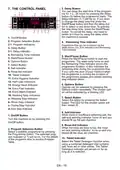
To change the buzzer sound level, follow
the below steps:
1. Open the door and press Option (6) and
Select (7) buttons at the same time for 3
seconds.
2. When sound setting is recognized,
buzzer gives a long sound and machine will
display last set level, from “S0” to “S3”.
3. To decrease sound level press Select
button (7). To increase sound level, press
Options button (6).
4. To save the selected sound level, turn off
the machine.
’’S0’’ level means all voices are off. Factory
setting is “S3”.
NOTE: If user do not deactivate Crystalight
function at the end of program, it will remain
active until the machine turns off.
NOTE: If Crystalight or Natural Ion Tech
function is active, Natural Ion Tech warning
led lights up like dimming during door is
open.
Save Power Mode
To activate or deactivate save power mode,
follow the below steps:
1. Open the door and press Program (2)
and Option (6) buttons at the same time for
3 seconds.
2. After 3 seconds, the machine will display
last Setting, “IL1” or “IL0”.
3. When Save Power Mode is activated,
“IL1” will be displayed. On this mode,
interior lights (if avaliable) will turn off 2
minutes after the door is opened, and the
machine will turn off 15 minutes after any
intervention in order to save energy.
4. When Save Power Mode is deactivated
“IL0” will be displayed. If Save Power Mode
is deactive, interior lights will be on as long
as the door is open, and the machine will
always be on unless it is turned off by user.
5. To save the selected setting, turn off the
machine.
In factory setting, Save Power Mode is
active.
Natural Ion Tech (Model Depending)
This function provides extra hygiene to the
machine thanks to Ion Technology. It opera-
tes as an independent program. This func-
tion is activated by pressing Options button
(6) for 3 seconds in ready state. At the end
of 3 seconds, “Ion” will be displayed which
indicates that Natural Ion Tech function is
activated. The button is released after “Ion”
is displayed. If there is no intervention by
user, 24 hours after activation of Natural Ion
Tech function, it is automatically cancelled.
NOTE: If machine is turned off, Natural Ion
Tech function is cancelled.
NOTE: Natural Ion Tech function does not
work with any program.
EN - 22

| General | Details |
|---|---|
| Name | SHARP QW-NA24S42DI-EE Dishwasher |
| Make | Sharp |
| Language | English |
| Filetype | PDF (Download) |
| File size | 1.04 MB |
 (1 votes, average: 5.00 out of 5)
 Loading...

SHARP SDW6506JS 24 Front Dishwasher

SHARP SDW6888JS Smart Dishwasher

SHARP QW-NA1BF47EI-EU Series Dishwasher

SHARP SDW6767HS Dishwasher

SHARP SDW6767HS Slide In Smart Dishwasher

SHARP SDW6767HS Smart Dishwasher

SHARP QW-NA26F39DI-EN Dishwasher

SHARP QW-NS1CF49EI-ES Dishwasher

SHARP SDW6757ES Dishwasher

SHARP QW-NA25GU44BS-DE Undercounter Dishwasher


BOSCH SMV4EB804E Dishwasher

BOSCH SMI6HAS00X-13 Dishwasher

FISHER PAYKEL DW60FC4X2 Dishwasher

FISHER AND PAYKEL DW60UNT4X2 Contemporary Tall Built Under Dishwasher

FISHER AND PAYKEL DW60FC4B2 Dishwasher

FISHER PAYKEL DD24DCTB9 N Sanitize Dishwasher

rhima RU-40 Underbench Dishwasher

Gaggenau 200 Series 24 Dishwasher

Haier HDW15F3B1 Steam Dishwasher

Magic Chef MCSCD3W 18 Inch Full Console Dishwasher