
INDESIT W11667630 B Dishwasher
















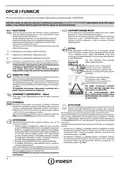


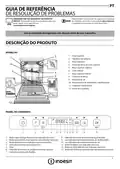
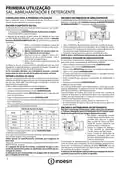


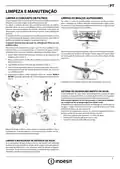
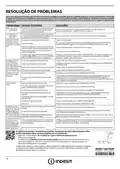





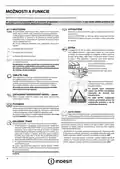





OPTIONS AND FUNCTIONS
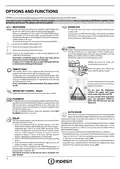
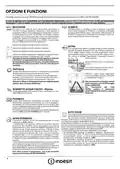
OPTIONS can be selected directly by pressing the corresponding button (see CONTROL PANEL).
If an option is not compatible with the selected program see PROGRAMS TABLE, the corresponding LED flashes rapidly 3 times
and beeps will sound. The option will not be enabled.
DRAIN OUT
MULTIZONE
If there are not many dishes to be washed, a half loading may
be used in order to save water, electricity and detergent.
Select the program and then press the MULTIZONE button:
the indicator over the button lights up and the symbol of the
chosen rack will appear on the display. By default the appliance
washes dishes in all racks.
To stop and cancel the active cycle, the Drain Out function
can be used.
A long press of START/PAUSE button, will activate the DRAIN
OUT function.The active program will be stopped and the water
in the dishwasher will be drained out.
To wash only the specific rack, press this button repeatedly:
shown on the display (only lower rack)
shown on the display (only upper rack)
shown on the display (only cutlery rack)
EXTRA
EXTRA makes it possible to carry out a heavy-duty wash cycle
of large crockery up to a max height of 53cm: baking pans,
oven grids, dripping pans, hob grids, large saucepans, serving
dishes, pizza dishes, stainless-steel hood filters.
Remove the upper rack to load bulky crockery.
shown on the display (option is OFF and the appliance will
wash dishes in all racks).
Remember to load the upper or lower rack only, and to
reduce the amount of detergent accordingly.
If upper rack is removed, please apply detergent directly
to tub instead of detergent dispenser.
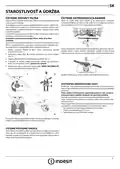
Release the two locks (right and
left) and pull out the rack.
When the upper rack is fitted, the
locks must be always closed.
TABLET (Tab)
This setting allows you to optimize the performance of the
program according to the type of detergent used.
A long press (for 3 seconds) of the MULTIZONE button (the
corresponding symbol will light up), will activate the function
if you use combined detergents in tablet form (rinse aid, salt
and detergent in 1 dose).
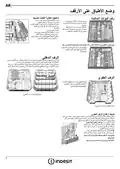
In order for the water to reach the
crockery everywhere, arrange it as
shown in the Figure.
If you use powder or liquid detergent, this option should
be off.
Do not start the dishwasher
without the upper rack using
wash cycles other than EXTRA.
WATER TAP CLOSED – Alarm
Flashes when there is no inlet water or water tap is closed.
To carry out the wash cycle Extra
pour the detergent DIRECTLY
INTO THE TUB and not into the
dispenser.
PUSH&GO
Push&GO button is an easily distinguishable button that allows
you direct access to the Push&GO program, a wash and dry cycle
that ensures great cleaning performance in a short time. You
don’t have to worry which program to choose, Push&GO cycle
will do the work for you.
To select Push&GO program, switch on appliance, press only
Push&GO button for 3 seconds.
AUTO DOOR
Auto Door is a convection drying system which automatically
opens the door during/after drying phase to ensure exceptional
drying performance every day. Door opens at the temperature that is
safe to your kitchen furniture.
DELAY
The start of the program may be delayed for a period of time
between 0:30 and 24 hours.
As additional steam protection, special designed protection foil is added
together with the dishwasher (depending on the model type - can be
the need to buy it). To see how to mount protection foil please refer to
(INSTALLATION GUIDE).
Auto Door functionality could be disabled by the user as follows:
• To DISABLE: Switch On, then switch Off. Keep the P button pressed for
5 sec., at the end of 5 sec the dishwasher plays a short beep. Switch
On the machine, the display shows„oOF”.
1. Select the program and any desired options. Press the
DELAY button (repeatedly) to delay the start of the program.
Adjustable from 0:30 to 24 hours. With each press of the
button, the delay start increases by: 0:30 if selection below
4 hours, 1:00 if selection is below 12 hours, 4 hours if
selection is above 12 hours. If 24 hours reached, and the
button is pressed, the delayed start is deactivated.
2. Press the START/PAUSE button: the timer will begin counting
down;
• To ENABLE: Switch On, then switch Off the machine. Keep the P button
pressed for 5 sec., at the end of 5 sec the dishwasher plays a short beep.
Switch On the machine, the display shows„oOn”.
3. Once this time has elapsed, the indicator light switches off
and the program begins automatically.
If at the time of the countdown the START/PAUSE button is
pressed again the DELAY option is cancelled and the selected
program starts automatically.
The DELAY function cannot be set once a program has
been started.
4

| General | Details |
|---|---|
| Name | INDESIT W11667630 B Dishwasher |
| Make | INDESIT |
| Language | English |
| Filetype | PDF (Download) |
| File size | 41.01 MB |
 (1 votes, average: 5.00 out of 5)
 Loading...

INDESIT D2I HL326 Full Size Dishwasher

Indesit D2F HD624 A Separate Dishwasher

Indesit 869991713220 Dishwasher

Indesit I0F D641A Dishwasher

INDESIT I0F D641A X Free Standing Dishwasher

INDESIT DFE 1B19 14 Dishwasher

INDeSIT D2F Dishwasher

INDeSIT D2I HD524 A Dishwasher

InDeSIT IN2FE10CS90S Dishwasher

inDeSIT DSIO3M24CS Dishwasher


FISHER and PAYKEL DD60D4HNB9 Contemporary Dishwasher

AVG DW-WQP12 Dishwasher

BOSCH SRV2HKX39G Fully-Integrated Dishwasher

Miele HG07 Dishwasher

FOTILE SD2F-P6 3 In 1 Sink Dishwasher

Electrolux EEG58600LX Built Under Dishwasher

FISHER PAYKEL DD24DCTX9 N Dishwasher

Westinghouse WSF6602XB 14 Place Dishwasher

Centerline CDH ML-130374 Commercial Dishwasher

Westinghouse WSF6604WA Dishwasher