
LG LRFLC2706S Dishwasher


















OPERATION 39
rinse aid dispenser level of 2. This can be checked
and adjusted from the control panel.
NOTE
• Adjust the setting higher if you have hard water
and notice calcium buildup on your dishes.
• Setting the rinse aid control too low will
contribute to spotting and streaking on dishes
and poor drying performance.
• Setting the control too high can cause foaming,
which will cause poor wash performance.
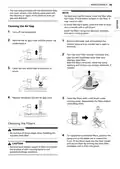
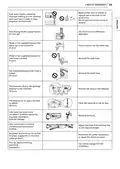
1
2
Ensure the appliance is off.
Press Power and Remote Start
simultaneously to enter the Option Setting
Mode.
3
4
Press Extra Dry to change the rinse aid
dispenser setting. Each press of the button
changes the setting one step from L0 to L4.
Once the desired rinse aid dispenser setting is
selected, press Start to save.
Refilling the Rinse Aid
How often the dispenser needs to be refilled
depends on how often dishes are washed and the
rinse aid setting used.
• The Rinse Aid Refill LED flashes when more
rinse aid is needed, unless the rinse aid
dispenser setting is set to L0.

| General | Details |
|---|---|
| Name | LG LRFLC2706S Dishwasher |
| Make | LG |
| Language | English |
| Filetype | PDF (Download) |
| File size | 4.74 MB |
 (1 votes, average: 5.00 out of 5)
 Loading...

LG LDTH7972SS Black Dishwasher

LG SDWB24S3 STUDIO Smart Dishwasher

LG LDTH7972D Smart Tub Dishwasher

LG LDPH7972D Smart Dishwasher

LG XD3A25UMB 15 Place QuadWash Dishwasher

LG LDT779 Dishwasher

LG LDT7808BD Dishwasher

LG LDFN4542S Dishwasher

LG DFB424 Dishwasher

LG LDTS5552D PrintProof Black Dishwasher


FISHER AND PAYKEL DD60DTX6I1 Dishwasher

INDeSIT D2I HD524 A Dishwasher

ARDESTO DWMB-V609SMH3 Dishwasher

BOSCH SX75ZX07CE Dishwasher

Gaggenau DF481101F Dishwasher

Whirlpool W7I HT58 T Fully Integrated Dishwasher

BOSCH SMI2HTS02G Dishwasher

Haier HDW13V1S1 Dishwasher

BOSCH SBT4ECX10E Dishwasher

LG Electronics LDPH7972D Dishwasher