
INVENTUM VVW6040AB Building Depot Dishwasher






ADJUSTING THE HEIGHT OF THE UPPER BASKET
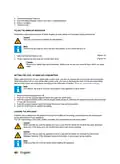
The complete upper basket can be moved to create more space in the upper basket or in the lower basket. When the
upper basket is in the upper position, you can place large items, such as pots and large plates, in the lower basket.
When the upper basket is in the lower position, you can place large plates in the upper basket.
(Figure 21)
1. Open the latch (A) on both guiding rails.
2. Remove the basket from the guiding rails.
(Figure 22)
3. Put the runners in the guiding rails:
a. Put the upper runners (B) in the guiding rails to put the basket in the lower position.
b. Put the lower runners (C) in the guiding rails to put the basket in the upper position.
4. Push the basket back in the guiding rails.
5. Close the latch on both guiding rails.
FOLDING THE RACKS OF THE UPPER BASKET
The racks can be folded down to create more space in the upper basket, for example to place large items (pots,
pans, etc.) in the basket. The racks can be folded separately or all together.
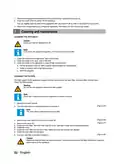
(Figure 23)
1. Push the racks (A) to fold them down.
2. Pull the racks upwards to put them in the up position.
FOLDING THE RACKS OF THE LOWER BASKET
The racks can be folded down to create more space in the lower basket, for example to place large items (pots,
pans, etc.) in the basket. The racks can be folded separately or all together.
(Figure 24)
1. Push the racks (A) to fold them down.
2. Pull the racks upwards to put them in the up position.
REMOVING THE CUTLERY DRAWER
The cutlery drawer can be removed partly to create more space in the upper basket or it can be removed completely
for easy loading.
(Figure 15)
1. Remove (part of) the cutlery drawer from the appliance.
STARTING THE APPLIANCE
1. Push the on/off button to start the appliance. The program-step indicator Wash goes on.
CHOOSING A PROGRAM
Note:
For an overview of the programs, refer to section 'Programs'.
Note:
If you used an extra option with the previous program, this option will remain activate for the new
program.
1. Use the program selector button to choose a program. The display shows the selected program and the duration.
2. Use the timer button to delay the start time of the program. Refer to section 'Delaying the program'.
3. Use the options button to browse through the options.
4. Use the select button to add an option to the selected program.
Note:
If an option is not compatible with the selected program, a buzzer sounds.
50 • English

| General | Details |
|---|---|
| Name | INVENTUM VVW6040AB Building Depot Dishwasher |
| Make | INVENTUM |
| Language | English |
| Filetype | PDF (Download) |
| File size | 3.43 MB |
 (1 votes, average: 5.00 out of 5)
 Loading...

INVENTUM VVW6060AB Dishwasher

INVENTUM VVW6030AS dishwasher

INVENTUM VVW6008AW Dishwasher

Inventum VVW6046AB Dishwasher

Inventum IVW6021A Dishwasher

INVENTUM VVW4530AW Dishwasher

INVENTUM VVW6046AW Dishwasher

INVENTUM IVW6008AXL Dishwasher

INVENTUM VVW6035AW Dishwasher

INVENTUM IVW6015A Dishwasher


FISHER PAYKEL DD24SCTW9 N Single DishDrawer Dishwasher

MDI450 Montpellier Dishwasher

Whirlpool 400011655817 E Dishwasher

SIEMENS SN45ZS55CS Dishwasher

AEG FSK94858P Sliding Door Dishwasher

Whirlpool WFE 2B19 X UK Dishwasher

lord D8 Dishwasher

FRIGIDAIRE GDPP4517A Gallery Series Dishwasher

COSMO COS-DWD24FBR Front Tall Tub Dishwasher

Midea MDF24P1BST Dishwasher